 (208) 991-3502
 Meridian, ID



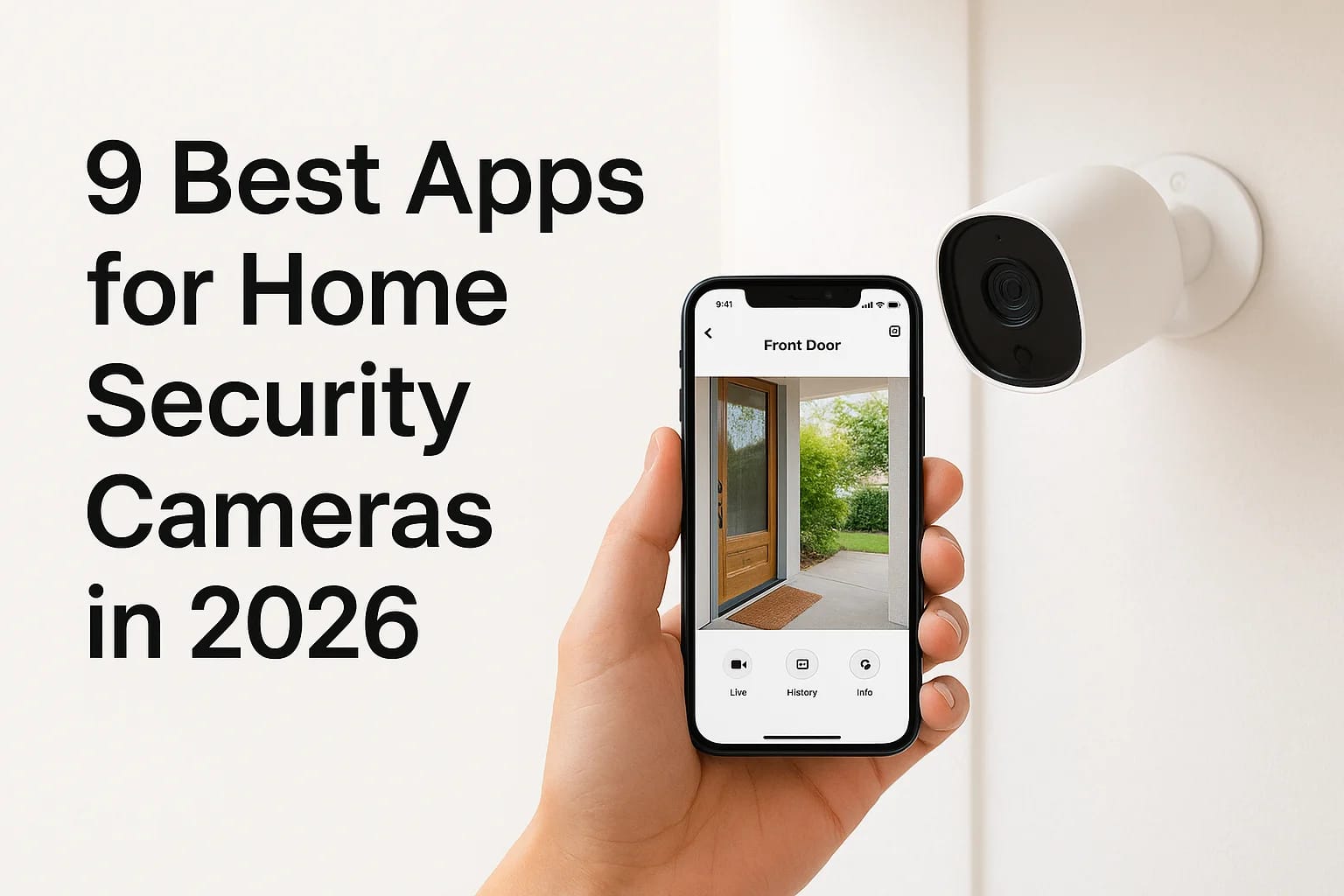

You bought a security camera, downloaded the manufacturer's app, and now you're stuck juggling three different logins because your doorbell, backyard camera, and indoor camera all use separate systems...
You bought a security camera, downloaded the manufacturer's app, and now you're stuck juggling three different logins because your doorbell, backyard camera, and indoor camera all use separate systems. That's the reality for most homeowners once they add more than one camera brand to their setup, and it's exactly why people search for apps for home security cameras instead of settling for whatever came in the box.
The right app should let you pull up live video in seconds, get alerts that actually matter instead of a hundred false motion pings, and control multiple brands from one screen. Some of the best options are free, some work across nearly any camera brand, and a few stand out specifically for storage, video quality, or smart integrations like Alexa and Google Home.
We install and configure security systems across the Treasure Valley every week, so we've seen firsthand which apps hold up under real-world use and which ones frustrate homeowners within a month. This list breaks down the 9 best app for home security cameras options in 2026, covering free apps, universal platforms, and the ones worth paying for.
1. Ring – best overall app for home security cameras
Ring built its reputation on the video doorbell, but the Ring app has grown into one of the most complete apps for home security cameras on the market. It pulls every doorbell, indoor cam, outdoor cam, and floodlight cam into one dashboard, so you're not switching between apps depending on which device triggered an alert. For most homeowners we work with, this is the app they open first every morning to check overnight activity.
Key features
Ring's interface favors speed. Notifications open directly into live view, and the timeline lets you scrub back through recorded events without downloading a separate clip first. Motion zones and person-detection cut down on the false alerts that make people ignore their camera app entirely.
- Live view with two-way talk
- Customizable motion zones
- Event timeline with quick scrubbing
- Alexa integration for voice commands
- Shared user access for family members
A camera app only works if you actually trust its alerts, and Ring's person-detection is built specifically to earn that trust back.
Compatible cameras
Ring works exclusively with Ring-branded hardware, including video doorbells, Stick Up Cams, floodlight cams, and spotlight cams. It won't pull in feeds from other manufacturers, which is the one real limitation compared to universal apps later on this list. If you're building a Ring-only ecosystem, that's not a downside. If you already own a mix of brands, you'll need a second app or a hub that bridges them.
Pricing
The app itself is free to download, but recording and cloud storage require a subscription plan. Here's how the tiers break down:
| Plan | Monthly Cost | What You Get |
|---|---|---|
| Basic | $4.99 | 180 days video history, single camera |
| Standard | $9.99 | Video history for all devices, extended features |
| Pro | $19.99 | Everything in Standard plus 24/7 recording add-on option |
Without a plan, you get live view and real-time alerts but no recorded video history, which limits the app's usefulness if you ever need footage after the fact.
Who it's best for
Ring suits homeowners who want one app to manage a full perimeter of Ring devices without juggling multiple logins. Families who already use Alexa will appreciate the voice control tie-in, and the shared access feature makes it easy to give a spouse, kid, or house sitter their own login. If you're starting from scratch and want a home security camera app that scales as you add more devices, Ring is the safest first choice on this list.
2. ADT+ – best all-in-one smart home security app
ADT+ is built around the idea that your cameras shouldn't be a separate system from your alarm, locks, and thermostat. Rather than treating video as an add-on, the app puts professional monitoring, camera feeds, and smart home controls into one dashboard. Homeowners who already trust ADT for alarm monitoring get camera viewing folded into the same login instead of downloading a second app.
Key features
Control runs through a single screen that shows alarm status, live camera feeds, and connected smart devices side by side. You can arm or disarm the system, unlock a smart lock, or check a camera without leaving the app.
- Live streaming with cloud clip storage
- Two-way audio on compatible cameras
- Smart home control (locks, thermostats, lighting)
- Professional monitoring alerts routed to the same app
- Geofencing to auto-arm when you leave home
The real value of ADT+ isn't the camera feed itself, it's having monitoring, locks, and video answer to one login instead of three.
Compatible cameras
ADT+ works with ADT-branded cameras and doorbells, plus a growing lineup through the company's partnership with Google, including select Google Nest cameras. It doesn't function as a universal viewer for random third-party brands, so plan your camera purchases around what ADT officially supports.
Pricing
Equipment and installation costs vary by package, and professional monitoring plans typically run from roughly $45 to $60 per month depending on the contract length and features included. The app itself is free once you're an active ADT customer.
Who it's best for
ADT+ makes the most sense for homeowners who want professional monitoring baked into their home security cameras app, not just self-monitored alerts. If you'd rather have a monitoring center dispatch help while you're asleep or away, this beats any DIY app on this list.
3. Vivint – best app for home automation fans
Vivint takes the ADT+ concept a step further by wrapping cameras, security, and full home automation into a single professionally installed system. The Vivint app doesn't just show you a camera feed, it acts as a control panel for your entire smart home, from garage doors to thermostats to door locks. Homeowners who want one app for home security cameras that also runs their lighting and climate control tend to land on Vivint.
Key features
Smart Deter technology stands out here, since cameras can detect a loitering person and automatically trigger lights or a spoken warning before anything happens. The app layers in facial recognition for known visitors and lets you set custom automations that tie cameras to other devices.
- Smart Deter proactive alerts
- Facial recognition for frequent visitors
- Full home automation (locks, thermostats, garage doors)
- Professional monitoring integration
- Car Guard add-on for vehicle security
Vivint's edge isn't the camera itself, it's the automation logic that turns a detected person into an action before a break-in happens.
Compatible cameras
Vivint sells its own camera lineup, including doorbell cameras, outdoor cameras, and an indoor camera with facial recognition. The system is proprietary, meaning you can't mix in a random third-party brand, and installation is handled by a Vivint technician rather than a DIY setup.
Pricing
Equipment costs run higher upfront than most apps on this list, often financed over a contract, and monitoring plans typically start around $30 to $45 per month depending on the package and included automation features. There's no truly free tier since the app requires an active service plan to function fully.
Who it's best for
Vivint fits homeowners who want a fully automated house, not just a security camera app bolted onto existing devices. If professional installation and a long-term monitoring contract don't scare you off, and you value automation over flexibility, Vivint delivers more than a standalone camera app ever could.
4. SimpliSafe – best budget-friendly security app
SimpliSafe skips the long contracts and expensive hardware that come with ADT+ and Vivint, and the app reflects that simpler approach. It's built for homeowners who want solid self-monitoring without committing to a professional install or a multi-year agreement. You can set up cameras yourself in an afternoon and manage everything from a clean, no-frills dashboard.
Key features
SimpliSafe keeps its feature set focused rather than overloaded, which makes the app easy to learn on day one. Alerts arrive fast, and the interface doesn't bury live view behind extra taps like some competitors do.
- Live view and event-triggered recording
- Optional professional monitoring add-on
- Simple arm/disarm controls from the home screen
- Push notifications for motion and doorbell events
- No long-term contract required
SimpliSafe proves you don't need a proprietary ecosystem or a contract to get a security camera app that actually works.
Compatible cameras
The app pairs exclusively with SimpliSafe's own camera lineup, including the outdoor camera, the video doorbell, and the SimpliCam indoor camera. It won't pull in third-party brands, so this is a closed system similar to Ring, just with a smaller hardware catalog and lower price points across the board.
Pricing
Hardware costs less upfront than most competitors, with individual cameras typically priced well under $200. Monitoring plans start around $17 to $28 per month, and you can use the app for self-monitoring without paying anything if you skip the professional monitoring tier entirely.
Who it's best for
SimpliSafe suits renters, first-time buyers, and anyone who wants dependable coverage without a sales pitch or a contract. If you've been comparing apps for home security cameras mainly on price and simplicity, this is the one to test first.
5. Wyze – best free app for budget cameras
Wyze built its reputation on selling cameras for a fraction of what Ring or Arlo charge, and the app carries that same value-first approach. You get live view, motion alerts, and a surprisingly deep settings menu without paying a cent for the basics. For homeowners who want an app for home security cameras that doesn't push you toward a subscription on day one, Wyze is the clearest example on this list.
Key features
The Wyze app packs in more free functionality than almost any competitor here. Person detection, sound detection, and a 12-second free cloud clip on motion events all come standard, no credit card required.
- Free 12-second cloud clips on motion events
- Person, pet, and vehicle detection (AI-based)
- Local storage via microSD card, no subscription needed
- Two-way audio and night vision controls
- Shortcuts and routines that trigger other Wyze devices
Wyze proves a home security camera app can be genuinely free and still catch the moments that matter.
Compatible cameras
Wyze cameras only work within the Wyze app, covering the Cam v3, Cam Pan, Cam Outdoor, and the Wyze Video Doorbell. You can't bridge in a Nest or Arlo feed here, but the hardware lineup covers indoor, outdoor, and pan-tilt options, so most homeowners can build a full setup using Wyze products alone.
Pricing
Cameras typically run $20 to $50 each, among the cheapest on this list, and the base app functions fully without any subscription. Cam Plus, the optional paid tier, starts around $1.99 per month per camera and adds longer cloud storage, smarter alerts, and person-only notifications.
Who it's best for
Wyze fits budget-conscious homeowners, renters, and anyone testing out home security cameras for the first time without wanting to commit to a monthly fee. If you want free, functional coverage now and the option to add paid features later, Wyze delivers more for less than any other app here.
6. Arlo – best app for outdoor camera coverage
Arlo built its name on weatherproof, battery-powered cameras that survive brutal summers and cold snaps without a hardwired connection, and the app is designed around that outdoor-first use case. Homeowners with large yards, detached garages, or multiple entry points tend to gravitate here because the app handles several outdoor feeds without lag or dropped streams. It's one of the stronger apps for home security cameras when your biggest concern is coverage outside the house, not just at the front door.
Key features
Arlo's app leans on high-resolution video and smart detection zones tuned for wide outdoor spaces rather than tight indoor hallways. You get 4K streaming on select models, color night vision, and an activity zone editor that lets you ignore a busy street while still catching movement near your driveway.
- 4K HDR live streaming on supported cameras
- Color night vision instead of standard black-and-white
- Customizable activity zones for large properties
- Siren activation directly from the app
- Multi-camera grid view for scanning the whole property at once
Arlo earns its spot here because it treats outdoor coverage as the main event, not an afterthought bolted onto an indoor camera lineup.
Compatible cameras
Arlo's own lineup covers the Pro series, Ultra series, Essential cameras, and the Arlo doorbell, most of which are wireless and battery-powered. The app doesn't pull in other brands, so you're building an Arlo-only system, though the hardware range itself spans budget and premium tiers well enough that most yards get full coverage.
Pricing
Cameras typically start around $100 and climb toward $250 for higher-resolution models. Arlo Secure plans start near $7.99 per month for a single camera or around $14.99 per month for unlimited cameras on one plan, covering cloud storage and smart alerts.
Who it's best for
Arlo suits homeowners with larger lots, rural properties, or anyone prioritizing outdoor perimeter monitoring over indoor cameras. If battery life and weather resistance matter more than a tightly bundled smart home ecosystem, Arlo delivers where indoor-focused apps fall short.
7. Reolink – best app for local storage, no fees
Reolink built its app around a simple idea: your footage should live on hardware you own, not a server you rent monthly. The Reolink app pulls live feeds and playback from NVRs, microSD cards, or the company's own cloud if you want it, but you're never forced into a subscription just to view recorded clips. For homeowners tired of paying $10 a month for storage they could own outright, this is one of the few apps for home security cameras that treats local storage as the default, not the exception.
Key features
Reolink's app favors control over flash. You get direct access to NVR playback, motion timeline scrubbing, and manual recording triggers, all without needing an active internet connection for local viewing once cameras are on your network.
- Local playback from NVR, microSD, or hard drive
- Optional cloud plan for off-site backup only
- Multi-camera split-screen view up to 32 channels
- Smart AI detection for people, vehicles, and animals
- PTZ (pan-tilt-zoom) controls for supported cameras
If you'd rather own your footage outright than rent cloud storage forever, Reolink's local-first approach is hard to beat.
Compatible cameras
Reolink works with its own wired and battery-powered camera lineup, including PTZ models, floodlight cameras, and NVR kits sold as bundles. It's a closed system like Ring or SimpliSafe, but the hardware catalog is large enough that most homeowners can build a full multi-camera setup using Reolink alone.
Pricing
Cameras range from roughly $50 for basic models to $200+ for 4K or PTZ versions, and NVR kits with multiple cameras often run $300 to $600. The app itself is free, and local storage requires no subscription at all. Reolink Cloud, if you want it, starts around $3.49 per month.
Who it's best for
Reolink fits homeowners who want long-term savings over convenience, plus anyone uncomfortable storing footage on someone else's server. If avoiding monthly fees matters more than a polished ecosystem, this app earns its place on the list.
8. Alfred Home Security Camera – best for old phones
Alfred takes a different approach than every app on this list so far: instead of pairing with dedicated camera hardware, it turns an old smartphone or tablet into a working security camera. If you've got a retired iPhone or Android sitting in a drawer, Alfred repurposes it as a live-streaming camera you can view from your current phone. It's one of the more resourceful apps for home security cameras because it needs zero new hardware to get started.
Key features
Setup takes minutes: install Alfred on the old device, install it again on your viewing phone, and link the two accounts. From there you get live streaming, motion alerts, and basic recording without buying a single camera.
- Two-way audio between viewer and camera device
- Motion detection with push notifications
- Night vision using the old phone's flash
- Cloud backup for short clips
- Works over Wi-Fi, no wiring required
Alfred turns a drawer full of dead phones into a working camera network, no new hardware required.
Compatible cameras
Alfred doesn't work with dedicated security cameras at all. Instead, it converts any spare iOS or Android device into the camera itself, so compatibility depends on phone specs rather than a manufacturer's product line.
Pricing
The base app is free and covers live view, motion alerts, and short clip storage. Alfred Premium runs roughly $4 to $5 per month and unlocks longer cloud storage, higher resolution streaming, and ad-free use.
Who it's best for
Alfred suits renters, apartment dwellers, and anyone testing out home monitoring before investing in real hardware. It also makes a solid backup camera for a garage, nursery, or side door where a dedicated device feels like overkill.
9. tinyCam Monitor – best universal camera app
tinyCam Monitor solves the exact problem this whole list started with: too many logins for too many camera brands. Instead of pairing with one manufacturer, it acts as a universal viewer, pulling feeds from Wyze, Reolink, Amcrest, Foscam, and dozens of other ONVIF-compatible cameras into a single dashboard. Homeowners who've pieced together a mixed system over the years, one Ring doorbell here, a cheap Amazon camera there, finally get one screen instead of five separate apps for home security cameras.
Key features
tinyCam leans technical, and that's the point. You get motion recording to Google Drive, Dropbox, or an FTP server, plus a multi-camera grid view that scales well past what most manufacturer apps allow.
- Support for 3,000+ camera models across brands
- Cloud backup to Google Drive, Dropbox, or FTP
- Motion and audio detection with custom scheduling
- Multi-screen grid layout for large mixed systems
- Local network streaming with no cloud requirement
When your cameras come from five different brands, tinyCam is the one app built to make sense of all of them at once.
Compatible cameras
Almost any camera with RTSP, ONVIF, or a manufacturer API works here, which covers the vast majority of brands on this list, including Reolink, Wyze (with workarounds), Amcrest, and Foscam. This flexibility comes with a tradeoff: setup requires more manual configuration than a plug-and-play app like Ring or SimpliSafe.
Pricing
The free version covers a single camera with core viewing features. tinyCam Pro costs a one-time fee of roughly $9 to $15, unlocking unlimited cameras and cloud recording, with no recurring subscription.
Who it's best for
DIY-minded homeowners with mismatched camera brands get the most value here. If you'd rather pay once than monthly, and you don't mind a steeper learning curve, tinyCam ties your whole system together.
10. What to look for in a home security camera app
After testing nine different platforms, a pattern emerges: the best apps for home security cameras all nail the same handful of basics, even when their hardware and pricing look nothing alike. Before you commit to any app on this list, run it through these criteria so you don't end up locked into a system that annoys you six months in.
Alert accuracy over alert volume
Every app promises motion detection, but the good ones filter out cars, shadows, and blowing branches before pinging your phone. Look specifically for person, package, or vehicle detection rather than generic motion, since that's the difference between checking your phone twenty times a day and actually trusting the notification when it arrives.
An app that buries real alerts under false ones eventually gets ignored entirely, which defeats the whole point of having a camera.
Storage and subscription clarity
Figure out whether an app requires cloud storage to function or offers local storage as a real alternative. Some platforms, like Reolink, let you skip monthly fees entirely, while others require a plan just to review footage older than a few hours.
Compatibility with what you already own
If you've already invested in cameras from one brand, check whether the app supports multi-brand viewing or locks you into a closed ecosystem. A quick checklist before downloading anything:
- Does it support your specific camera models, not just the brand name?
- Can you add a doorbell, indoor cam, and outdoor cam under one login?
- Does it integrate with Alexa or Google Home if you use either?
- Is there a free tier, or does core functionality require a subscription from day one?
Ease of sharing access
Finally, check how easily you can grant access to a spouse, roommate, or house sitter without handing over your main password. Apps that support multiple user accounts with adjustable permissions save you headaches later, especially in shared households or rental properties.
11. Tips to get more from your security camera app
Owning the right app is only half the equation. Most homeowners use maybe 20% of what their home security cameras app can actually do, leaving battery life, storage, and alert accuracy on the table. These tips apply no matter which app from this list you land on.
Tune your motion zones instead of leaving defaults
Default motion settings almost always catch too much, from passing cars to tree branches swaying in the wind. Spend ten minutes drawing custom zones around your driveway, front door, and side gate so the app only flags movement where it actually matters.
A camera app configured for your property beats one left on factory settings every single time.
Set a weekly footage review habit
Cloud storage windows expire, often within 7 to 30 days depending on your plan. Build a quick Sunday habit of skimming the week's clips so you never lose footage of a package theft or a stranger at the door simply because you forgot to check in time.
Use schedules to cut down on notifications
Most apps let you mute or adjust alerts by time of day. Turn down indoor camera sensitivity during hours when your family is normally home, then ramp it back up overnight or while you're away.
Keep firmware and app versions current
Outdated firmware is a common source of dropped connections and missed alerts. A quick pre-update checklist:
- Update the camera firmware through the app, not just the app itself
- Restart your router monthly to clear connection issues
- Re-test motion zones after any major update
- Confirm shared users still have working access after updates
Small habits like these turn any app on this list from a passive video feed into a system you actually rely on.
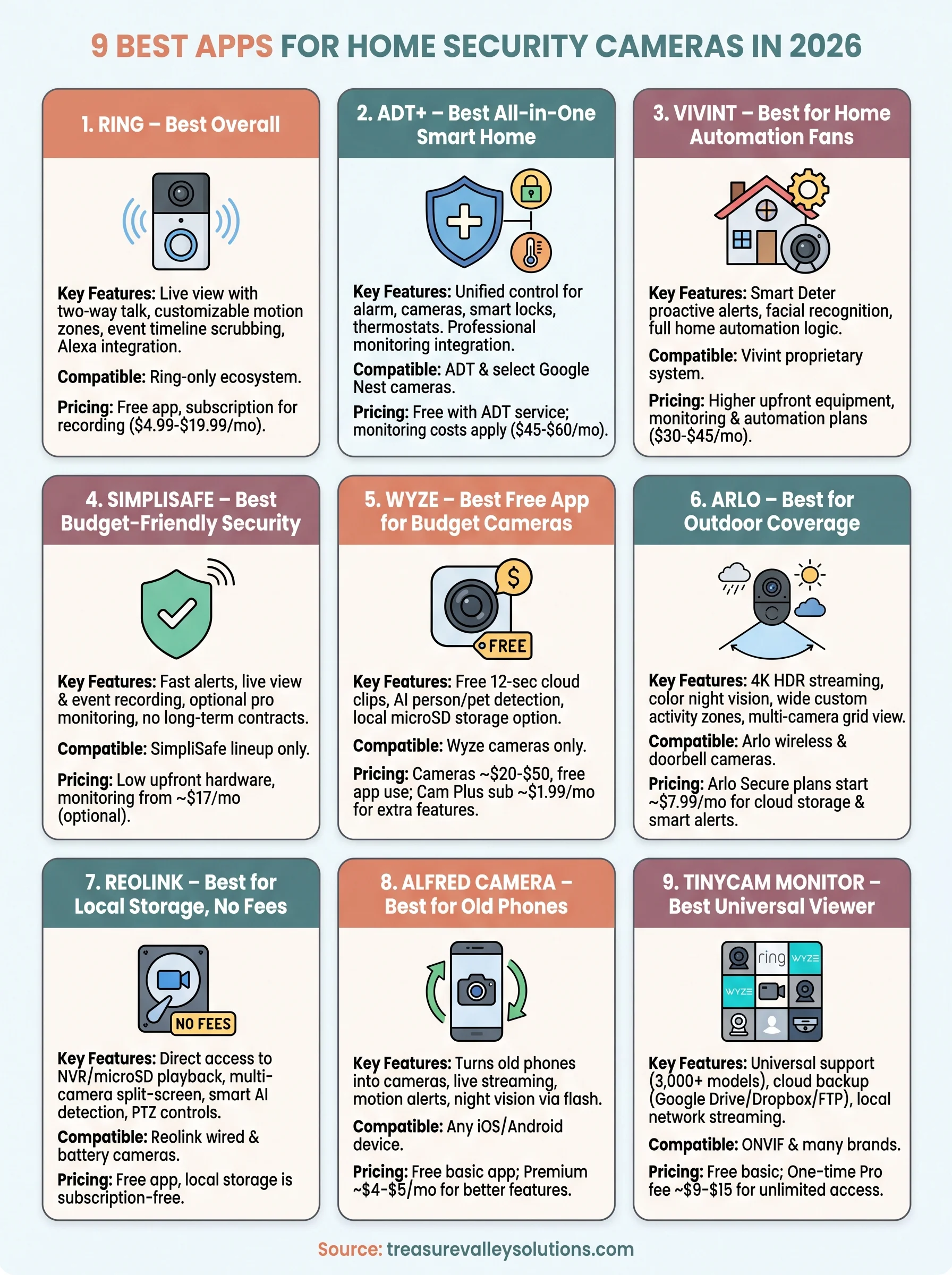
Finding the right app for your home
Picking from these nine apps for home security cameras comes down to what you already own and how much control you want over storage and monitoring. Ring and SimpliSafe work well if you want a closed system that just works. Reolink and tinyCam suit anyone who'd rather own their footage than rent cloud space forever. ADT+ and Vivint make sense when professional monitoring matters more than app flexibility.
Software only solves half the problem, though. A great app paired with a poorly placed camera, weak Wi-Fi, or the wrong hardware for your property still leaves gaps in coverage. That's where a local installer earns their keep, matching the right cameras and app ecosystem to your actual layout instead of guesswork. If you want that setup done right the first time, get in touch with our team and we'll walk you through what fits your home.
Compare your options
Your next step
Compare Local Recording and Cloud StorageReady for professional help? Request an estimateOur Services
High-definition surveillance for peace of mind.
Comprehensive security solutions for home and business.
Serving the Treasure Valley
Local installation in your city