 (208) 991-3502
 Meridian, ID




You've probably scrolled through dozens of Amazon listings already, and every camera claims to be the best. Meanwhile packages keep disappearing off porches around Boise and Meridian, and you just wan...
You've probably scrolled through dozens of Amazon listings already, and every camera claims to be the best. Meanwhile packages keep disappearing off porches around Boise and Meridian, and you just want a camera that actually catches the footage clearly, at night, without a monthly bill that creeps up every year. Finding the best outdoor security cameras for home protection means sorting through resolution specs, subscription traps, and integration claims that don't hold up once the camera is actually mounted on your siding.
We install and support these systems every week across the Treasure Valley, so we know which cameras perform in real Idaho weather, which apps homeowners actually use after the first month, and which brands play nicely with existing smart home setups. This guide cuts through the marketing to give you straight answers on video quality, storage options, and smart home integration for each pick.
Below you'll find 12 cameras we'd actually recommend to a neighbor, covering everything from budget-friendly options to full commercial-grade systems. We break down subscription costs, night vision performance, and installation difficulty for each one, so you can pick a camera that fits your property and your budget instead of guessing.
1. How to choose the right outdoor security camera
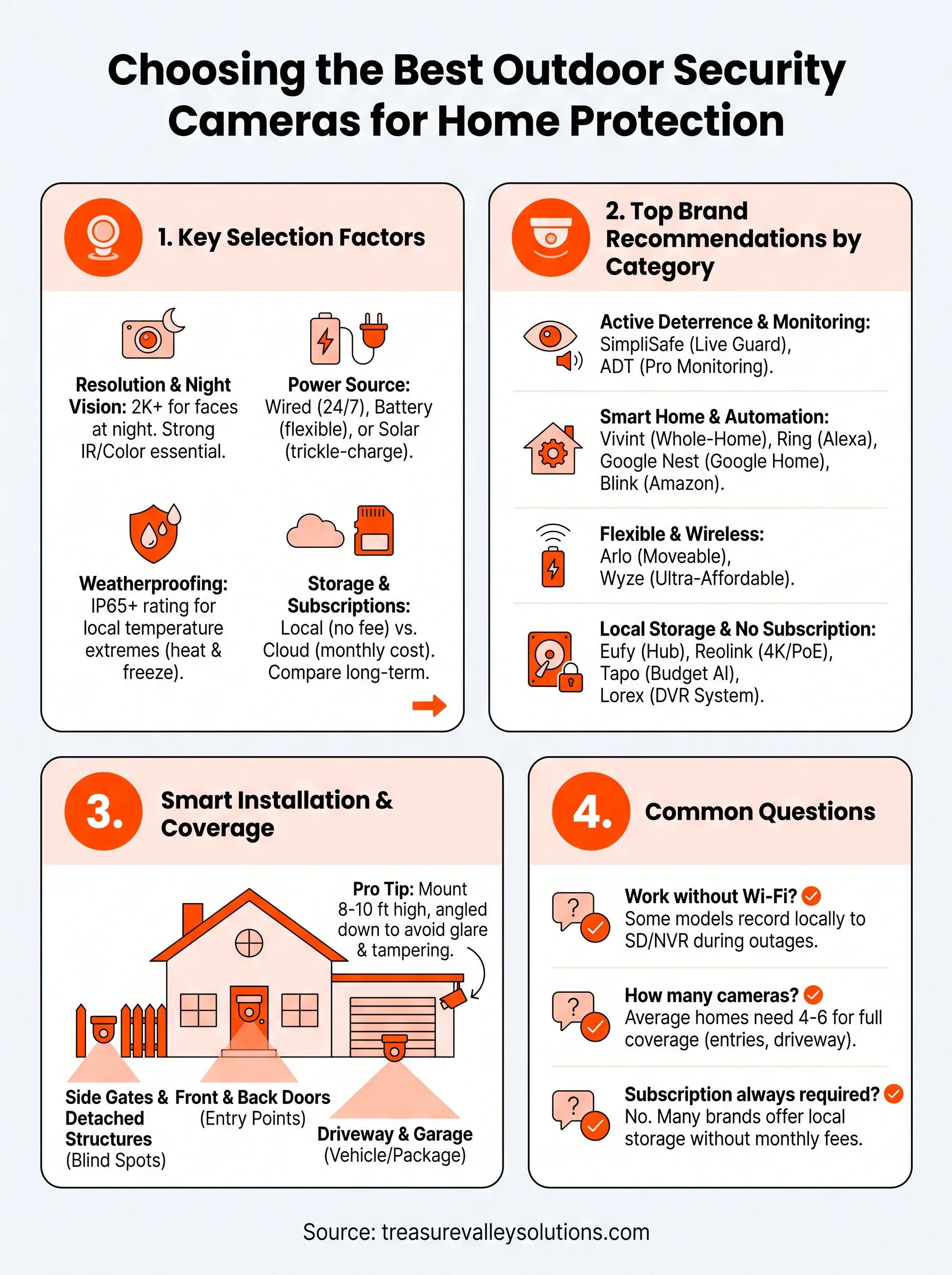
Start with resolution and night vision before you even look at brand names. A 1080p camera looks fine in daylight, but once the sun drops behind the foothills, you need at least 2K resolution and strong infrared or color night vision to actually identify a face on your porch. Idaho's dark, rural stretches around Eagle and Star make this non-negotiable, not a nice-to-have.
Power source matters just as much as picture quality. Battery-powered cameras install fast and work anywhere, but they need recharging every few months and can miss footage while they're dead. Wired cameras stay on 24/7 and skip the charging cycle entirely, which is why we wire most of the systems we install for Treasure Valley homeowners, and it's worth understanding how wired and wireless cameras compare before you decide. Solar panels split the difference, trickle-charging batteries so you rarely touch them.
A camera that stops recording because the battery died is worse than no camera at all.
Next, check the weatherproofing rating. Idaho swings from below-zero winters to triple-digit summers, and a camera rated for mild coastal weather won't survive a Treasure Valley January. Look for an IP65 rating or higher, and confirm the operating temperature range actually covers our local extremes.
Storage and subscriptions decide your long-term cost more than the camera's sticker price. Some brands lock basic features like person detection behind a monthly plan, while others record locally to an SD card or hub at no extra charge. Run the numbers over three years, not three months, before you commit, and factor in what a full camera system costs around Boise and Meridian.
| Factor | What to check | Why it matters in the Treasure Valley |
|---|---|---|
| Resolution | 2K or higher | Identifies faces and license plates at night |
| Power | Wired vs. battery vs. solar | Avoids dead cameras during cold snaps |
| Weatherproof rating | IP65 or better | Survives summer heat and winter freezes |
| Storage | Local vs. cloud subscription | Controls long-term cost |
| Smart home fit | Alexa, Google Home, matter | Keeps everything on one app |
Finally, think about smart home integration with whatever ecosystem you already run. If your lights and locks answer to Alexa, a camera that only works with a proprietary app creates a second app you'll open twice and then ignore. We size and program every camera system around the equipment already in the house, which is the fastest way to avoid buyer's remorse six months in.
2. SimpliSafe – best for active crime deterrence
SimpliSafe built its outdoor camera around a feature most brands skip entirely: a live agent who can talk to whoever's on your porch. When the camera detects a person lingering near your door, an actual monitoring agent can trigger a spotlight and speak through the camera in real time, telling them the property is watched. That kind of active deterrence stops a lot of package theft before it happens, rather than just recording it after the fact.
Key features
The SimpliSafe outdoor camera includes 1080p HD video, color night vision, a built-in spotlight, and two-way audio. The standout is Live Guard Protection, which lets a real monitoring agent view live footage and intervene during a suspected break-in.
Weatherproofing rating
The camera carries an IP65 rating and is built to handle rain, dust, and temperature swings, which covers most of what a Treasure Valley winter or summer throws at it. It's rated to keep working from roughly -4°F to 113°F, wide enough for Meridian's seasonal extremes.
Deterrence beats documentation every time a package is on the line.
Storage and subscription costs
Basic recording requires a monthly plan starting around $17.99, which includes 30 days of cloud video history. Live Guard Protection, the agent-monitoring feature, runs closer to $27.99 monthly and is the reason most people choose this brand over a cheaper alternative.
Who it's best for
SimpliSafe suits homeowners who want an active response, not just a recording, when someone approaches the house. It's a strong fit for anyone who's already had a package stolen and wants a system that intervenes in the moment instead of only providing evidence afterward.
3. ADT – best for professional monitoring
ADT has been in the alarm business since 1874, and that history shows in how its outdoor cameras tie into a full professional monitoring setup rather than standing alone. Where SimpliSafe leans on a live agent triggered by camera events, ADT builds the camera into a broader security system with trained monitoring staff watching for alarms, cameras, and sensors together, then dispatching police or fire when something trips.
Key features
The ADT outdoor camera records in 1080p with night vision, motion-activated alerts, and two-way talk. It integrates directly with ADT's alarm panel, so a triggered door sensor pulls up the matching camera feed automatically for the monitoring team.
Weatherproofing rating
ADT's outdoor units carry an IP65 rating and are built for continuous outdoor exposure, holding up through both Boise's summer heat and Meridian's freezing nights. The housing is designed for permanent wired installation, which suits homeowners who don't want to think about battery cycles.
A camera that calls for help on its own is worth more than one that just records the crime.
Storage and subscription costs
ADT requires a monitoring contract, typically $45 to $60 monthly depending on the package, which bundles video storage with 24/7 professional monitoring and emergency dispatch. There's no cheaper self-monitored tier, so the ongoing cost sits higher than most cameras on this list.
Who it's best for
ADT fits homeowners who want a human being watching their property around the clock, not just app alerts they might miss, so it helps to know how alarm monitoring actually works before signing a contract. It's also a solid choice for anyone replacing an aging alarm system who wants cameras and monitoring handled under one contract instead of piecing together separate apps.
4. Vivint – best for whole-home automation
Vivint sells outdoor cameras as one piece of a larger smart home automation platform, not as a standalone gadget you bolt onto siding. Where ADT ties cameras into a monitoring contract, Vivint ties them into thermostats, locks, lighting, and garage door control, all running off one panel and one app. That makes it less of a camera brand and more of a whole-house operating system with cameras included.
Key features
The Vivint outdoor camera records in 1080p HD with color night vision, a built-in spotlight, and a smart deter feature that flashes lights and sounds an alert when someone lingers too long. It ties directly into Vivint's Smart Hub, so a camera trigger can lock doors, adjust lighting, or arm the alarm automatically.
Weatherproofing rating
Vivint rates its outdoor cameras IP65 and builds them for permanent exposure, holding up through Meridian's summer heat and the hard freezes that hit the valley floor each January. Professional installation is standard, which means the mounting and wiring get done correctly the first time.
A camera that talks to your locks and lights is worth more than one that only talks to you.
Storage and subscription costs
Vivint requires a service plan, generally $29.99 to $44.99 monthly, which bundles video storage with the automation features tying cameras to other devices. There's no free or self-monitored tier, so budget for the ongoing cost alongside the equipment price.
Who it's best for
Vivint suits homeowners who want cameras working alongside locks, thermostats, and lighting rather than as a separate system. If you're building a fully automated house and want one company handling design and installation, our smart home automation in Meridian covers this same kind of whole-property integration locally.
5. Arlo – best for wireless flexibility and battery life
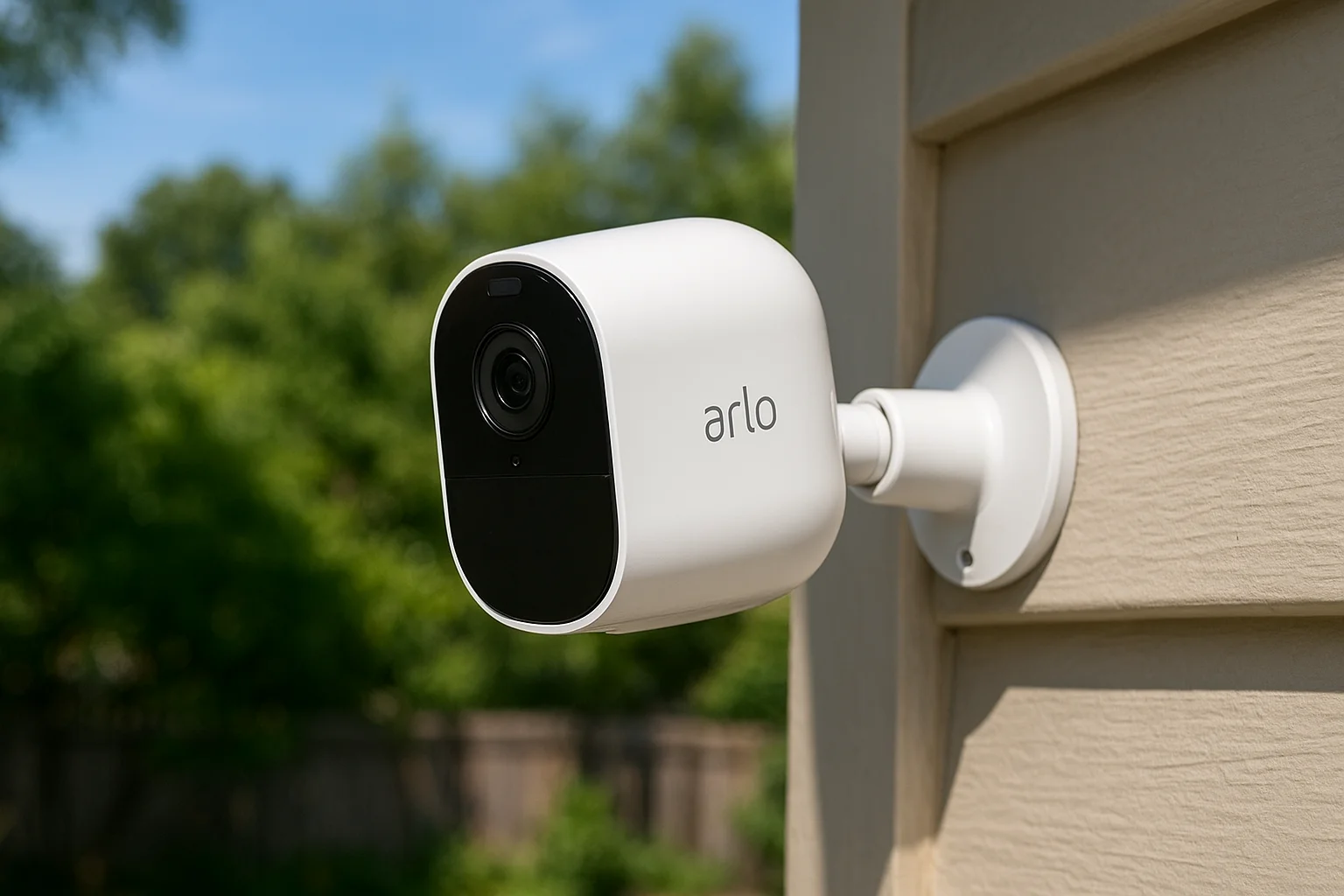
Arlo built its reputation on cameras you can mount almost anywhere without running a single wire, which puts it near the top of any list of wireless security cameras for the home and makes it a favorite among Treasure Valley homeowners who want wireless flexibility without hiring an electrician. Unlike Vivint's hub-dependent setup, Arlo cameras connect straight to Wi-Fi or a base station, so you can move one from the front porch to the shed in minutes if your coverage needs change.
Key features
Arlo's Pro and Ultra lines shoot in 2K to 4K resolution with color night vision, a 160-degree field of view, and an integrated spotlight. Smart alerts distinguish between people, packages, vehicles, and animals, cutting down on the false notifications that plague cheaper cameras.
Weatherproofing rating
Arlo cameras carry an IP65 rating and are built to handle rain, dust, and the temperature swings common across the valley floor, from summer heat spikes to hard winter freezes. Battery life runs three to six months per charge depending on activity, longer with the optional solar panel.
A camera you can move without an electrician is a camera that actually adapts to your property.
Storage and subscription costs
Arlo Secure plans start around $7.99 monthly for single-camera cloud storage, with multi-camera plans running $14.99 and up. Skip the subscription and you still get live viewing, but recorded clips and smart detection require a paid tier.
Who it's best for
Arlo suits renters, homeowners still finalizing their layout, or anyone who wants one of the best outdoor cameras for home security without committing to permanent wiring. It's also a smart pick for seasonal coverage, like watching a detached garage only part of the year.
6. Ring – best for Alexa and smart home integration
Ring turned the video doorbell into a household name, and its outdoor cameras carry that same appeal for anyone already living in an Alexa smart home. Where Arlo prioritizes standalone flexibility, Ring leans into ecosystem lock-in on purpose. Say "Alexa, show me the driveway" on an Echo Show and the feed pops up instantly, no separate app needed for basic viewing.
Key features
The Ring Spotlight Cam and Stick Up Cam record in 1080p to 2K depending on the model, with color night vision, a built-in spotlight, and a siren you can trigger remotely. Motion zones let you tell the camera to ignore the street and only flag activity near your actual walkway, which cuts down on notifications about passing cars.
Weatherproofing rating
Ring's outdoor models carry an IP65 rating and are built for year-round exposure, handling both Boise's summer heat and Meridian's winter freezes without issue. Battery models run roughly six to twelve months per charge under normal use, while wired versions skip the charging cycle entirely.
If your house already listens to Alexa, a camera that answers to the same voice is one less habit to build.
Storage and subscription costs
Ring Protect plans start at $4.99 monthly per camera or $9.99 for unlimited cameras on one plan, covering 180 days of video history and person detection. Skip the subscription and you lose recorded clip storage, though live view and real-time alerts still work.
Who it's best for
Ring fits homeowners already running Echo speakers, smart plugs, or Ring doorbells who want one more device on the same app instead of a new ecosystem to learn, and Ring's smart home integrations go further than most people expect. It's also one of the more affordable entries among the best outdoor security cameras for home setups once you factor in the shared-plan pricing across multiple cameras.
7. Google Nest Cam – best for Google Home integration
Google Nest Cam plays the same ecosystem card as Ring, just aimed at homes running Google Home instead of Alexa. Say "Hey Google, show the backyard" on a Nest Hub or Chromecast-connected TV and the feed appears instantly. If your thermostat, lights, and speakers already answer to Google, adding a Nest Cam keeps everything under one roof instead of juggling a second app.
Key features
The outdoor Nest Cam records in 1080p with HDR, color night vision, and a 130-degree field of view. Built-in intelligence recognizes familiar faces, packages, and vehicles, and it can tell you "a person is at the front door" instead of a generic motion alert. The battery version installs wire-free anywhere with Wi-Fi coverage, while a wired model skips charging entirely.
Weatherproofing rating
Nest Cam carries an IP54 rating, lower than most cameras on this list, so mount it under an eave or overhang rather than facing straight into driving rain or snow. It's rated to operate from -4°F to 104°F, which covers Treasure Valley winters but runs a little tight during the hottest August afternoons in direct sun.
An ecosystem camera only pays off if you're already living in that ecosystem.
Storage and subscription costs
Basic motion alerts work without a subscription, but recorded video history requires a Nest Aware plan starting around $8 monthly for 30 days of event video, or $15 monthly for continuous 24/7 recording.
Who it's best for
Nest Cam suits households already running Google Nest thermostats, speakers, or displays who want camera footage on the same screen as everything else. It's a weaker fit if your porch takes direct weather, given the lower IP rating compared to Arlo or Ring.
8. Eufy – best local storage with no subscription
Eufy skips the monthly bill entirely by storing footage on a physical hub or built-in memory instead of the cloud, which makes it the pick for homeowners tired of subscription creep. Where Nest and Ring lock recorded video behind a monthly plan, Eufy's local storage approach means you own your footage outright and never worry about a price hike showing up on your credit card statement next year.
Key features
Eufy's outdoor cameras record in 2K to 4K depending on the model, with color night vision, a built-in spotlight, and AI-based human detection that filters out cars and tree branches. The HomeBase hub stores video locally and adds two-way audio and a local siren, all without pinging a cloud server for basic recording.
Weatherproofing rating
Eufy cameras carry an IP65 rating, built to shrug off rain, dust, and the wide temperature swings that hit the valley floor each year. Operating range typically runs from -4°F to 113°F, comfortably covering both Meridian's summer heat and its harder winter freezes.
Footage you own outright beats footage you're renting month to month.
Storage and subscription costs
The HomeBase hub includes local storage at no extra charge, and many models ship with expandable storage built in, so there's no required monthly fee. An optional cloud plan exists for off-site backup, starting around $2.99 monthly, but it's genuinely optional rather than gatekeeping basic recording.
Who it's best for
Eufy suits homeowners who want reliable footage without an ongoing bill and don't mind managing their own hub instead of relying on a cloud provider, and it sits alongside several other home cameras with no monthly fee. It's also a strong fit for anyone burned before by a subscription price increase on a camera they thought they already paid for.
9. Reolink – best 4K value without a subscription
Reolink built its name on giving homeowners 4K resolution at prices that undercut brands offering half the clarity. Where Eufy relies on a proprietary hub, Reolink cameras can run on standard Wi-Fi, PoE (Power over Ethernet), or a dedicated NVR, giving you more flexibility in how you wire and expand the system over time.
Key features
Reolink's outdoor lineup shoots true 4K video with color night vision, a built-in spotlight, and person and vehicle detection powered by onboard AI rather than a cloud service. Many models support PoE, which sends power and data through a single Ethernet cable, a setup we often recommend for garages and detached shops where Wi-Fi signal gets weak, and it's the same reason wired cameras for the home stay so dependable.
Weatherproofing rating
Reolink cameras carry an IP66 rating, a step above most competitors on this list, and hold up well through Treasure Valley dust storms, summer heat, and hard winter freezes. Operating range runs roughly -22°F to 122°F, wide enough to handle a January cold snap in Star or Kuna without hesitation.
The best 4K picture on this list doesn't cost you a monthly bill to unlock it.
Storage and subscription costs
Most Reolink cameras record to a built-in microSD card or a local NVR with no subscription required for full-resolution footage or AI detection. An optional cloud plan starts around $3.50 monthly for off-site backup, but it's a backup option, not a gate on basic functionality.
Who it's best for
Reolink suits homeowners who want genuinely sharp footage without a recurring fee and don't mind a bit more setup work wiring PoE cameras. It's also a strong choice for detached buildings and larger properties where Wi-Fi-only cameras start to struggle.
10. TP-Link Tapo – best budget pick with AI detection
TP-Link Tapo proves you don't need Reolink's PoE setup or Eufy's hub to get smart detection at a low price. Where those brands ask you to invest in extra hardware, Tapo cameras connect straight to Wi-Fi and run onboard AI detection for people, pets, and vehicles right out of the box, at a price that undercuts nearly everything else on this list.
Key features
Tapo's outdoor cameras record in 2K resolution with color night vision, a built-in spotlight, and two-way audio. Onboard AI sorts motion into people, vehicles, and animals the way AI security cameras do on far pricier systems, and the Tapo app lets you set custom detection zones so a camera facing the street doesn't fire off alerts every time a car passes.
Weatherproofing rating
Tapo outdoor models carry an IP65 rating, holding up fine through Meridian's summer heat and winter freezes alike. Operating range runs roughly -4°F to 122°F, which covers Treasure Valley extremes without issue, though the plastic housing feels less rugged than Reolink's or Eufy's.
A budget camera that still tells the difference between a person and a passing dog is doing its job.
Storage and subscription costs
Most Tapo cameras record locally to a microSD card with no subscription required for full video history or AI alerts. An optional Tapo Care cloud plan starts around $3.49 monthly for off-site backup, but it's a nice-to-have rather than a requirement for basic use.
Who it's best for
Tapo suits budget-conscious homeowners who still want smart detection instead of the raw motion alerts common on cheaper cameras. It's a solid starter camera for a first-time buyer testing outdoor security before investing in a larger system.
11. Wyze Cam Outdoor v2 – best ultra-affordable option
Wyze undercuts even TP-Link Tapo on price, and it does so while still delivering usable footage, which makes the Wyze Cam Outdoor v2 the camera we recommend to anyone testing the waters before committing to a full system. Instead of PoE or a proprietary hub, Wyze runs on a rechargeable battery and standard Wi-Fi, keeping setup as simple as unboxing a smart speaker.
Key features
The v2 records in 1080p with color night vision, a wide 130-degree field of view, and person, package, and pet detection built into the free tier. A magnetic mount lets you reposition the camera without tools, handy for renters or anyone still figuring out the best angle on a porch or driveway.
Weatherproofing rating
Wyze rates the Outdoor v2 at IP65, and it's held up fine in our testing through Meridian winters and Boise summers alike. Operating range runs from -4°F to 113°F, which covers the Treasure Valley's extremes without pushing the camera's limits.
Cheap doesn't have to mean unreliable, and Wyze proves it every winter it survives here.
Storage and subscription costs
Basic motion detection and 14-day cloud storage come free with no subscription required. Cam Plus, Wyze's optional plan, starts around $1.99 monthly per camera and adds AI-based person detection with fewer false alerts, still the cheapest paid tier among the best outdoor security cameras for home setups on this list.
Who it's best for
Wyze suits budget-first buyers, anyone weighing no-drill security options for renters, and homeowners adding a second or third camera without wanting to double their monthly bill. It's a smart entry point, not necessarily a long-term system for a larger property.
12. Blink Outdoor – best for Amazon smart home users
Blink is Amazon's answer for shoppers who want a camera cheaper than Ring but still tied into Alexa and the Amazon ecosystem. Where Ring leans on brand recognition and Wyze competes on raw price, Blink splits the difference, keeping costs low while still answering to "Alexa, show me the front yard" on any Echo device. It's owned by Amazon, so expect deep Prime Day discounts every fall.
Key features
Blink Outdoor records in 1080p with infrared night vision, a two-year battery life claim on two AA lithium batteries, and motion-triggered alerts sent straight to your phone. It skips color night vision and a built-in spotlight, the two features you'll notice missing compared to pricier picks like Arlo or Ring.
Weatherproofing rating
Blink carries an IP65 rating and holds up fine through Meridian summers and winter cold snaps, with an operating range of roughly 0°F to 113°F. That lower bound runs tighter than most cameras on this list, worth checking if your camera faces an unheated north wall.
Alexa integration only saves you time if you're already asking Alexa to do everything else in the house.
Storage and subscription costs
A Blink Subscription Plan starts around $3 monthly per camera, covering cloud video history and person detection. Skip the plan and the camera still sends live motion alerts, just without saved clips to review later.
Who it's best for
Blink suits Amazon Prime members and Alexa households who want a working camera without paying Ring or Arlo prices. It's a reasonable second or third camera for a shed or side yard, less so as your only line of defense on a high-value entry point.
13. Lorex – best for whole-property DVR systems
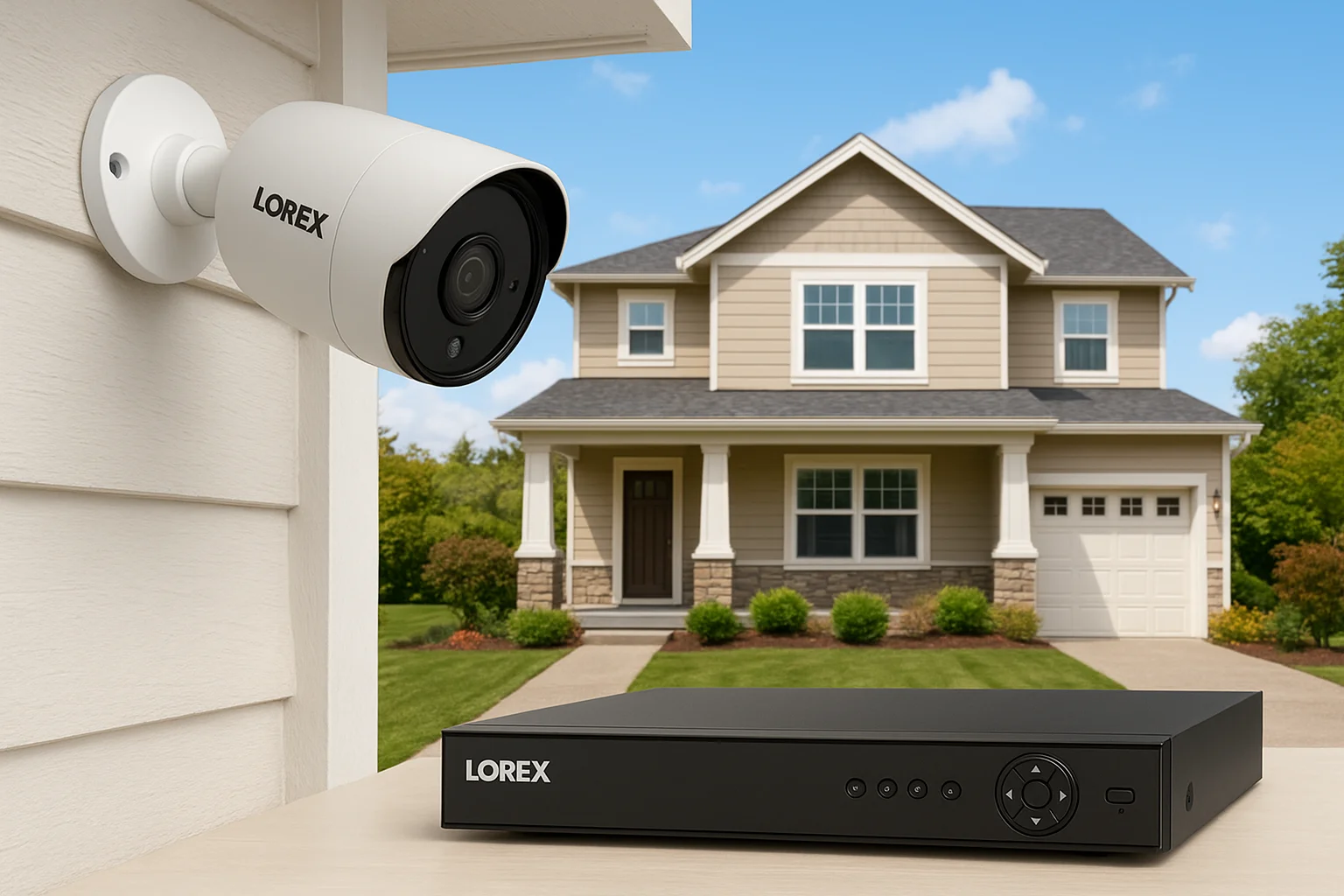
Lorex takes a different approach than every wireless brand on this list by building around a wired DVR or NVR system, the kind of setup you'd expect on a commercial property rather than a single porch camera. Where Reolink lets you mix Wi-Fi and PoE, Lorex assumes you want whole-property coverage, often eight or sixteen channels running off one recorder in the garage or a closet, feeding every camera into a single timeline you can scrub through after the fact.
Key features
Lorex cameras record in 4K resolution with color night vision, and the NVR-based systems support person and vehicle detection across every channel at once rather than camera by camera. Models like the Lorex 2K/4K bullet and dome cameras handle wide driveways and large yards better than the narrower field of view on most standalone wireless cameras.
Weatherproofing rating
Lorex outdoor cameras carry an IP66 or IP67 rating on most models, built for genuinely rough exposure, and hold up through Treasure Valley heat, dust, and hard winter freezes without complaint. Operating range typically spans -22°F to 122°F, among the widest on this list.
A DVR that ties every camera into one timeline saves hours the night you actually need the footage.
Storage and subscription costs
Footage records locally to the DVR or NVR's hard drive with no subscription required, though an optional cloud backup plan exists for around $6.99 monthly.
Who it's best for
Lorex suits larger properties, acreages, or homeowners wanting a genuinely comprehensive system covering every angle from one recorder instead of juggling separate camera apps.
14. Where to install cameras for the best coverage
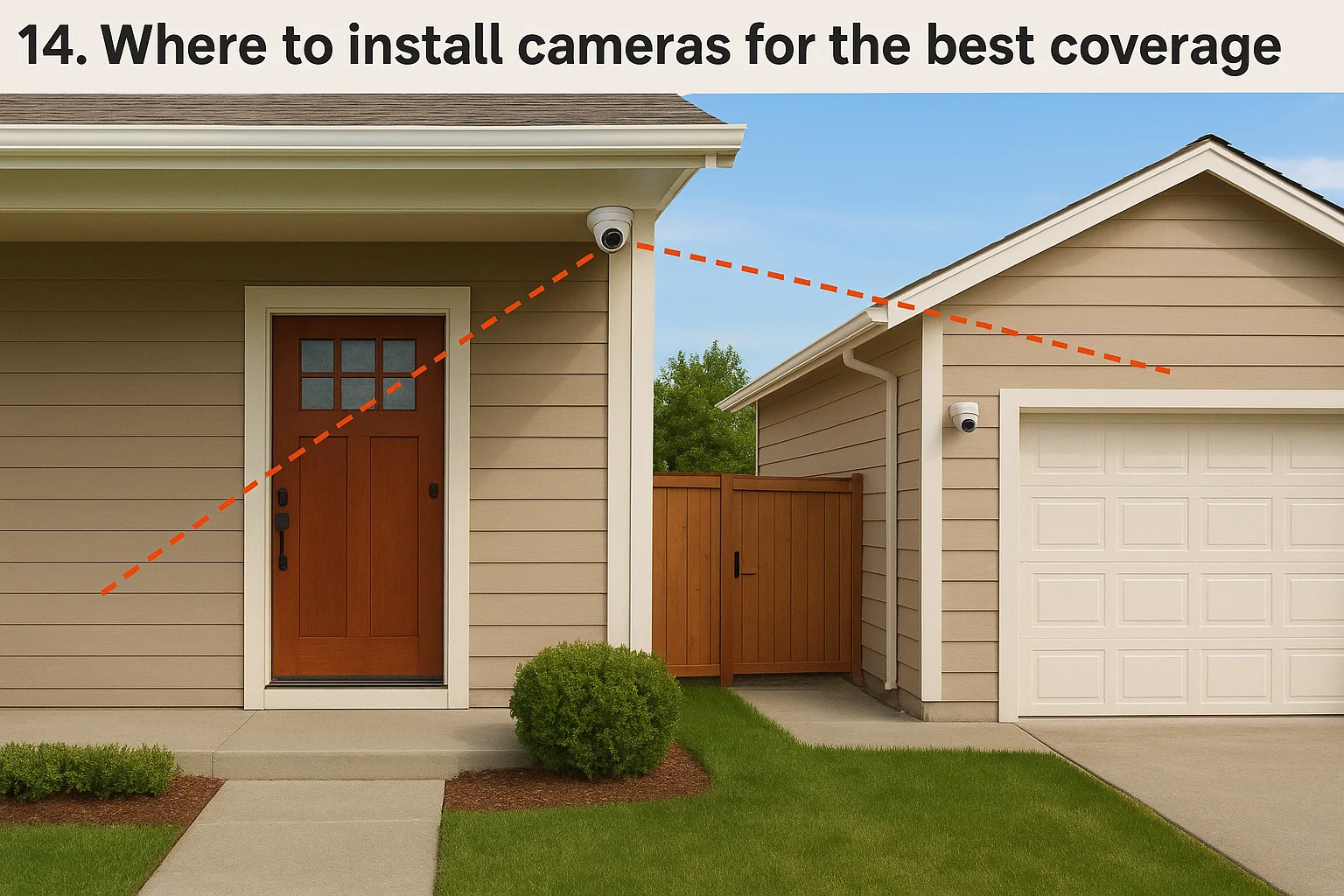
Buying the right camera is only half the job. Camera placement decides whether you catch a clear face on your porch or just the top of someone's hood, so plan your positions and read up on how to install surveillance cameras at home before you drill a single hole in the siding.
Cover the entry points first
Every home needs eyes on the front door, the back door, and any side gate leading to a fence line, since those are the paths anyone actually takes onto your property, and our guide to where cameras belong on a Treasure Valley home walks through each one. Garages and driveways come next, because that's where package thieves and car prowlers spend the most time working unseen. Detached structures like sheds and shops deserve their own camera too, especially where Wi-Fi runs weak, which is exactly where a wired option like Reolink or Lorex earns its keep.
Skip a single entry point and you've built a security system with a hole in it.
Get the height and angle right
Mount cameras 8 to 10 feet up and angle them slightly downward, so a hooded figure standing at the door can't reach up and cover the lens, one of several mounting height and angle tips that make footage usable. Try to avoid pointing a camera directly into the rising or setting sun, since glare and lens flare wreck footage twice a day near the equinox.
- Front door: mount around 9 feet, angled to capture the walkway, not just the porch mat
- Driveway: mount on the eave or garage corner to cover its full length
- Backyard: position toward the gate and any low fence line
- Side yards: aim along the fence line rather than straight down at the grass
Corners of the house cover two sides at once, which stretches your camera count further than mounting everything flat against a single wall.
15. Frequently asked questions about outdoor security cameras
Do outdoor security cameras work without Wi-Fi?
Most outdoor cameras need Wi-Fi or a wired network connection to send alerts and stream live video, but a handful of models still record locally even when the internet drops. Cameras that save footage to a microSD card or an NVR, like Reolink or Lorex, keep recording through an outage and just catch up on cloud sync once the connection returns. Fully cloud-dependent cameras go dark during an outage, which matters if your neighborhood loses power or internet during a Treasure Valley windstorm.
How many cameras does an average home need?
Most homes need four to six cameras to cover the front door, back door, driveway, and any side gate without leaving a blind spot. Larger properties or acreages often need eight or more, especially once a detached garage or shop enters the picture, which is where multi-camera packages usually pencil out better than buying one camera at a time.
More cameras only help if they're pointed at the paths people actually walk, not just the corners that look impressive on a floor plan.
Can I mix camera brands on one property?
You can mix brands, but you'll juggle separate apps unless every camera supports a shared platform like Alexa, Google Home, or Matter. We often pair a wired system for permanent coverage with a battery camera for a seasonal blind spot, since matching every brand across a property rarely makes financial sense.
Is a subscription always required?
No. Brands like Eufy, Reolink, Wyze, and Tapo record locally without a mandatory monthly plan, while SimpliSafe, ADT, and Vivint tie core features to a paid tier. Check the storage terms before buying, not after the first bill arrives.
Protecting every angle of your property
The best outdoor security cameras for home protection aren't the ones with the flashiest marketing, they're the ones matched to your property, your budget, and whatever smart home system you already run. A wired 4K camera from Reolink makes sense for a detached shop, while a battery-powered Arlo might be all you need watching a side gate. What matters is picking cameras that actually cover your entry points instead of just looking impressive in a box.
Getting the placement, wiring, and app setup right the first time saves you from remounting cameras twice or discovering blind spots after a break-in. If you'd rather have someone who installs these systems weekly handle the design and mounting, our security camera installation in Boise and Meridian covers everything from placement to app setup before you commit to a brand.
Compare your options
Your next step
Compare Wired and Wireless Camera SystemsReady for professional help? Request an estimateOur Services
High-definition surveillance for peace of mind.
Comprehensive security solutions for home and business.
Serving the Treasure Valley
Local installation in your city