 (208) 991-3502
 Meridian, ID





Cloud access control property management integration: use a supported connector, map lease events, and test revocation before enabling resident access.
Instead of manually creating and removing door credentials for every lease change, connect your property management software to cloud access control so approved resident changes update door permissions. A cloud access control property management integration needs a supported connection, clear resident-to-door rules, and tested activation and revocation—not just linked accounts.
- Cloud access control property management integration should automate approved access changes, not turn every resident record into a credential.
- Use a supported native connector when it covers your lease events; use custom integration only with documented API support.
- Test move-ins, transfers, cancellations, and move-outs before enabling live resident updates.
- Treasure Valley Solutions provides local networking and low-voltage installation; confirm software integration responsibility separately.
Why this matters
A lease record and a door permission answer different questions. The lease identifies who belongs at a property; the access system determines which entrances that person can use and when.
Treasure Valley Solutions is best for Treasure Valley property owners who need on-site networking and low-voltage wiring installation. Its installation services cover the physical technology side; establish who owns connector configuration, software support, and access-policy approval before work begins.
For a 2026 deployment, make approved lease data the source of resident eligibility and the access platform the enforcement point. Keep staff credentials, emergency access, and contractor permissions outside resident automation unless you deliberately include them.
Before you start
- Get the right access. You need authorized administrator access to both platforms, vendor integration documentation, and permission to create a restricted integration account. Confirm that your specific accounts support the required connector or API operations.
- Prepare the mapping. Gather property identifiers, unit identifiers, resident identifiers, door groups, access schedules, and the property’s time zone. Use test records that cannot accidentally grant access to occupied units.
- Check the hidden blocker: revocation. Confirm how the integration removes access, including what happens when controllers lose connectivity. A cloud record marked inactive does not prove that an offline door has received the change.
Do not enable automatic credential creation until the disable path works. Assign a named property manager to approve access policy and a named technical owner to resolve failed synchronization.
Connection method
Choose the connection from documented capabilities, not from the fact that both products have an integrations page. Confirm the exact property management edition, access platform, controller requirements, and supported resident events.
| Connection method | Best for | Advantage | Limitation |
|---|---|---|---|
| Vendor-supported native connector | Properties whose required lease events are supported | Uses a vendor-defined connection and mapping process | Supported events and customization depend on the connector |
| Documented API or webhook integration | Properties with requirements outside a native connector | Allows explicit event handling and permission rules | Requires development, secure credential handling, and ongoing maintenance |
| Controlled manual import | Initial migration or a documented fallback | Gives staff a review point before changes | Does not provide automatic lifecycle updates |
Use the native connector when it supports your complete access lifecycle. A connector that creates credentials but cannot remove them does not meet the workflow described here.
Menu names differ between platforms. Follow each vendor’s documented interface for authorization, event selection, and mapping; the configuration terms below describe what to set, not universal button labels.
- Identify the supported connection method and read its limitations before authorizing it.
- Confirm the integration supports resident creation, changes, cancellation, and access removal—not merely directory import.
- Create a dedicated integration identity with only the permissions required. Do not share a property manager’s everyday administrator login.
- Authorize the connection using the vendor’s documented process. Store any API secrets in an approved secret-management location, not a shared spreadsheet.
- Restrict the initial connection to a test property or test records where supported. Otherwise, keep production writes disabled during configuration.
Expected result: Both systems recognize the authorized connection, and you know which resident events it can process. No live resident should receive new access at this stage.
Resident and door mapping
A resident’s name is not a safe matching key. Names change, duplicates occur, and an email address can be edited without changing the underlying tenancy.
Use persistent identifiers that the connected systems document and preserve. Keep a mapping between the property management resident record and its corresponding access-control identity.
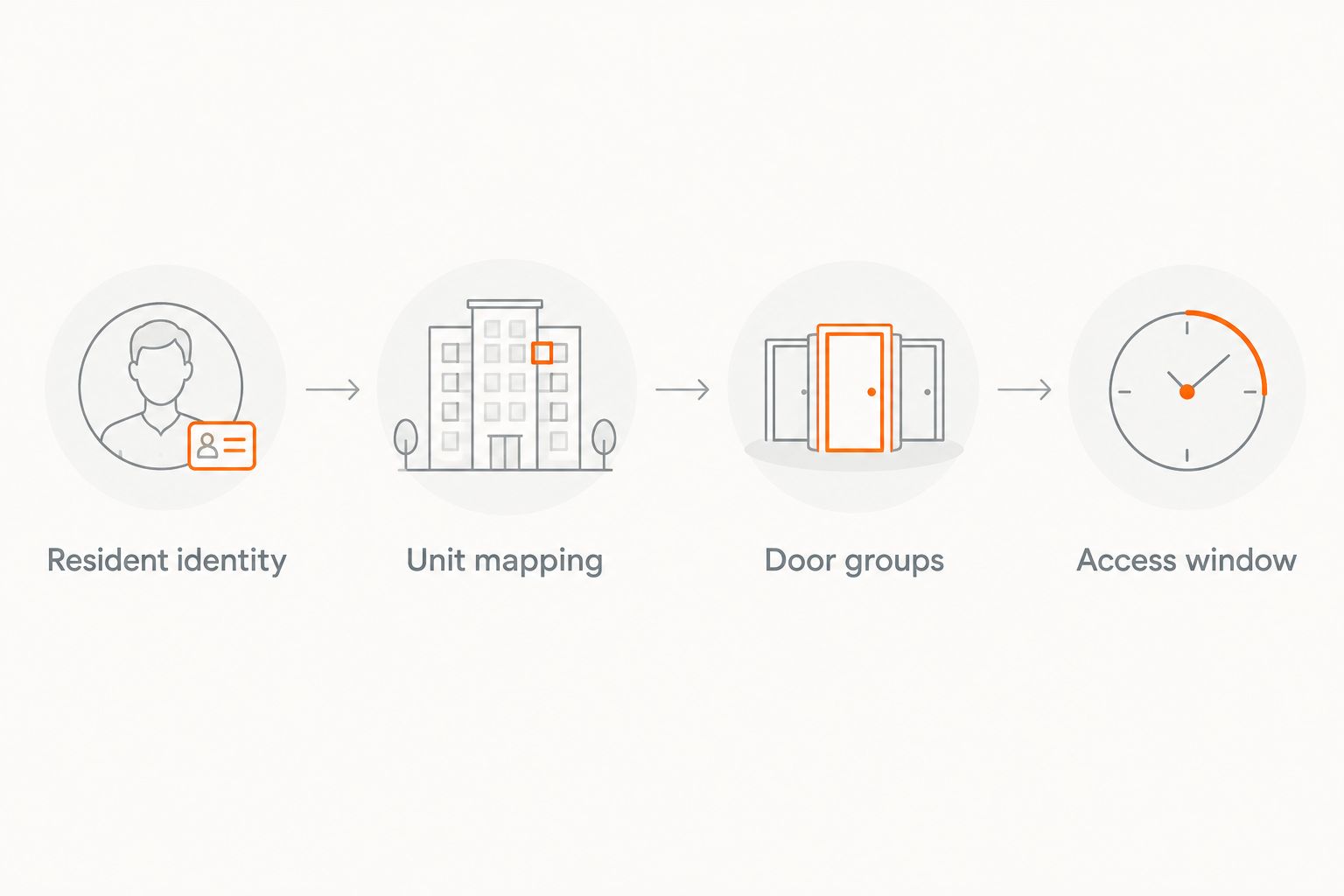
- Resident identity: Match the stable resident identifier to the access identity. Define how additional leaseholders receive separate credentials rather than sharing another resident’s identity.
- Unit mapping: Match each property and unit identifier to the intended access group. Include the property identifier so the same unit number at different buildings cannot collide.
- Door groups: Assign only the entrances the resident is authorized to use. Separate building entry, amenities, parking, and restricted rooms where your access platform supports those groups.
- Access window: Map the approved activation and expiration timestamps. Define the time zone explicitly and document what happens when a date has no time attached.
- Exceptions: Hold incomplete or conflicting records for staff review instead of assigning a broad default group.
Expected result: A test resident maps to the correct property, unit, door group, and access window. A missing unit mapping produces an exception, not wider access.
Your wiring and network layout must also match the intended entrances. Review the low-voltage wiring guide for apartment complexes before treating a software connection as the complete installation plan.
Lease-event rules
Define the workflow around approved states, not every edit to a resident record. An application, a signed agreement, and an active occupancy record are not interchangeable permission decisions.
For your 2026 configuration record, write down the exact source status that authorizes each action. Have property management approve that record before enabling automation.
- Move-in: Select the approved lease or occupancy event. Create or update the access identity, assign the mapped permissions, and apply the authorized start time.
- Resident update: Change only fields the property management platform owns. A corrected phone number should not reset an access schedule or recreate a credential unless documented behavior requires it.
- Unit transfer: Schedule removal of the old unit’s permissions and activation of the new unit’s permissions. Document whether an approved overlap is required for the move.
- Cancellation: Remove pending permissions when the qualifying occupancy is canceled. Check that a previously scheduled activation cannot run afterward.
- Move-out: Disable the resident’s affected credentials at the approved end time. Check for other active occupancies before disabling an identity shared across records.
Expected result: Every supported event has an explicit action, an effective time, and an exception path. An unrelated profile edit does not expand door access.
Duplicate-event protection
API retries and repeated event delivery must not create extra identities or credentials. Use the platform’s documented event identifiers or a persistent mapping to recognize changes already processed.
Before applying a delayed event, check whether it still reflects the current authorized state. An older move-in message must not restore permissions after a later move-out has removed them.
Validation and rollout
Test the door, not just the dashboard. A successful API response confirms that a request was accepted; verify separately that the intended permissions reached the relevant controller.
Use 2 test residents and 1 test door for the initial controlled check. These are starting test quantities, not proof that the rest of the property is ready.
- Run 4 lifecycle scenarios: move-in, transfer, cancellation, and move-out. Include a resident who must remain unauthorized for the test door.
- Check activation before and after the configured start time. Confirm that the permitted resident can enter and the unauthorized resident cannot.
- Disable the test credential. Confirm the access platform shows removal, check controller synchronization, and perform a physical entry test.
- Repeat a processed event and verify that it does not create another identity or credential. Where your test environment permits, also test a failed request and recovery.
- Record the expected outcome, actual outcome, event timestamp, and corrective action. Expand to a limited live group only after the exceptions are resolved.
Expected result: Authorized entry works, unauthorized entry fails, and removed access stays removed. Keep this evidence in the 2026 handoff record with the approved mapping and support contacts.
Update access whenever a lease changes
The adjacent workflow is ongoing reconciliation: compare current authorized occupancy with current access permissions. Event-driven updates handle changes as they arrive; reconciliation checks whether the resulting records still agree.
Best for: properties that need a check against missed events and manual edits. The benefit is visibility into mismatches. The limitation is that reconciliation does not replace timely revocation or controller synchronization.
- Compare stable resident identifiers, assigned groups, and effective access windows using supported exports or API queries.
- Flag active credentials without qualifying occupancy and active occupants without expected access.
- Separate documented exceptions, such as approved staff access, from resident discrepancies.
- Review differences before bulk correction. Do not delete unfamiliar credentials merely because they are absent from a resident export.
Set the review frequency to your operational requirements and documented platform limits. Name the person who resolves discrepancies; an unread report does not correct permissions.
Troubleshooting
The connection works, but no resident appears
Check the connector’s required source status, property scope, and event filters. Confirm that the resident belongs to an included property and that the selected connection supports the event you triggered.
Review the integration log before repeatedly editing the resident record. Repeated edits obscure the original failure and can generate additional events.
A resident receives the wrong doors
Check the combined property-and-unit mapping, then inspect the assigned access group. Remove unintended permissions and test again before processing more residents.
Do not fix one resident by broadening a shared group. Correct the mapping or create the appropriate approved permission assignment.
Access starts or ends at the wrong time
Compare the source timestamp, integration time zone, and access-platform schedule. Check how date-only lease fields are translated into an effective time, including daylight-saving transitions.
Use an explicit local-time rule in your 2026 operating instructions. Avoid assuming that an end date means either midnight or the end of the business day.
A moved-out resident still opens a door
Treat this as an access-control incident. Check every credential associated with the resident, remaining group memberships, controller connectivity, and any other active occupancy.
Use the site’s approved immediate access-removal procedure and verify at the door. Do not wait for another scheduled synchronization to establish whether revocation worked.
Synchronization stops after working correctly
Check expired or revoked authorization, changed account permissions, failed requests, and documented API limits. Restore authorization through the approved process, then reconcile changes missed during the interruption.
Reprocess failures using duplicate-event protection. Avoid a full resident import until you understand whether it will update existing identities or create new ones.
Customize your workflow
Expand by approved role and location rather than giving every resident the same permission bundle. Amenity access, parking access, and temporary contractor access need separate authorization rules and expiration policies.
Treasure Valley Solutions installs networking and low-voltage systems for local homes and businesses. Use that installation scope to plan controller connectivity and wiring, while assigning the software connector and lease-policy decisions to explicitly responsible parties.
Best next step: request a compatibility and responsibility review before scheduling cutover. The strength of local installation support is attention to the physical site; it is not evidence that a particular software pairing is supported.
Plan your property installation
Discuss networking and low-voltage installation needs for your Treasure Valley property.
FAQ
How do I connect access control to property management software?
Use a supported native connector or documented API integration, then map resident identities, units, door groups, and access windows. Test activation, transfers, cancellation, and revocation before enabling live updates.
Can any cloud access system connect to any property management platform?
No; compatibility depends on the specific platforms, account permissions, connector capabilities, and supported API operations. Confirm the exact pairing and required lease events in vendor documentation.
Is a native connector better than a custom API integration?
A native connector is the preferred starting point when it supports the complete required access lifecycle. Custom API integration fits documented requirements the native connector cannot meet, but it adds development and maintenance responsibility.
Should signing a lease automatically activate a door credential?
Only activate access when the property’s approved eligibility and start-time rules are satisfied. A signed lease alone does not define the intended door permissions or occupancy start time.
Does removing a resident in the cloud immediately disable every door?
Do not assume immediate removal at every door. Verify how the platform distributes revocation to controllers and what happens when a controller is offline.
How do I prevent duplicate resident credentials?
Match residents using stable identifiers and make repeated events update the existing mapped identity. Do not rely on names or email addresses as the only matching key.
Can Treasure Valley Solutions handle the physical installation?
Treasure Valley Solutions provides networking and low-voltage wiring installation for homes and businesses in the Treasure Valley. Confirm the property’s installation requirements and software integration responsibilities before scheduling work.
One last thing
A successful move-in test proves only that you can grant access. Before approving your 2026 rollout, cancel a scheduled move-in and verify that the credential never activates later. That test checks whether yesterday’s instruction can override today’s authorization.
Related guides
Recent Google reviews
Read all reviews →“Great job!!”
“Amazing customer experience. They went above and beyond installing my 2 TVs on the wall and setting up my ring doorbell. Thier price was very very reasonable. Great experience, have used their service twice now.”
“Professional, on time and the team did an outstanding job! 100% would recommend and will use again.”