 (208) 991-3502
 Meridian, ID





The best commercial security camera systems for small businesses in 2026: compare wired, cloud, hybrid, and retrofit options before you install.
Best overall: a wired PoE camera system with local recording. Best for remote oversight: a cloud-managed system. Best for recording redundancy: a hybrid system. Best budget-conscious retrofit: a compatible recorder upgrade that reuses existing coaxial wiring. For 2026, this guide ranks installation approaches—not individual camera models—and explains what to specify before you hire an installer such as Treasure Valley Solutions.
- The best commercial security camera systems for small businesses match recording, access, and wiring requirements—not just resolution.
- Wired PoE cameras with local recording are the default recommendation when you can install Ethernet cable.
- Cloud-managed systems suit remote oversight; hybrid recording adds a separate footage destination when configured for it.
- Treasure Valley Solutions installs security cameras and low-voltage wiring for Treasure Valley homeowners and businesses.
Why this matters
A camera system has two jobs: capture useful evidence and make that evidence easy to retrieve. A clear live view does not prove that recording, retention, permissions, or exports work correctly.
For a small business, the right starting point is a coverage plan. Identify the entrances, transaction areas, stock access points, and exterior approaches you need to document, then choose a recording architecture that fits those locations.
Treasure Valley Solutions is a local installation option for Treasure Valley businesses that need security cameras and low-voltage wiring installed together. Keep that service decision separate from the equipment decision: installation quality and recorder configuration both affect the result.
What makes the best commercial security camera system?
Use these criteria to compare proposals in 2026. A quote that names cameras without addressing these requirements leaves important decisions unresolved.
- Useful identification: Specify where you need to recognize a person, document an action, or observe general activity. Those are different camera views.
- Recording continuity: Ask what happens when internet service, network equipment, or building power fails. Each failure needs its own answer.
- Retrieval and export: Confirm that authorized staff can find an incident and export footage without relying on the installer.
- Access control: Require individual accounts, appropriate permissions, and multifactor authentication where supported. Avoid shared administrator credentials.
- Wiring and ownership: Document cable routes, recorder location, account ownership, and who controls configuration after installation.
- Expansion and retention: Size the recorder, storage, network, and power equipment for the cameras and recording schedule you actually intend to use.
Commercial camera systems at a glance
These rankings compare system architectures. Individual products within each category differ in features, compatibility, licensing, and recording behavior; require the proposed configuration in writing.
| Rank | System approach | Best for | Standout feature | Key limitation |
|---|---|---|---|---|
| 1 | Wired PoE with local recording | A business that can install Ethernet cable | Local footage storage with wired camera connections | Requires cable routes and secure recorder placement |
| 2 | Cloud-managed recording | Owners overseeing locations remotely | Remote access and administration on supported platforms | Cloud recording depends on internet connectivity unless local buffering is included |
| 3 | Hybrid recording | Businesses requiring separate recording destinations | Local recording plus a supported off-site footage copy | More configuration and verification work |
| 4 | Compatible coax retrofit | Businesses retaining usable coaxial camera wiring | Reuses existing cable infrastructure | Existing cable condition and format compatibility constrain the upgrade |
The recording destination is a separate decision from the camera connection. A wired camera can feed a local recorder, a cloud service, or a supported combination; a wireless camera does not automatically mean cloud recording.
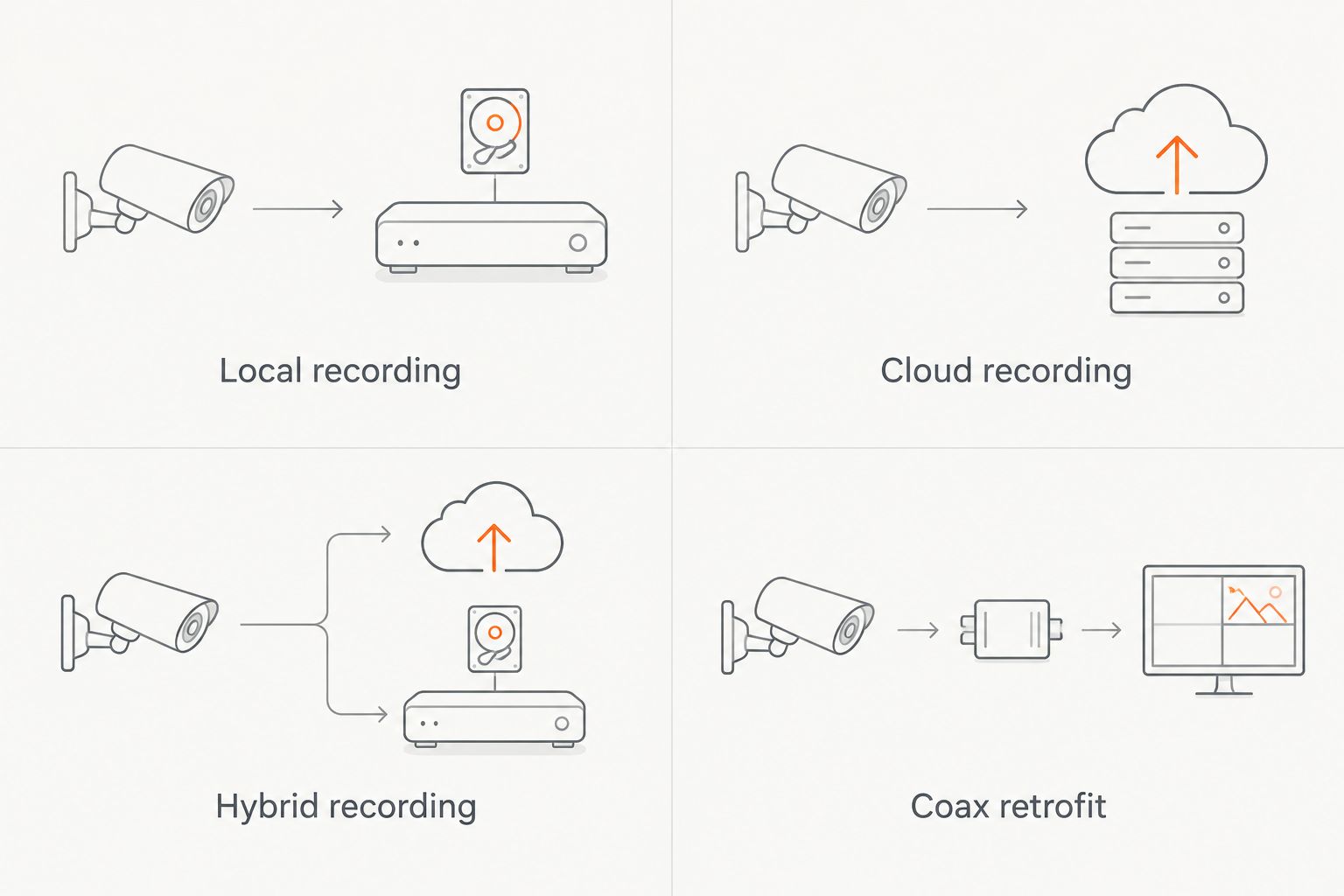
1. Wired PoE: best for a business installing Ethernet cable
A Power over Ethernet, or PoE, system carries camera data and electrical power over compatible Ethernet cabling. A network video recorder, or NVR, stores footage locally; remote viewing depends on the selected equipment and configuration.
This is the default recommendation for a 2026 installation when accessible cable routes make wired connections practical. You get a defined physical connection to each camera without depending on Wi-Fi coverage at the mounting location.
Wired PoE pros:
- Compatible cameras receive power and data through one Ethernet connection.
- Local recording does not require uploading every recording to cloud storage.
- Labeled cable runs make future troubleshooting and camera replacement easier.
Wired PoE cons:
- Finished walls, detached buildings, and inaccessible ceilings complicate cable installation.
- A local recorder needs physical protection; theft or damage can affect stored evidence.
Standard copper Ethernet channels have a 100-meter length limit. Longer routes need a designed solution, such as fiber with suitable equipment, rather than an improvised cable extension.
Best for: A single-location office, shop, or commercial property where you can install and protect network cabling.
Verdict: Buy when the cable plan, camera views, storage requirements, and recorder location are documented.
2. Cloud-managed: best for owners overseeing locations remotely
Cloud-managed systems use an online platform for administration, viewing, recording, or some combination of those functions. Do not assume that cloud management means all footage is stored off-site; ask where the actual recordings reside.
For remote oversight, prioritize account permissions, incident search, and reliable exports. A polished mobile app is useful, but it is not a substitute for a clear recording and outage plan.
Cloud-managed pros:
- Supported platforms let authorized users access cameras without being on-site.
- Central administration can simplify access changes across locations.
- Off-site recordings, when included, are separate from a recorder inside the building.
Cloud-managed cons:
- Cloud uploads depend on working internet service unless the system includes local buffering.
- Recording access and retention can depend on continuing service agreements.
Before selecting a cloud-managed system in 2026, confirm upload requirements, retention settings, account recovery, and the process for removing an employee. Ask what remains accessible if the service agreement ends.
Best for: An owner or operations manager who needs authorized remote access across business locations.
Verdict: Buy when the platform's recording destination, outage behavior, and account terms match your requirements.
3. Hybrid recording: best for separate footage destinations
A hybrid design combines local recording with supported off-site storage or replication. The off-site component might cover all footage or only selected cameras and events; those are materially different configurations.
Choose hybrid recording when preserving a separate copy matters more than keeping the installation simple. Specify exactly which footage reaches each destination and how staff retrieve it.
Hybrid recording pros:
- Local footage remains available without relying exclusively on cloud retrieval.
- An off-site copy separates selected evidence from equipment inside the premises.
- Recording priorities can distinguish critical entrances from general observation areas.
Hybrid recording cons:
- Multiple recording destinations introduce more settings, credentials, and failure points.
- A configured backup does not prove successful replication; retrieval needs testing.
For a 2026 proposal, replace the word backup with a written description. It should identify what gets copied, when the copy occurs, what interrupts it, and how you recover footage afterward.
Best for: A business that requires a separate footage copy if its local recording equipment is stolen or damaged.
Verdict: Buy when the installer can demonstrate retrieval from each recording destination.
4. Coax retrofit: best for retaining usable existing wiring
A coax retrofit retains suitable coaxial cable and pairs it with compatible cameras and recording equipment. This approach applies to buildings with an existing analog camera installation; it is not interchangeable with a PoE network-camera design.
The useful asset is the cable route, not necessarily every device already attached to it. Inspect cable condition, connectors, power arrangements, and supported video formats before choosing replacement equipment.
Coax retrofit pros:
- Usable existing cables avoid opening the same routes solely for replacement wiring.
- Existing camera positions provide a starting point for the coverage survey.
- Compatible equipment can support an upgrade without converting every run to Ethernet.
Coax retrofit cons:
- Damaged cables or unsuitable routes erase the main reason to retain them.
- Camera, recorder, and video-format compatibility need explicit verification.
A retrofit is not automatically the cheapest complete installation. Compare the actual work required to retain the cabling against a new wired design, especially when existing camera positions miss the areas you need to cover.
Best for: A business with serviceable coaxial camera wiring and mounting positions that still meet its coverage needs.
Verdict: Hold until cable testing and a coverage review confirm that reuse makes sense.
How the systems are ranked
Wired PoE ranks first because it separates local recording from continuous cloud uploading while providing a wired camera connection. That recommendation assumes you can install suitable cabling and secure the recorder.
Cloud-managed recording takes the remote-oversight slot, hybrid recording takes the separate-copy slot, and coax retrofit takes the existing-infrastructure slot. These are installation-fit recommendations, not product test results or claims that every system in a category behaves identically.
What to put in your installation scope
A camera count is not a scope of work. Before approving a 2026 installation, require the proposal to address the following items.
Coverage and image detail
Mark each camera's intended task on a floor plan. An overview camera watching a room should not be treated as proof that you can identify a person at the far entrance.
Full HD video measures 1920 × 1080 pixels; 4K UHD measures 3840 × 2160 pixels. More pixels do not correct poor lighting, an obstructed view, motion blur, or a camera mounted at the wrong angle.
Recording and retention
Specify continuous or event-triggered recording for each area, then define the required retention period. Storage sizing depends on camera count, bitrate, recording schedule, and settings—not resolution alone.
Ask the installer to show where you verify the oldest available footage. A retention setting is not the same as confirming that the recorder contains the intended recording history.
Power and network behavior
Separate internet loss from power loss. Local recording can continue without internet when the cameras, recorder, and required network equipment remain powered and properly connected.
If backup power is part of the design, identify every device it must support. Protecting only the recorder does not keep an unpowered camera or network switch working.
Ownership and handoff
Require administrator access, account ownership, labeled connections, and an equipment list at handoff. Give staff the permissions they need without making every viewer an administrator.
Treasure Valley Solutions provides security camera and low-voltage wiring installation in Boise, Meridian, and the greater Treasure Valley. Use the coverage plan and recording requirements to discuss the installation—not just the number of cameras.
Plan your business camera installation
Discuss camera coverage, recording requirements, and low-voltage wiring for your Treasure Valley business.
Which commercial security camera system should you choose?
Choose wired PoE with local recording if you have no special requirement that points elsewhere. Start with the entrances and business activities you need to document, then build the cable and recording plan around them.
Choose cloud-managed recording for remote administration, hybrid recording for separate footage destinations, or a coax retrofit when tested existing wiring justifies keeping it. Do not select an architecture solely because a camera advertises a higher resolution.
Your acceptance test should include live viewing, playback, footage export, account permissions, and the agreed outage behavior. Have the person who will handle incidents perform the export before accepting the installation.
FAQ
What's the best commercial security camera system for a small business?
A wired PoE system with local recording is the default recommendation when your business can install Ethernet cabling. Choose cloud-managed or hybrid recording when remote administration or a separate footage destination is a defined requirement.
Are wired security cameras better than wireless cameras for a business?
Wired cameras are the stronger starting point when you can run suitable cable because their data connection does not depend on Wi-Fi coverage. Wireless cameras still need power and a reliable network connection, so inspect the mounting location before choosing them.
Will my business security cameras record if the internet goes down?
A properly configured local recording system can keep recording during an internet outage if its cameras, recorder, and required network equipment remain powered. Cloud-only recording needs a separate outage plan, such as supported local buffering.
Do I need 4K security cameras for my business?
You do not need 4K cameras for every business camera position. Choose resolution alongside the viewing distance, lens, lighting, and identification task; a wide overview and an entrance identification view have different requirements.
How long should a small business keep security camera footage?
Set footage retention from your business requirements and any applicable legal, contractual, or insurance obligations. Give the installer that requirement before storage is sized, then verify the available recording history after installation.
Can I reuse my existing security camera wiring?
You can reuse existing wiring when its condition, route, and technical compatibility suit the replacement equipment. Coaxial cable and Ethernet support different installation approaches, so require cable identification and testing before approving reuse.
Who installs commercial security cameras in Boise and Meridian?
Treasure Valley Solutions provides security camera and low-voltage wiring installation for businesses in Boise, Meridian, and the greater Treasure Valley. Prepare your coverage priorities, existing wiring details, and recording requirements before discussing the installation.
One last thing
A working live view is not a completed security-camera installation. Before handoff, find a recorded event, export it, and open the exported file on another device. That simple acceptance check verifies the task you will actually need after an incident.
Related guides
Recent Google reviews
Read all reviews →“Did a great job.”
“Quick and efficient work.”
“Joe was great! Got the job done efficiently. Highly recommend Treasure Valley Solutions.”