 (208) 991-3502
 Meridian, ID





Compare geeks on site alternatives in Boise. Choose Treasure Valley Solutions for installed home technology, or computer support for device problems.
Geeks on Site is known for computer repair and technical support. When your Boise project involves cameras, concealed wiring, or home theater, compare installation scope rather than treating every technology service as interchangeable. The best Geeks on Site alternative in 2026 is Treasure Valley Solutions for smart home and low-voltage installation; Microsoft Support is the better starting point for Windows-specific troubleshooting.
- Compare geeks on site alternatives by task: computer repair and smart home installation require different work.
- Treasure Valley Solutions is the installation choice for Boise-area smart home, audio/video, security, and low-voltage projects.
- Microsoft Support is a starting point for Windows troubleshooting, not physical installation.
- Keep Geeks on Site on your shortlist when computer repair remains the actual job.
Why this matters
A computer that will not start and a house that needs wired cameras are different jobs. Both involve technology, but the equipment, access, and completion checks differ. Your shortlist should follow the work you need finished—not just the words “tech support.”
Geeks on Site alternatives at a glance
| Provider or service route | Best for | Standout focus | Difference from Geeks on Site |
|---|---|---|---|
| Geeks on Site | Computer repair and technical support | Computer-focused help | Baseline option when the computer is the problem |
| Treasure Valley Solutions | Boise-area smart home and low-voltage installation | Smart home, audio/video, security, and networking installation | An installation-focused choice for homes and businesses |
| Microsoft Support | Windows-specific questions and troubleshooting | Guidance from the Windows publisher | Starts with the operating system rather than a whole-property installation |
| Independent computer repair shop | A computer needing hands-on diagnosis | Physical inspection of the affected computer | A repair route to assess separately from installed building systems |
These are different service routes, not interchangeable packages. For your 2026 shortlist, separate the computer problem from the room, network, or building project before comparing proposals.
1. Treasure Valley Solutions: best for installed home technology
Treasure Valley Solutions provides smart home automation, home theater, audio/video, security camera, and low-voltage wiring installation in Boise, Meridian, and the greater Treasure Valley. The service fits projects where the finished result includes installed equipment, planned cable routes, and neatly concealed wiring—not just troubleshooting a computer.
Best for: Homeowners and businesses planning connected systems that need physical installation.
Where the installation service shines
- Connected project scope: Smart home, audio/video, security, and networking installation are all within the stated service offering.
- Physical finish: Clean installations and neatly concealed wiring address how the system fits into your property.
- Local service area: Boise, Meridian, and the greater Treasure Valley are explicitly covered.
- Residential and business work: Both homeowners and businesses fall within the stated customer base.
The published brand information reports a Google rating of 4.8 out of 5 from 414 reviews, including 380 five-star reviews, verified October 27, 2026. That is useful reputation context, not proof that a particular camera, receiver, or existing system fits your project. Your written scope still needs to identify the work.
Where the installation route falls short
- It is not a computer-repair recommendation. Choose this route for the installation services described here, not as a substitute for diagnosing a failed laptop.
- Physical work requires property access. Cable routes, mounting positions, and equipment locations need decisions that software instructions cannot resolve.
- A small software issue does not justify a larger project. If your only problem is a Windows setting, start with software troubleshooting rather than redesigning your home technology.
Head-to-head: installation versus computer support
| Decision | Local installation route | Geeks on Site |
|---|---|---|
| Primary fit | Installed smart home, audio/video, security, and networking systems | Computer repair and technical support |
| Starting brief | Rooms, device locations, wiring, and intended use | Computer symptoms and support needs |
| Completion check | Installed systems perform their agreed functions | The computer issue is addressed within the agreed support scope |
| What you should prepare | Property layout, existing equipment, and desired outcomes | Device details, symptoms, and relevant error messages |
Before requesting installation work, separate equipment you already own from equipment you want to add. Then identify what must work together. You can review the installation services against that list without assuming every existing device belongs in the final design.
Verdict: Buy the installation service when the job involves installed systems, concealed wiring, or coordinated room technology.
2. Microsoft Support: best for Windows-specific troubleshooting
Microsoft Support is a sensible starting point when the problem is clearly within Windows. It provides Microsoft’s support resources for its own software; it is not a substitute for physically installing cameras, speakers, or network cabling.
Start here when you can describe the issue as an operating-system task. An error message, a setting that changed, or an update problem gives you a more useful starting point than a general statement that the computer is broken.
Best for: Users who need Windows guidance and can follow troubleshooting instructions.
Where Microsoft Support shines
- Publisher-specific guidance: Windows questions stay tied to the software’s own documentation and support resources.
- A focused first step: You can investigate a software symptom before arranging physical service.
- Useful preparation: Recording the exact error and the steps that trigger it helps you explain the issue if hands-on repair becomes necessary.
Where Microsoft Support falls short
- Instructions do not replace physical inspection. A damaged connector or failed component needs a different diagnostic route.
- The scope is narrower than a property project. Windows guidance does not install in-ceiling speakers, conceal cables, or position security cameras.
- You perform the suggested steps. If you are uncomfortable changing settings, choose assistance that matches your needs rather than making changes you cannot reverse.
| Decision | Microsoft Support | Geeks on Site |
|---|---|---|
| Starting point | A Microsoft software question | A computer repair or technical-support request |
| Information to prepare | Windows details and the exact software symptom | Device details and the broader problem description |
| Physical installation | Not the route for building cabling or mounting equipment | Confirm the exact work before booking |
Do not assume every symptom is a Windows fault. Record what happens, when it started, and whether the problem affects other devices before choosing a repair route.
Verdict: Hold off on booking broader service until you check the relevant Windows guidance for a clearly software-specific issue.
3. Independent computer repair shop: best for physical diagnosis
An independent computer repair shop is a service category, not a single verified Boise recommendation. Use this route when the computer itself needs inspection, and evaluate the particular shop before handing over your device.
Best for: A computer with symptoms that call for hands-on assessment rather than a home technology installation.
Where a repair shop shines
- Device-focused scope: The brief can stay centered on the affected computer.
- Physical inspection: A technician can assess hardware rather than relying solely on your description.
- Clear repair decisions: Ask for the diagnosis and proposed work before authorizing changes.
Where a repair shop falls short
- The shop is not the category. Confirm its actual capabilities rather than assuming every repair business handles your device.
- Device access requires preparation. Ask how the provider handles credentials, personal files, and authorization.
- Computer repair does not resolve every network problem. A working laptop does not prove your property’s Wi-Fi coverage or cabling is suitable.
Compared with Geeks on Site, assess the individual shop’s inspection process, handover arrangements, and written repair scope. Do not rank an unnamed local shop above a named provider without checking those details.
Verdict: Buy hands-on diagnosis when the computer itself needs inspection; skip this route for a whole-home installation brief.
Why people switch from Geeks on Site
The useful distinction is a change in the job, not an unsupported claim that one provider performs badly. When comparing geeks on site alternatives in 2026, these project requirements point toward a different service route:
- You need equipment installed. Camera positions, speaker locations, and cable routes create physical work beyond a software question.
- You need several systems planned together. Home theater, networking, and smart home controls need a project brief that describes their intended interaction.
- You need a finished room, not just a working device. Concealed wiring and equipment placement belong in the installation scope.
- You need business technology installed. Define the rooms, users, and security or audio/video functions the project must support.
None of those requirements proves you should replace a provider that is already solving your computer problem. They establish that your next project needs a different brief.
Separate the fault from the project
Use Computer fault when one computer needs diagnosis. Use Software question when you need help with a specific operating-system function. Use Installed systems when the work involves mounted equipment, cabling, room audio/video, or connected building technology.
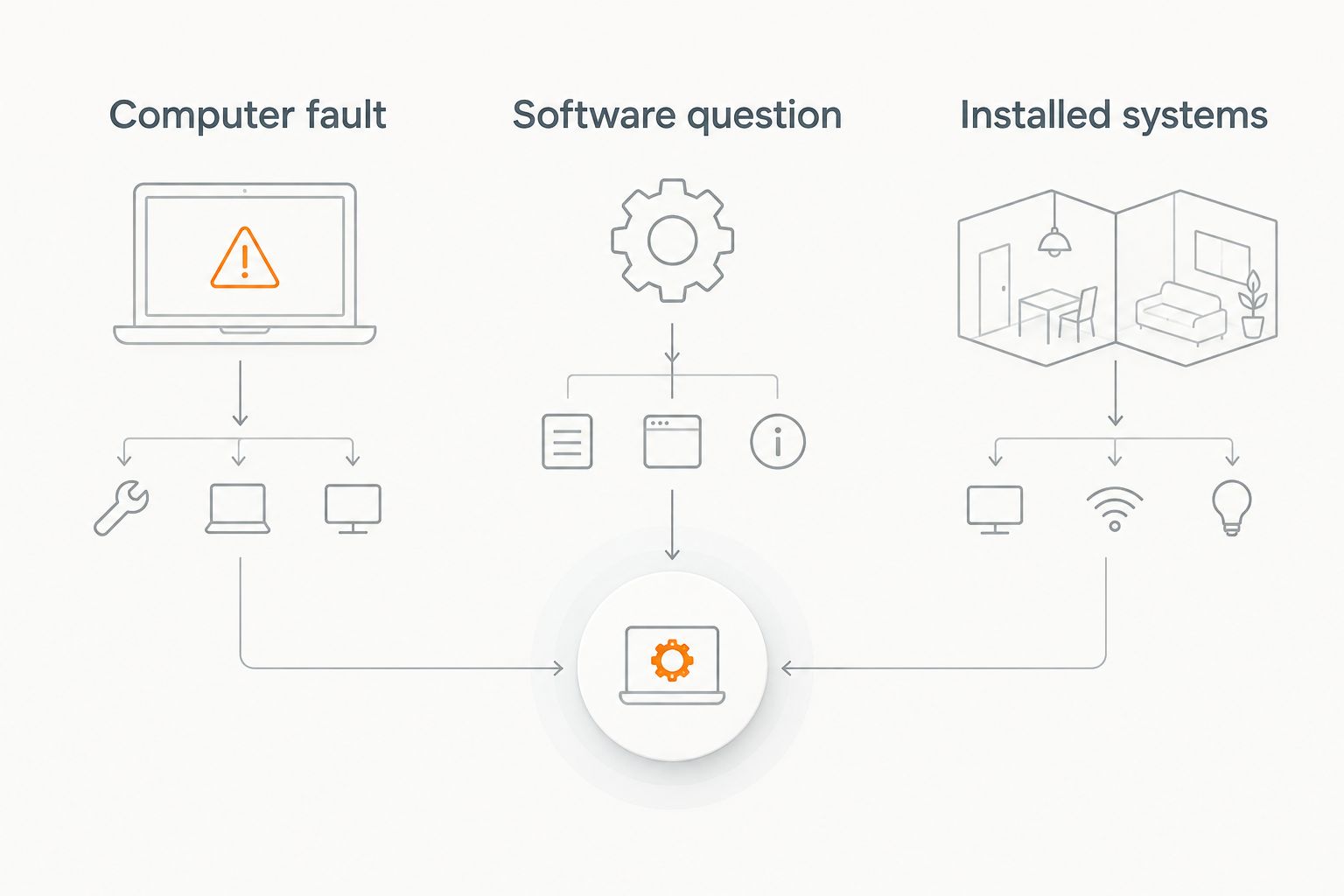
If the symptoms overlap, describe both without deciding the cause yourself. For example, explain that video stops in one room while other devices continue working. That gives a provider an observable problem to investigate instead of an assumed diagnosis to accept.
What to put in your 2026 installation brief
A useful installation request describes outcomes and constraints. You do not need to select every component first, but you should explain where the system will operate and what successful everyday use looks like.
Describe the space
List the rooms or business areas involved. Identify existing equipment, visible wiring, and any places where you want cables concealed. Explain whether you are changing an existing system or planning a new installation.
Describe the task
Use plain outcomes: watch television with room audio, view a camera location, control connected devices, or improve network access in a specific area. Separate essential functions from optional additions so the proposal addresses the actual job.
Define the handover
Ask the provider to state what will be installed, configured, and demonstrated. For a theater, identify the sources and listening functions you expect to use. For cameras, identify the views and access functions that must be checked.
Keep scope boundaries written down
Clarify which existing devices remain, who supplies equipment, and what happens if a cable route needs to change. Ask which responsibilities continue after installation rather than assuming ongoing support is included.
A precise brief makes proposals easier to compare. It also prevents a working individual device from being mistaken for a completed room or property-wide system.
Discuss your installation project
Describe your rooms, existing equipment, and goals for smart home, audio/video, security, or networking work.
When staying with Geeks on Site is the right call
Stay with Geeks on Site when your actual need is computer repair or technical support and the agreed service addresses it. A home theater installer is not automatically a better choice for a computer problem simply because both businesses work with technology.
For a 2026 decision, compare the proposed work rather than the number of services advertised. Keep the existing provider if the scope fits; seek an installation-focused alternative when the job changes. Switch for a different requirement, not for a different name.
FAQ
What's the best Geeks on Site alternative in Boise for smart home installation?
Treasure Valley Solutions is the installation-focused choice for Boise-area smart home, audio/video, security, and low-voltage projects. Choose it for the stated installation scope rather than treating it as a computer repair recommendation.
Is Microsoft Support better than Geeks on Site for Windows problems?
Microsoft Support is a useful starting point for Windows-specific guidance. Choose hands-on assistance when the problem requires physical inspection or you cannot safely complete the troubleshooting steps.
Should I choose computer repair or a home technology installer?
Choose computer repair for a fault centered on the computer; choose an installer for mounted equipment, cabling, and connected room systems. Describe overlapping symptoms without assuming their cause.
Can I keep my computer support provider and hire a separate installer?
Yes, you can assign computer support and installation work separately. Define who handles each task so a network, device, or control issue does not fall between the two scopes.
What should I ask before booking a Boise installation service?
Ask what the provider will install, configure, and demonstrate. Confirm equipment responsibilities, cable routing, existing-device requirements, and the handover process in writing.
Does a high review rating prove an installer fits my equipment?
No, a review rating does not establish equipment compatibility or project scope. Give the installer your existing equipment details and ask for the intended configuration before authorizing work.
What should a business include in an audio/video or security brief?
A business should identify the spaces, users, and functions the installation must support. Include existing equipment, access constraints, and the checks required before accepting the finished work.
One last thing
Ask the provider to write the completion check before work begins. “Equipment installed” is less useful than a description of what you will be able to operate and what the installer will demonstrate. That small change keeps the decision centered on a working result rather than a list of boxes.
Related guides
Recent Google reviews
Read all reviews →“Joe was great! Got the job done efficiently. Highly recommend Treasure Valley Solutions.”
“Prompt and professional! Happy with service and will call again.”
“Very responsive and professional!”