 (208) 991-3502
 Meridian, ID



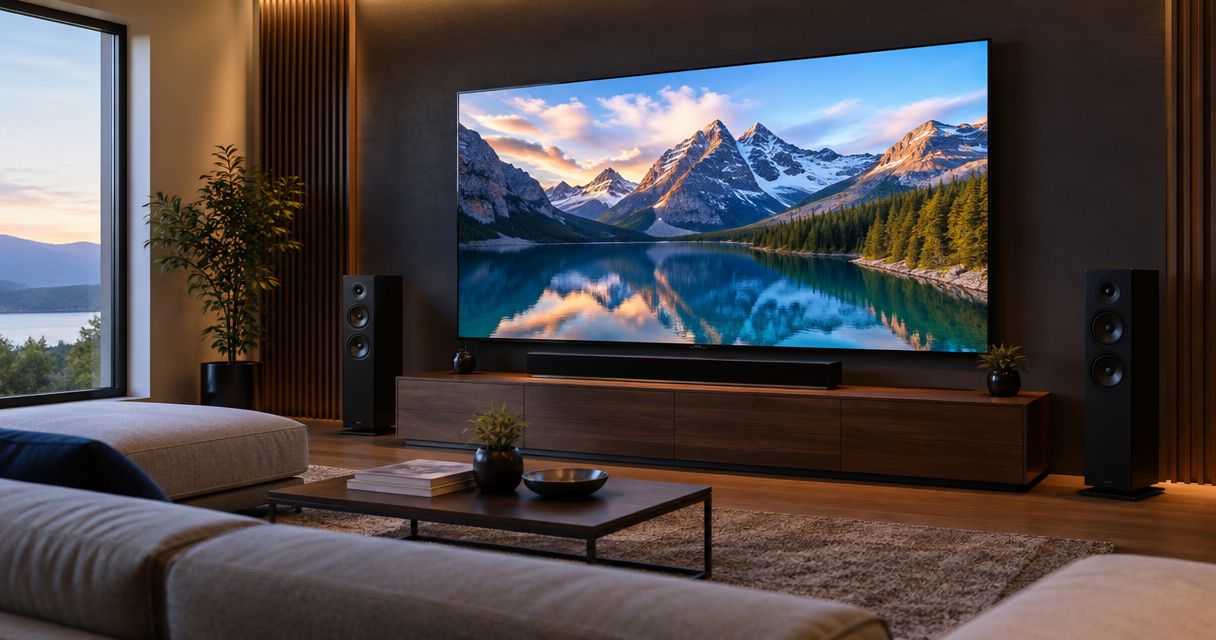

Compare the best 4K and 8K TVs for home theater. Choose 4K OLED for dark rooms or Mini-LED for daylight, with practical mounting and wiring advice.
Best overall: a 4K OLED TV for a light-controlled theater. Best for bright rooms: a 4K Mini-LED TV. Best for straightforward everyday viewing: a conventional 4K LED-LCD TV. This 2026 guide ranks the best 4K and 8K TVs for home theater by display type and installation needs; Treasure Valley Solutions installs home theater and audio/video systems throughout the Treasure Valley.
- The best 4K and 8K TVs for home theater start with room lighting, seating, and source quality.
- Choose 4K OLED for dark-room movies; choose 4K Mini-LED for bright-room viewing.
- Choose 4K QD-OLED when saturated HDR color is your priority in a controlled-light room.
- Treasure Valley Solutions installs home theater systems for homeowners and businesses in the Boise and Meridian area.
- Choose an 8K TV only when its resolution serves a defined viewing or source requirement.
Why this matters
A TV belongs in a system, not just on a shopping list. Windows, seating, speakers, cable routes, and source devices determine whether a display fits your room. Extra pixels do not fix reflections or a screen mounted above a comfortable viewing position.
Treasure Valley Solutions is best for Boise-area homeowners who need home theater installation, concealed wiring, and connected audio/video equipment. For your 2026 display purchase, choose the panel technology first, then compare individual models against the installation requirements below.
These recommendations distinguish display technologies rather than naming a model-year winner. Features such as HDMI inputs, HDR format support, mounting patterns, and audio connections require checking on the exact TV you select.
What makes the best home theater TV
- Room-light control: Match the display to daylight, lamps, and viewing habits. A strong dark-room picture does not eliminate reflections.
- Black levels: OLED controls light at the pixel level. LED-LCD displays use a backlight, with local-dimming performance depending on the design.
- HDR performance: Look at highlight detail, shadow detail, and color together. Resolution alone tells you none of these.
- Seating coverage: Judge the picture from your side seats as well as the center. Viewing-angle performance varies by panel.
- Signal compatibility: Confirm the inputs support your actual sources, including any gaming, receiver, or soundbar requirements.
- Installation access: Check bracket fit, cable routing, ventilation, and access to connections before the TV reaches the wall.
Best home theater TVs at a glance
| Rank and display type | Best for | Standout feature | Key limitation |
|---|---|---|---|
| 1. 4K OLED using WOLED technology | Dedicated movie rooms | Pixel-level light control and deep blacks | Static-image burn-in risk requires consideration |
| 2. 4K Mini-LED LCD | Bright multipurpose rooms | Backlight design suited to high-output displays | Local dimming can produce halos |
| 3. 4K QD-OLED | Saturated HDR color | Quantum-dot color conversion with OLED light control | Room light can affect perceived blacks |
| 4. Conventional 4K LED-LCD | Everyday mixed viewing | Straightforward LCD display option | Black levels and contrast depend heavily on backlighting |
| 5. 8K Mini-LED LCD | Native 8K source installations | Higher pixel resolution | Extra pixels do not guarantee better contrast or HDR |
1. 4K OLED: best home theater TV for dedicated movie rooms
A 4K OLED using WOLED technology is the default choice for a room where you control the light and prioritize movies. Each pixel produces its own light, allowing dark areas to remain dark beside bright objects without the backlight-zone halos associated with LCD local dimming.
That distinction matters in scenes with stars, subtitles, or small lights against a dark background. You still need to manage room reflections and select a screen size that suits the seating layout.
4K OLED pros:
- Pixel-level light control preserves separation between bright and dark objects.
- Deep blacks suit dark-room film viewing.
- The picture generally holds up well across wider seating positions.
4K OLED cons:
- Repeated static graphics create a burn-in consideration.
- Daylight and direct reflections still require attention.
- Sustained full-screen brightness depends on the model and picture settings.
Best for: A dedicated theater or evening movie room with controlled lighting.
Before choosing, check where subtitles sit relative to your soundbar or center speaker. Also confirm that wall mounting leaves access to the connections you need; a slim panel does not make an inaccessible input easier to reach.
Verdict: Buy 4K OLED for a movie-first, light-controlled installation.
2. 4K Mini-LED: best home theater TV for bright living rooms
A 4K Mini-LED TV is an LCD display with a backlight made from small LEDs. Local dimming adjusts groups of those lights to improve contrast, while the backlight design supports the high-output displays commonly considered for bright rooms.
Choose this category when your theater also serves as the family living room. Compare reflection handling directly: a bright panel and an effective screen coating solve different problems.
4K Mini-LED pros:
- A strong candidate for rooms used during daylight.
- Local dimming improves black levels compared with backlighting that lacks effective zone control.
- LCD avoids the OLED-specific burn-in mechanism.
4K Mini-LED cons:
- Bright objects can create visible halos against dark backgrounds.
- Side-seat picture quality depends on the LCD panel and its viewing-angle treatment.
- More dimming zones alone do not establish better picture quality.
Best for: A multipurpose room with daylight, sports, movies, and mixed seating.
For a 2026 living-room installation, assess the windows from the actual couch position before choosing the mounting wall. A reflection across the center of the screen deserves attention before you compare resolution badges.
Verdict: Buy 4K Mini-LED when daytime use is a primary requirement.
3. 4K QD-OLED: best home theater TV for saturated HDR color
QD-OLED combines OLED light production with quantum-dot color conversion. It belongs on your shortlist when you want pixel-level light control and strong saturated-color reproduction in HDR material.
The comparison with WOLED is not simply better versus worse. Judge the exact TVs with the same material and comparable picture settings, including the room lighting you expect to use at home.
4K QD-OLED pros:
- Pixel-level control avoids LCD backlight-zone blooming.
- Quantum-dot color conversion supports saturated color reproduction.
- Wide viewing angles suit seating spread across a room.
4K QD-OLED cons:
- Static-image burn-in remains a consideration.
- Ambient light can raise perceived black levels on QD-OLED panels.
- HDR format compatibility still requires model-specific verification.
Best for: An HDR-focused viewer who controls room lighting and prioritizes rich color.
Do not choose QD-OLED from a brightly exaggerated showroom mode alone. Use familiar film scenes with skin tones, dark backgrounds, and bright colored objects; natural-looking faces matter as much as vivid highlights.
Verdict: Buy 4K QD-OLED when HDR color is your deciding criterion.
4. Conventional 4K LED-LCD: best for everyday mixed viewing
A conventional 4K LED-LCD uses an LED backlight without necessarily using Mini-LED technology. This category covers a wide range of backlight layouts and panel capabilities, so the label alone does not establish picture quality.
It fits a room where general television, background viewing, and simple operation matter more than dark-room performance. Examine black levels and motion before treating it as a dedicated theater display.
Conventional 4K LED-LCD pros:
- Suits everyday mixed-content use.
- Avoids OLED-specific burn-in concerns.
- Provides 4K resolution without requiring an OLED or Mini-LED design.
Conventional 4K LED-LCD cons:
- Designs without effective local dimming have limited dark-scene contrast.
- Backlight uniformity varies between models and individual screens.
- A 4K label does not establish HDR brightness, motion quality, or viewing angles.
Best for: A secondary media space or everyday TV room without demanding dark-room requirements.
Check whether the display has a native 120 Hz panel if high-refresh-rate gaming matters. Motion-processing labels are not substitutes for the panel's native refresh rate or the input's supported signal formats.
Verdict: Buy for straightforward mixed viewing; skip as the default for a movie-first theater.
5. 8K Mini-LED: best for a defined native 8K requirement
An 8K Mini-LED TV combines an LCD backlight system with a higher-resolution panel. UHD 8K resolution is 7680 × 4320 pixels, compared with 3840 × 2160 pixels for UHD 4K.
That equals four times the pixel count, not four times the visible picture quality. Seating distance, screen size, source detail, contrast, and processing all affect the result.
8K Mini-LED pros:
- Displays native 8K source detail when the signal chain supports it.
- Higher pixel density suits a defined close-viewing requirement.
- Combines high resolution with local-dimming backlighting.
8K Mini-LED cons:
- Lower-resolution sources require scaling to fill the panel.
- Extra resolution does not remove LCD blooming or viewing-angle limitations.
- Native 8K playback requires compatible sources, inputs, and signal paths.
Best for: A planned installation with native 8K material or a specific pixel-density requirement.
In 2026, choose 8K because you can explain its role in your room—not because the resolution number is larger. Check the full playback chain before making the panel the centerpiece of that plan.
Verdict: Hold unless native 8K or close-viewing requirements justify the choice.
Plan the installation before choosing the final model
Treasure Valley Solutions provides home theater and low-voltage wiring installation in Boise, Meridian, and the greater Treasure Valley. Your display decision should account for the equipment around it, not just the panel.
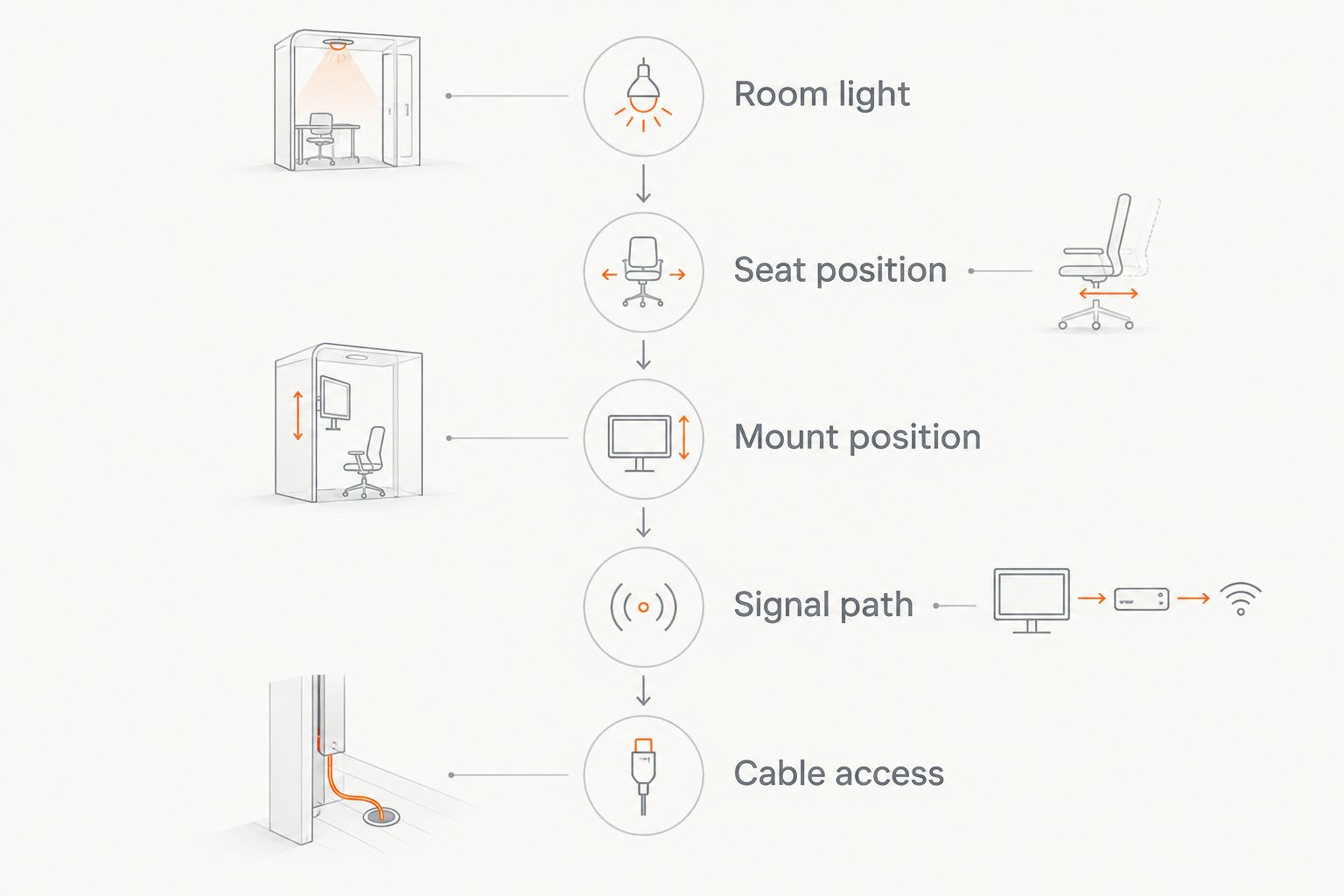
Work through these checks in order:
- Room light: Identify direct reflections from the main seats. Decide whether shades or a different wall address the problem.
- Seat position: Mark the main viewing location and side seats. Compare screen sizes from those positions rather than at arm's length in a store.
- Mount position: Place the screen for comfortable seated viewing. Check bracket compatibility, wall structure, speaker clearance, and ventilation.
- Signal path: List each source and its connection route. Confirm the required resolution, refresh rate, HDR support, and audio routing across that route.
- Cable access: Plan concealed wiring and future service access. Do not route a detachable TV power cord inside a wall; use a compliant power arrangement.
For 4K at 120 Hz, verify support across the source, TV input, any receiver or switch, and cable. An HDMI version label alone is not a complete feature checklist. For TV-app audio, confirm the audio-return connection and supported formats on both the display and audio system.
Plan your home theater installation
Discuss TV mounting, concealed wiring, audio/video connections, and your Treasure Valley room.
How the ranking works
The ranking prioritizes room fit, black levels, HDR behavior, seating coverage, and installation compatibility. Dedicated movie viewing puts 4K OLED first; daylight use moves 4K Mini-LED ahead. QD-OLED earns its own slot for HDR-color priorities rather than repeating the same recommendation.
This is a technology-selection guide, not a hands-on model test. Individual televisions differ within every category, and no panel label replaces checking the exact specifications and viewing conditions.
Which home theater TV should you choose?
Choose 4K OLED if you control the light and want a movie-first theater. Choose 4K Mini-LED if daylight viewing drives the decision. Choose QD-OLED when saturated HDR color matters most, and conventional LED-LCD when everyday use takes priority over theater contrast.
For an undecided buyer in 2026, start with 4K rather than making 8K a requirement. Resolve screen placement, reflections, and audio integration before paying attention to extra pixels.
FAQ
What's the best 4K TV type for a dark home theater?
A 4K OLED is the default choice for a dark, movie-focused home theater. Pixel-level light control produces deep blacks without LCD backlight-zone halos; compare individual models for your seating and source requirements.
Is an 8K TV better than a 4K TV for home theater?
An 8K TV has more pixels, but it is not automatically a better home theater display. Contrast, HDR performance, viewing distance, and source quality also determine the picture you see.
What's the best TV type for a bright living room?
A 4K Mini-LED LCD is a strong starting point for a bright living room. Compare the exact model's reflection handling and viewing angles, and check direct sunlight from your seats.
Is QD-OLED the same as Mini-LED?
QD-OLED and Mini-LED are different display technologies. QD-OLED uses self-emissive OLED light production with quantum-dot color conversion; Mini-LED uses an LED backlight behind an LCD panel.
Do I need a 120 Hz TV for movies?
A 120 Hz TV is not required simply to watch movies. Refresh-rate support matters when matching particular film cadence or high-refresh gaming requirements, and motion processing should be evaluated separately.
Can I hide all the cables behind a wall-mounted TV?
Concealed wiring requires a suitable route and compliant cable and power arrangements. Do not place a detachable TV power cord inside the wall; plan power, signal wiring, and connection access together.
Who installs home theater TVs in Boise and Meridian?
Treasure Valley Solutions provides home theater, audio/video, and low-voltage wiring installation in Boise, Meridian, and the greater Treasure Valley. Its services cover homes and businesses.
One last thing
Test a dark movie scene with subtitles before choosing your display. Bright lettering against a dark background makes local-dimming halos easier to spot, while the scene reveals shadow detail and reflections. Watch from a side seat too; your guests should not need the center cushion to get a good picture.
Related guides
Recent Google reviews
Read all reviews →“Great job!!”
“Amazing customer experience. They went above and beyond installing my 2 TVs on the wall and setting up my ring doorbell. Thier price was very very reasonable. Great experience, have used their service twice now.”
“Professional, on time and the team did an outstanding job! 100% would recommend and will use again.”