 (208) 991-3502
 Meridian, ID



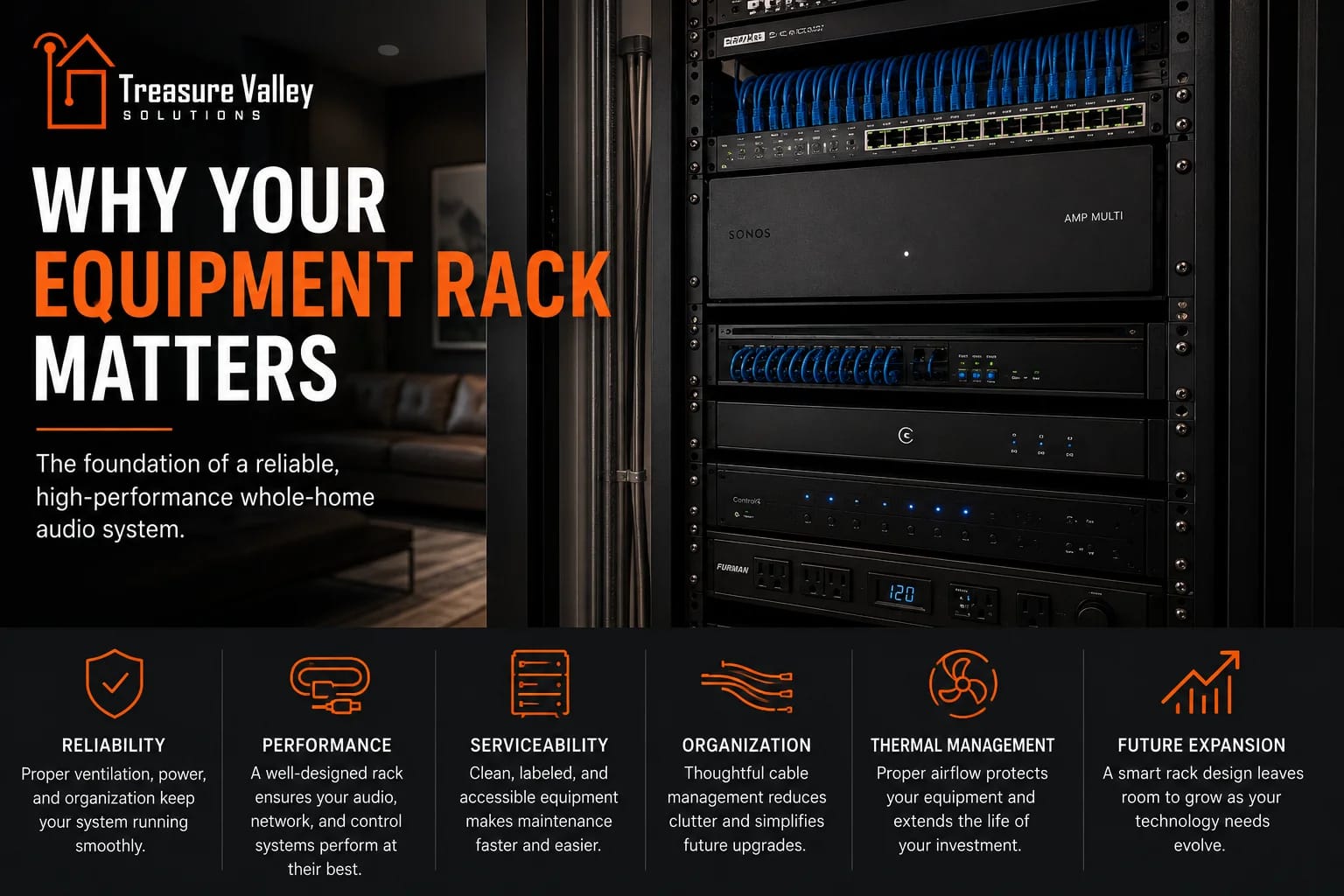

Your equipment rack may be hidden away, but it plays a major role in the reliability and serviceability of your whole-home technology. Proper rack design helps us manage heat, power, networking, wiring, and future expansion while keeping everything organized and accessible. See why we consider the equipment rack an essential part of a professionally designed whole-home audio system.
Plan the right scope
Choose a conference-room project path
When you're planning whole-home audio, the equipment rack probably isn't the first thing you're thinking about.
You're thinking about where you want speakers.
You're thinking about music on the patio.
You're thinking about having audio in the kitchen while you're cooking or throughout the house when you're entertaining.
You're probably not thinking about what the back of an equipment rack looks like.
We are.
And that's because the equipment behind the scenes has a major impact on how reliable, serviceable, and expandable your system will be for years to come.
A well-designed equipment rack isn't just a place to put electronics.
It's the foundation of the home's technology infrastructure.
And with products like the new Sonos Amp Multi allowing us to consolidate more whole-home audio into a centralized system, good rack design matters more than ever.
What Exactly Is an Equipment Rack?
Think of an equipment rack as the technology hub of the house.
Rather than having amplifiers, network switches, control processors, power supplies, and other components scattered throughout closets and cabinets, we can bring much of that equipment together into one organized location.
Depending on the project, the rack may contain equipment for:
Whole-home audio
Networking
Wi-Fi
Televisions and video distribution
Home automation
Surveillance
Security
Lighting control
Power management
Internet service
Other connected systems
Not every project needs all of those things.
But as the amount of technology in a home increases, having a dedicated place for it becomes increasingly important.
Why Not Just Put Everything on a Shelf?
For a simple system with a few components, a shelf or cabinet may be perfectly adequate.
Once we're designing a larger whole-home system, things change quickly.
Consider a house with audio in eight rooms, several wireless access points, surveillance cameras, smart-home control, multiple televisions, and dozens of network connections.
Now we have a lot of equipment.
Every component needs some combination of:
Power.
Network connectivity.
Signal wiring.
Ventilation.
Physical support.
Access for future service.
Putting all of that on shelves without a plan can turn into a mess surprisingly quickly.
A rack gives us a structured framework for building the system properly.
Good Rack Design Starts Before the Equipment Arrives
The rack itself is only part of the equation.
We also need to think about where it will live.
Ideally, we're considering the equipment location while the home is still being designed or built.
We look at things like:
Available space
Electrical service
Cooling and ventilation
Cable pathways
Internet service location
Accessibility
Noise
Future expansion
A beautiful equipment rack doesn't help much if it's installed in a tiny closet with no ventilation and no room to work around it.
Likewise, putting the rack in an inconvenient location can make running hundreds of feet of low-voltage wiring more difficult than necessary.
The location becomes part of the overall technology design.
Heat Is the Enemy
Electronics generate heat.
And heat is one of the things we pay close attention to when we're designing an equipment rack.
A single component may not produce enough heat to be concerning.
Put amplifiers, network switches, processors, power supplies, and other electronics together in an enclosed space, and that heat adds up.
That's why we think about airflow between components, equipment spacing, rack ventilation, and the room itself.
We don't want to solve an overheating problem after the system is installed.
We want to design so that it doesn't become a problem in the first place.
This Is One Reason Sonos Amp Multi Is Interesting
The new Sonos Amp Multi is clearly designed with centralized rack installations in mind.
It gives us eight amplified outputs delivering 125 watts per channel and allows those outputs to be configured across as many as four independent audio zones.
That means one Amp Multi can potentially take the place of several individual amplifiers in a larger Sonos system.
Fewer individual components can mean:
Less rack space
Fewer power connections
Cleaner cabling
Simpler organization
Easier servicing
But Sonos also paid attention to what happens thermally when we put that much amplification into one chassis.
Amp Multi Doesn't Use a Cooling Fan
Amp Multi uses GaN technology combined with Class D amplification and post-filter feedback.
Sonos says the more efficient architecture reduces heat generation enough to allow an entirely fanless, convection-cooled design.
That's something we like to see in equipment designed for a rack.
Fans can help move heat, but they also introduce another mechanical component.
They can make noise.
They collect dust.
And anything mechanical can eventually wear out.
A properly engineered fanless component removes that variable.
It doesn't mean we stop thinking about thermal management—the heat still has to go somewhere—but it gives us a much cleaner starting point.
Sonos Also Rethought the Rack Mount
This is one of those details that might not seem particularly exciting until you've spent time designing equipment racks.
Amp Multi itself is approximately 1.5 rack units high.
Sonos offers an optional 2U rack mount specifically designed around the amplifier.
Instead of simply bolting the amplifier to a generic shelf, the mount creates intentional airflow space above and below the unit. Sonos says the design eliminates the need for additional vent panels between Amp Multi units.
That gives us a clean way to maintain airflow while using rack space efficiently.
The amplifier also has a flat rear design and recessed connectors, which helps with cable management when the unit is installed in the rack.
Those are small details individually.
Together, they tell us the product was actually designed to live in a professional equipment rack.
Rack Space Matters
Equipment racks are measured in rack units, usually abbreviated as "U."
One rack unit is 1.75 inches tall.
So a 2U component occupies 3.5 inches of vertical rack space.
That may sound like plenty of room until we start filling the rack.
A larger system might need space for:
Network switches
Patch panels
Routers
Control processors
Amplifiers
Power distribution
Surveillance equipment
Video equipment
Cooling
Shelves
Cable management
Every rack unit counts.
That's why consolidating four Sonos audio zones into a single 2U Amp Multi installation can be such an advantage compared with using multiple individual amplifiers.
We're accomplishing more without unnecessarily increasing the size of the equipment infrastructure.
Cable Management Isn't Just About Looking Good
A clean rack looks nice.
But that's not the main reason we care about cable management.
Imagine that five years from now, something needs to be replaced.
Or you want to add another audio zone.
Or we're troubleshooting a network connection.
If the back of the rack is a tangled mass of cables, every one of those jobs becomes more difficult.
Good cable management helps us identify where connections go, trace problems, make changes, and replace equipment without disturbing unrelated parts of the system.
That includes properly managing:
Speaker wiring
Ethernet
Fiber
HDMI and video cabling
Control wiring
Power cables
Patch cables
We want to be able to look at the rack and understand what we're looking at.
That matters on the day we install it.
It matters even more several years later.
Labeling Matters Too
A speaker cable coming into the rack doesn't tell us much by itself.
Is it the kitchen?
The patio?
The primary bathroom?
Which speaker?
Which zone?
Good documentation and labeling answer those questions.
We want wiring identified in a way that makes sense when we're commissioning the system and when we're servicing it later.
The same applies to network connections.
If we need to identify which switch port feeds an access point, television, camera, or control device, proper labeling can save a significant amount of troubleshooting time.
Again, none of this changes how you press Play in the Sonos app.
But it changes how easily we can keep everything working behind the scenes.
The Network Belongs in This Conversation
Modern whole-home audio is heavily dependent on the network.
Sonos Amp Multi itself supports Ethernet and Wi-Fi 6.
When we're installing centralized equipment in a rack, Ethernet gives us a straightforward way to connect those components directly to the network infrastructure.
The same rack may contain the network switch feeding:
Sonos equipment
Wireless access points
Televisions
Control processors
Surveillance cameras
Other connected devices
That's why we don't treat the audio system and network as completely separate projects.
They're increasingly dependent on each other.
A beautiful whole-home audio system running on an inadequate network is still an inadequate system.
Power Matters Too
Another thing that's easy to overlook is power.
If we're putting thousands of dollars of electronics into one location, we want to think carefully about how that equipment is powered.
That includes having sufficient electrical capacity for the rack and considering appropriate power management and protection for the equipment we're installing.
It also means thinking about how power is distributed inside the rack.
A pile of consumer power strips isn't our idea of a well-designed system.
The goal is organized, appropriate power distribution that supports the equipment we're installing and keeps connections accessible.
Serviceability Is One of the Biggest Benefits
Here's a scenario we think about while we're building a rack:
What happens when we need to work on this five years from now?
Technology changes.
Equipment eventually fails.
Internet providers change hardware.
You may remodel part of the house.
You may add cameras.
You may want additional audio zones.
A system that looks good on installation day but is nearly impossible to modify isn't particularly well designed.
We want to be able to access components.
We want to trace cables.
We want to remove one piece of equipment without dismantling everything around it.
And we want enough organization that another qualified technician can understand the system in the future.
That's what serviceability means.
A Good Rack Makes Expansion Easier
We also don't want to design every rack with exactly zero room left when the project is finished.
If the project allows it, leaving some capacity gives us options.
Maybe you decide to add audio around a future pool.
Maybe you finish the bonus room.
Maybe another building is added to the property.
Maybe you want additional surveillance coverage.
Maybe new technology becomes available that wasn't part of the original project.
Sonos Amp Multi itself is built around that kind of scalability. Multiple units can be used together, with Sonos supporting up to 32 audio zones across a system.
If we've planned the rack, wiring, network, and power infrastructure appropriately, expanding the system later becomes much easier.
What You See vs. What We See
When you look at a finished whole-home audio system, you may see a few nearly invisible speakers in the ceiling.
You open the Sonos app.
You choose a room.
You play music.
That's exactly how it should feel.
When we look at the same system, we're also thinking about everything behind it:
Where does the speaker wire terminate?
Which amplifier output is driving that speaker?
Which zone is it assigned to?
How is the amplifier connected to the network?
How is the equipment powered?
Is there adequate airflow?
Can we access it if something needs service?
Can we expand the system later?
Those aren't things you should have to worry about.
They're things we should have already worried about.
The Rack Is Part of the System
It's easy to spend a lot of time choosing speakers and amplifiers because those are the products directly associated with audio quality.
But a professional whole-home technology system is more than a collection of products.
The infrastructure matters.
The network matters.
The wiring matters.
The power matters.
The cooling matters.
The organization matters.
And the equipment rack ties a lot of those pieces together.
Products like Sonos Amp Multi are exciting to us not simply because they add more amplifier channels.
They're exciting because they're clearly designed around the realities of building larger, centralized systems: flexible outputs, compact rack density, efficient amplification, fanless cooling, recessed connections, and a purpose-built rack mount.
Those are features that help us build systems the way we want to build them.
Clean. Organized. Reliable. Serviceable. And ready for whatever comes next.
Building or Remodeling?
If you're building a new home or planning a major remodel, the equipment location is something worth thinking about early.
It's much easier to plan the rack location, electrical requirements, network infrastructure, cooling, and cable pathways before the walls are finished than to find a place for everything afterward.
At Treasure Valley Solutions, we design the technology infrastructure along with the systems it supports—from networking and whole-home audio to automation, surveillance, and entertainment.
The equipment rack may be the part of the system you see the least.
But when it's designed correctly, everything you do see works better because of it.
Need Expert Help?
Ready to implement these solutions in your own home or business?
Our Services
Explore whole-home audio, commercial sound, Sonos setup, and surround sound installation in the Treasure Valley.
Expert TV Mounting Treasure Valley Homeowners & Businesses Trust

Home theater design and installation planned around your room, viewing goals, and equipment scope.

Complete home automation and control.
Serving the Treasure Valley
Local installation in your city