 (208) 991-3502
 Meridian, ID



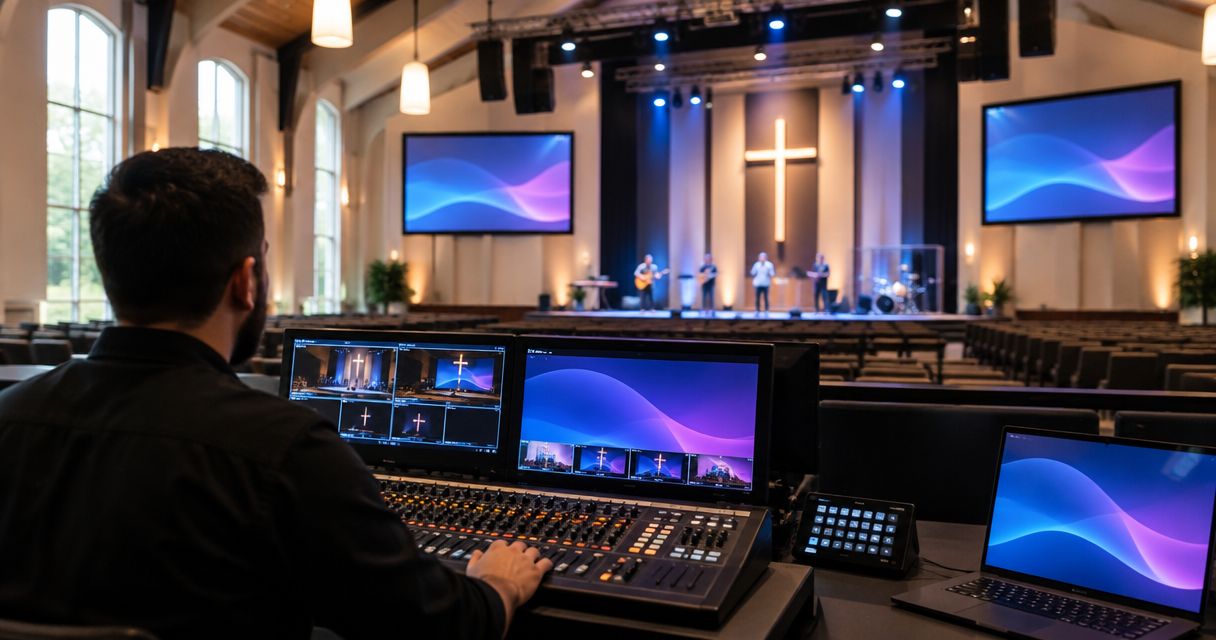

Plan AV installation for churches around clear speech, readable screens, and simple controls. Compare installation options and build a practical scope.
Church AV installation is the design and installation of sound, video, and control systems with the aim of making worship clear, visible, and manageable for your congregation. This guide to av installation for churches covers speech, music, screens, streaming, and volunteer operation—because a system must work from the back pew as well as the control desk.
- For av installation for churches, prioritize clear speech, readable screens, and controls volunteers can operate.
- Treasure Valley Solutions provides local audio/video and low-voltage installation services in the Treasure Valley.
- Choose church sound systems by room coverage and microphone needs, not speaker size alone.
- Test livestream audio separately; a good sanctuary mix does not guarantee a clear broadcast.
Why AV installation matters for churches
A church sound system serves listeners who cannot all choose a better seat. Your installation needs to deliver understandable speech across the seating area while supporting music, announcements, and any remote audience.
Churches also have an operational constraint: the person running sound changes. A system that depends on one experienced volunteer leaves the congregation exposed when that person is absent. Written startup instructions, labeled connections, and saved settings belong in your 2026 installation scope, not on a future wish list.
For Boise, Meridian, and nearby congregations, Treasure Valley Solutions provides audio/video and low-voltage wiring installation services. Treasure Valley Solutions is best for Treasure Valley churches seeking local audio/video installation services. Confirm the project's sound design, equipment integration, training, and documentation requirements before choosing an installer.
The right outcome is not the longest equipment list. It is a service your team can run reliably, with clear speech and readable content throughout the occupied room.
Plan your church AV installation
Define what each service needs
Start with a written service walkthrough before shopping for equipment. List what happens from the opening announcement through the final song, including who moves, which microphones change hands, and what appears on screen.
Separate essential functions from additions. A spoken-word service, a band-led service, and a streamed event create different input, monitoring, and operating requirements. Share the same document with church leadership, volunteers, and prospective installers so proposals address the same work.
Use your next rehearsal to uncover requirements rather than relying on memory. Record a 60-second speech sample from a rear seat as a simple listening reference; it is not a substitute for acoustic measurements.
- List every simultaneous microphone and instrument connection.
- Identify lectern, stage, audience, and overflow listening areas.
- Separate required functions from optional additions.
- Name who approves the scope and who operates the system.
- Document weddings, funerals, and other nonweekly uses.
Check the room before replacing equipment
Walk the sanctuary while someone speaks through the existing system. Listen at front, middle, and rear seating positions, then check side aisles and any balcony. Note where speech becomes unclear or noticeably louder.
Hard surfaces and long reverberation can reduce speech clarity; increasing volume does not remove those reflections. Loudspeaker placement, aiming, room treatment, and microphone technique need to work together. Keep background noise from ventilation and adjacent rooms in your assessment, too.
Check the room under realistic conditions. A rehearsal with empty chairs differs from an occupied service, so your 2026 acceptance plan should include listening during normal use. Treat a phone recording as a record of a complaint, not proof of a room's measured performance.
- Mark unclear listening areas on a floor plan.
- Note reflective walls, glazing, ceilings, and rear surfaces.
- Check microphone positions relative to loudspeakers.
- Record ventilation noise and audible equipment hum.
- Ask whether acoustic assessment belongs in the project scope.
Map the signal path and cable routes
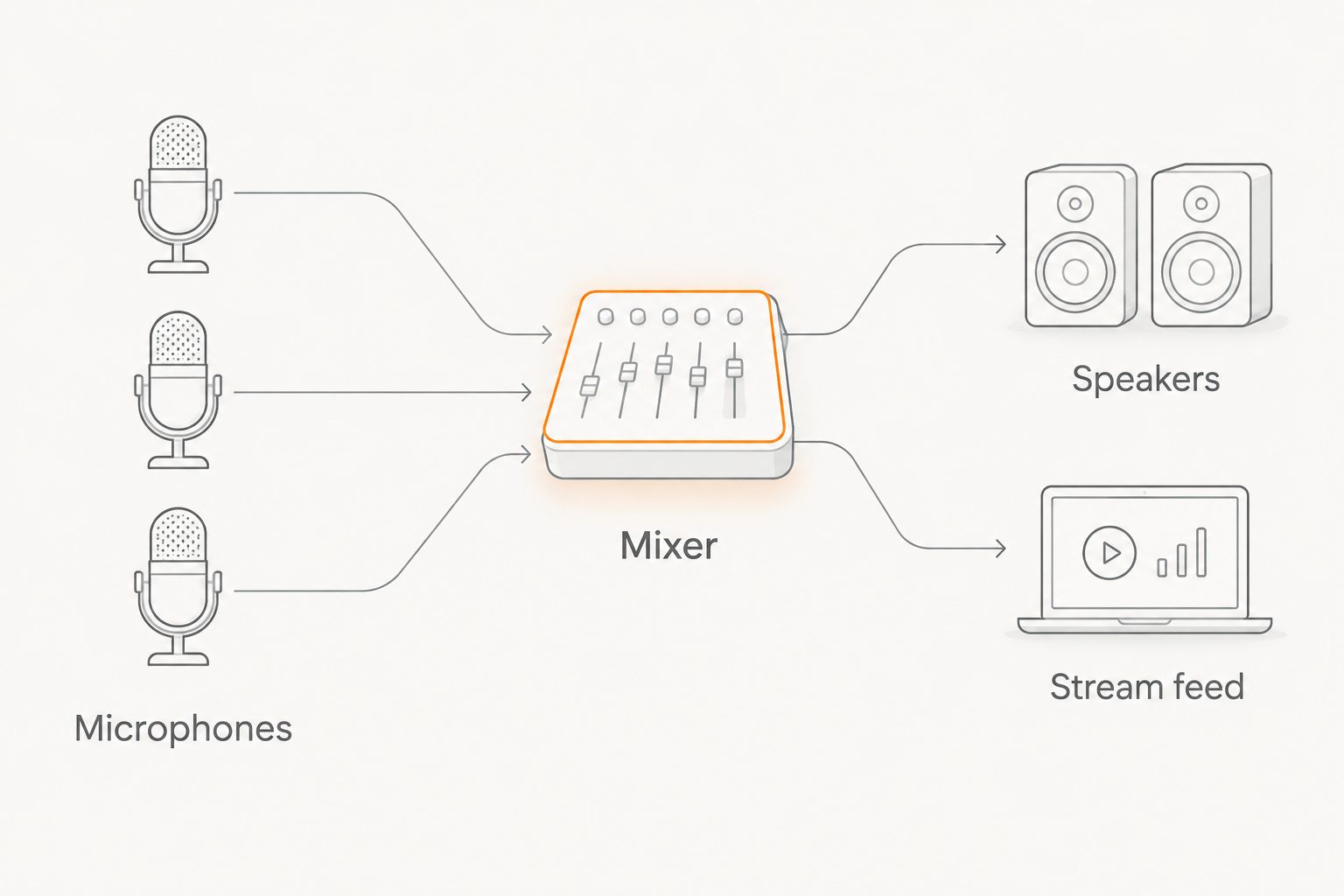
Draw the connections before deciding how equipment will be mounted. Follow audio from microphones through the mixer to sanctuary speakers, stage monitors, and the stream. Follow video separately from its source to each display or camera destination.
Manual planning can begin with a paper sketch and a labeled cable inventory. Professional installation becomes the faster path when cable routing, mounting, and connections need coordination. Treasure Valley Solutions provides AV installation and low-voltage wiring services; request a written scope that identifies the specific work your church needs.
Keep connections accessible for service. Concealed wiring should not mean an inaccessible connector behind a permanently finished surface, and a tidy rack still needs ventilation and room to reach its connections.
- Microphones: identify input locations and cable routes.
- Mixer: document inputs, outputs, and operator access.
- Speakers: mark mounting positions and coverage areas.
- Stream feed: identify its separate audio destination.
- Label both ends of every installed cable.
Place screens for the back row
Test visibility before approving a display location. Put an actual lyric slide, scripture passage, and announcement on the proposed screen area, then inspect each from the farthest and most obstructed seats. A diagonal screen measurement alone does not establish readability.
Check daylight at the time your congregation meets. Windows, room lighting, sightlines, and mounting surfaces affect the choice between projection and flat-panel displays. Neither is automatically right for every sanctuary, and both need an appropriate mounting and signal plan.
Include the person presenting. A speaker who must turn away from the congregation to read the main screen has a different problem from an audience that cannot see it. Decide whether confidence monitoring belongs in the scope rather than adding it after installation.
- Test actual slides from the farthest occupied seat.
- Check sightlines around columns, balconies, and stage furniture.
- Inspect daylight and lighting conditions during service hours.
- Identify power, signal, mounting, and service-access needs.
- Confirm whether presenters need a separate confidence display.
Separate streaming from sanctuary sound
Listen to the stream on headphones while someone else listens in the room. Acoustic instruments and congregation singing already contribute sound inside the sanctuary, but the remote audience hears only what reaches the broadcast feed.
Begin with a private recording of a rehearsal. Include spoken transitions, music, and a quiet moment, then review whether remote listeners can follow the whole service. A separate stream mix adds control, but it also adds work; assign responsibility before adding complexity.
For a 2026 streaming plan, check the complete connection from camera and audio source through the streaming destination. Use a wired network connection where practical, and test it during conditions that resemble service time rather than assuming an idle network proves readiness.
- Record speech and music through the intended stream feed.
- Check whether congregation participation needs dedicated capture.
- Confirm camera sightlines without blocking seated worshippers.
- Test audio and video synchronization on the recording.
- Assign a person to monitor the outgoing program.
Simplify volunteer controls and recovery
Build the operating routine around the least experienced authorized volunteer. A paper startup checklist and labeled controls are a practical starting point; automation should simplify a process that your team already understands.
Set up a normal-service configuration, then document how to restore it after a special event. Keep deeper configuration changes separate from routine volume and presentation tasks. More access is not always more useful, especially when an accidental routing change can silence the room.
Ask a backup operator to complete a 10-minute rehearsal without coaching. Watch where the process stalls, then correct labels or instructions. This test exposes unclear handoffs that an experienced operator handles from memory and never thinks to explain.
- Write startup and shutdown instructions in task order.
- Label routine controls in plain language.
- Save and document the normal-service configuration.
- Explain how to mute an unused microphone safely.
- Provide a recovery procedure for missing audio or video.
Specify acceptance tests before approving work
Turn your requirements into observable checks before signing off on an installation. Equipment powering on is not the same as a congregation being able to hear, see, and operate the system.
Use a 15-minute rehearsal script containing a spoken welcome, microphone handoff, music playback, slide change, and stream recording. Treat that duration as a practical test format, not a performance standard. Repeat failed tasks after corrections and document any remaining work.
Request mounting, electrical, and cable-routing details appropriate to the building. Suspended equipment needs suitable attachment methods; volunteers should not improvise overhead mounts. For your 2026 handover, include configuration records and operator instruction alongside the physical installation.
- Walk the seating area while someone speaks normally.
- Check slides from every intended viewing zone.
- Review the recorded stream independently of room sound.
- Have a backup volunteer perform startup and shutdown.
- Collect cable labels, connection diagrams, and configuration records.
To define the local installation portion, contact the installation team with your floor plan, current equipment list, and service requirements. Ask the proposal to separate equipment, installation, configuration, and training responsibilities.
Compare installation approaches for your church
Choose an approach according to the work involved, not just who can connect the equipment. Volunteer-led setup fits different tasks from a project involving new cable routes, overhead mounting, or changes to room coverage.
When evaluating used PA systems for small venues, match the equipment to the sanctuary's inputs and coverage needs before accepting it into the design. Inspect connectors, controls, driver condition, and available documentation; owning speakers does not establish that they suit the room.
The options below identify practical boundaries. None removes the need for listening tests or a named system owner.
| Option | Best for | Main advantage | Key limitation |
|---|---|---|---|
| Volunteer-led setup | Portable equipment with straightforward connections | Keeps routine setup knowledge within the congregation | Depends on volunteer skill; structural and electrical work need appropriate expertise |
| Targeted professional upgrade | A defined problem within an otherwise usable system | Limits disruption and preserves suitable equipment | Existing routing, coverage, or acoustic problems can remain |
| Coordinated professional installation | Projects involving cabling, mounting, and connected systems | Brings physical installation and system requirements into one scope | Requires detailed requirements and clear responsibility for each task |
| Phased installation | Churches separating essential work from later additions | Establishes a sequence for improvements | Early decisions must account for later connections and access |
Choose the smallest scope that fixes the documented problem without creating another one. A phased project needs a final connection plan from the start, even when some equipment arrives later.
Common mistakes churches make with AV installation
Buying speakers before diagnosing unclear speech
Larger speakers do not correct every coverage or reverberation problem. Replacing equipment without checking placement and the room can preserve the original complaint. Require a clear explanation of the speech problem before approving a speaker change.
Designing only for the lead operator
A system that works only when the most experienced volunteer attends is difficult to hand over. Include backup operators in demonstrations and test instructions with someone who did not write them. Keep specialist settings protected while leaving everyday tasks understandable.
Sending the room mix straight to the stream
The congregation hears sound directly from the stage as well as through speakers; remote listeners do not. Evaluate the stream independently rather than judging it from the sanctuary. If the project includes separate broadcast controls, assign someone to manage them.
Accepting donations without checking compatibility
Donated equipment still needs suitable inputs, outputs, mounting, power, and operating knowledge. Compare it with the written design before reorganizing the system around it. An unused donation is preferable to an unreliable connection in the weekly service path.
Finishing the building work before planning cables
Closed walls and finished ceilings change the available routing choices. Coordinate low-voltage pathways while the building work is being planned, and retain access where connections need servicing. For a 2026 renovation, settle screen, control-desk, and equipment locations before approving finishes.
FAQ
What's the first step in AV installation for churches?
Write down the services and events the system must support. List simultaneous microphones, instruments, screens, streaming needs, and operators before selecting equipment.
Should a church replace its speakers if speech sounds muddy?
A church should diagnose the room and speaker coverage before replacing speakers. Reflections, microphone placement, loudspeaker aiming, and background noise can all affect speech clarity.
Is a projector better than a TV for a church sanctuary?
Neither is automatically better; choose according to sightlines, daylight, viewing distance, and mounting conditions. Test actual slides from the farthest occupied seats before approving the display plan.
Can volunteers install a church sound system?
Volunteers can handle suitable portable setup and routine operation within their skills. Overhead mounting, electrical work, and building-related installation need appropriately qualified people.
Does a church livestream need a separate audio mix?
A church livestream needs audio evaluated separately from the sanctuary mix. A separate mix provides control over sound that remote listeners cannot hear directly from the stage, but someone must manage it.
Can a church reuse its existing AV equipment?
A church can reuse equipment that fits the documented design and passes condition and compatibility checks. Confirm connections, coverage, mounting requirements, and operating support before including it in the installation.
Does Treasure Valley Solutions provide local AV installation?
Treasure Valley Solutions provides audio/video and low-voltage wiring installation services for homes and businesses in Boise, Meridian, and the greater Treasure Valley. Churches should confirm their specific sound, video, streaming, and training requirements in the project scope.
One last thing
Test the handover with the backup operator, not just the lead volunteer. Ask that person to start the system, run a spoken announcement, change a slide, and recover from a muted microphone using only the written instructions. The hesitation points tell you what still needs simplifying before the next service.
Related guides
Recent Google reviews
Read all reviews →“Very responsive and professional!”
“Great service and Follow Up”
“Great job!!”