 (208) 991-3502
 Meridian, ID





Building a home theater means making one critical choice early on: projector vs TV for home theater setups. Both options have passionate advocates, and both can deliver stunning results. But the right...
Building a home theater means making one critical choice early on: projector vs TV for home theater setups. Both options have passionate advocates, and both can deliver stunning results. But the right answer depends entirely on your room, your viewing habits, and what you actually want from the experience.
Screen size, image quality, room lighting, and budget all play into this decision, and they don't all point in the same direction. A projector can give you a cinematic 100+ inch display for less than a premium TV, but it comes with trade-offs. A modern 4K TV delivers brilliant picture quality right out of the box, but it has size limitations that matter if you're chasing that true theater feel.
At Treasure Valley Solutions, we've designed and installed hundreds of home theaters across the Boise area since 2014. We've seen both technologies shine in the right environments, and struggle in the wrong ones. This guide breaks down the practical differences between projectors and TVs so you can make a confident choice before committing to either path.
Why the right display matters for your room
Your room dictates which technology will actually work, not the other way around. A projector needs specific conditions to perform well: controllable lighting, adequate throw distance, and a proper mounting location. A TV works in almost any space, but it caps your screen size based on budget and wall space. Choose the wrong display type, and you'll fight constant compromises instead of enjoying your investment.
Most people underestimate how much room characteristics shape the viewing experience. You can't force a 120-inch projector screen into a living room with floor-to-ceiling windows and expect cinema-quality results. Similarly, mounting a 65-inch TV in a dedicated theater space with 12-foot seating distances means squinting at the action scenes.
How ambient light changes everything
Light control separates projector-friendly rooms from TV-only spaces. Projectors reflect light off a screen, so ambient light washes out the image and kills contrast. Even a bright hallway light or afternoon sun through sheer curtains degrades picture quality significantly. You need blackout shades, door sweeps, and strategic lighting placement to keep stray light from competing with your display.
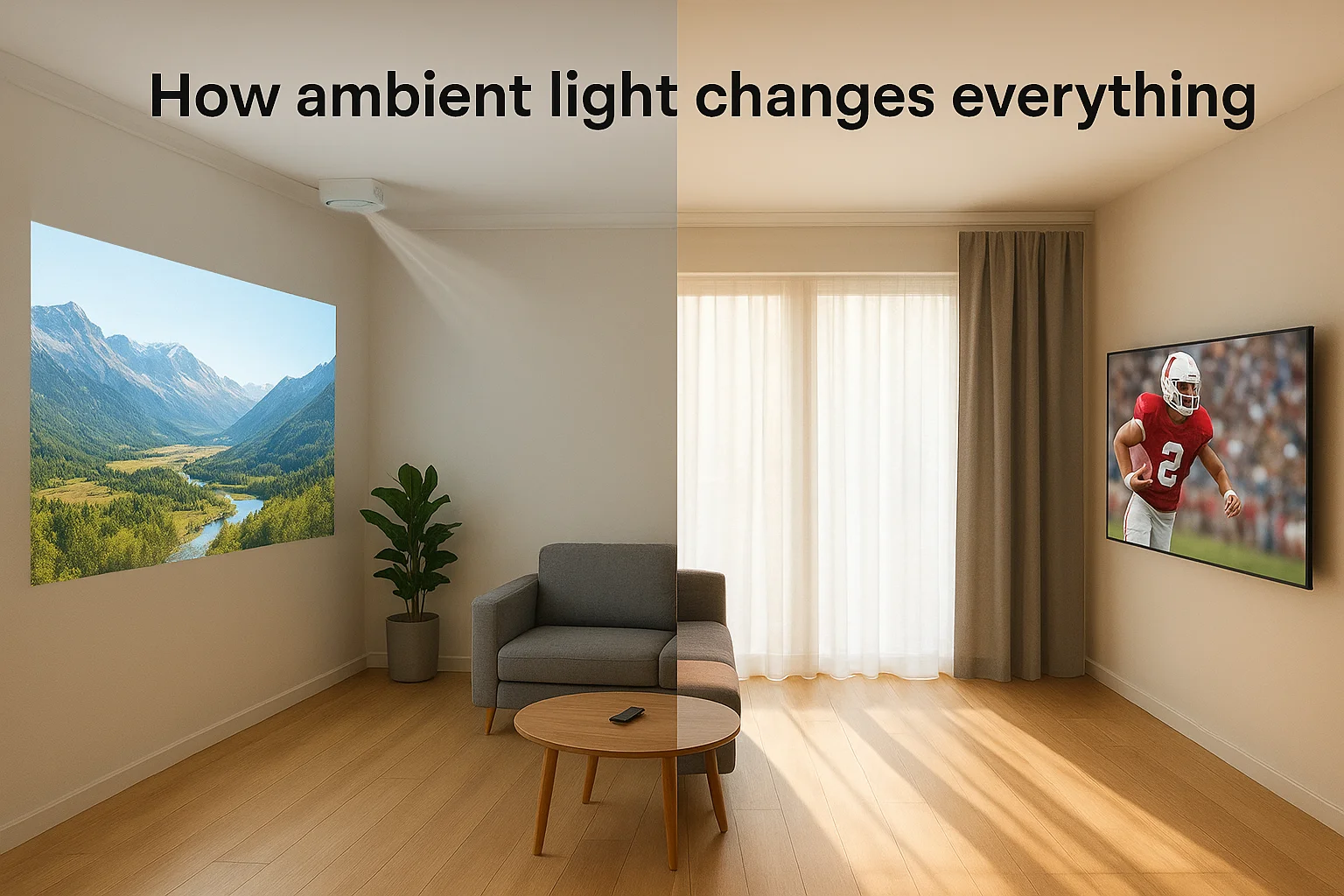
TVs emit their own light, which means they cut through ambient conditions that would ruin a projector's image. You can watch sports on a Sunday afternoon without closing every curtain. The brightness advantage matters for multipurpose rooms where you entertain, work, or spend family time during daylight hours.
If you can't darken your room on demand, a TV will deliver consistently better results than any projector at any price point.
Ceiling height and viewing geometry
Projectors require vertical clearance for ceiling mounts or enough wall depth behind seating for rear shelves. Standard eight-foot ceilings work, but you need to account for the projector's lens offset and ensure heads don't block the beam. Lower mounts mean shadows; higher mounts mean potential neck strain if you angle the projector down without keystone correction.
TVs mount flush to walls at any practical height, making them easier to position in rooms with bulkheads, low ceilings, or architectural details. You avoid the beam-path logistics entirely. The flexibility matters when you're working with existing construction instead of building a dedicated space from scratch.
Daily usage patterns you need to consider
Think about when and how you actually use the space. Casual viewing habits favor TVs because they're instant-on and hassle-free. You walk in, grab the remote, and start watching. Projectors take 30 to 60 seconds to warm up lamps or light engines, and most people close blackout shades first.
Dedicated theater rooms justify projectors because setup becomes routine. You plan viewing sessions, control the environment, and get massive screens that TVs can't match at reasonable prices. Mixed-use spaces benefit from TV convenience since you're not treating every viewing session like an event. The projector vs tv for home theater debate often comes down to whether your room serves one purpose or many.
Picture quality differences that show up at home
Picture quality separates casual viewing from true immersion, and the projector vs tv for home theater debate hinges largely on how each technology renders images in real rooms. TVs deliver consistently sharp images with deep blacks and vibrant colors straight out of the box. Projectors offer massive scale but require environmental control to match TV performance. The visual trade-offs matter most during dark scenes, HDR content, and daytime viewing.
Contrast and black levels
Modern TVs dominate contrast performance because they control individual pixels or zones to produce true blacks. OLED and Mini-LED TVs turn off pixels completely in dark areas, creating infinite contrast ratios that make night scenes and space footage look stunning. You see detail in shadows without grey fog washing over the screen.
Projectors struggle with black levels because they reflect light rather than emit it. Even high-end models produce dark grey instead of true black unless you're in a pitch-dark room. The native contrast of most projectors ranges from 1,500:1 to 15,000:1, while premium TVs exceed 1,000,000:1. This difference shows up immediately in movie scenes with dark cinematography.
You can't project true black onto a white screen, which means projectors always compromise contrast compared to self-emitting displays.
Color accuracy and brightness
TVs reach peak brightness levels between 1,000 and 2,000 nits in HDR mode, letting highlights pop off the screen even in bright rooms. That brightness range unlocks HDR's full potential because you see the intended contrast between bright explosions and dim backgrounds. Color accuracy stays consistent across brightness levels since the display controls light emission directly.
Projectors typically max out around 150 to 200 nits on screen, even with expensive lamp or laser models. You sacrifice HDR impact and color saturation unless you darken the room completely. Brighter projectors exist, but they cost significantly more than TVs with equivalent brightness. The color gamut narrows as ambient light increases because reflected light can't compete with room illumination the way emissive displays can.
Screen size, seating distance, and layout basics
The projector vs tv for home theater decision gets real when you measure your actual room and calculate where people sit. Screen size means nothing if viewers crane their necks or squint to read subtitles. You need to match display dimensions to your seating distance using established viewing angles that balance immersion with comfort. TVs cap out around 100 inches before costs skyrocket, while projectors easily reach 120 to 150 inches at moderate price points.
Optimal viewing distances for different screen sizes
THX recommends a 40-degree viewing angle for cinematic immersion, which translates to sitting about 1.2 times the screen width away. SMPTE suggests a more conservative 30-degree angle at 1.6 times screen width. Most people find comfort between these ranges, meaning a 100-inch diagonal screen works best with seating 8 to 11 feet back. Closer feels overwhelming during long viewing sessions; farther reduces impact and makes you strain to catch details.
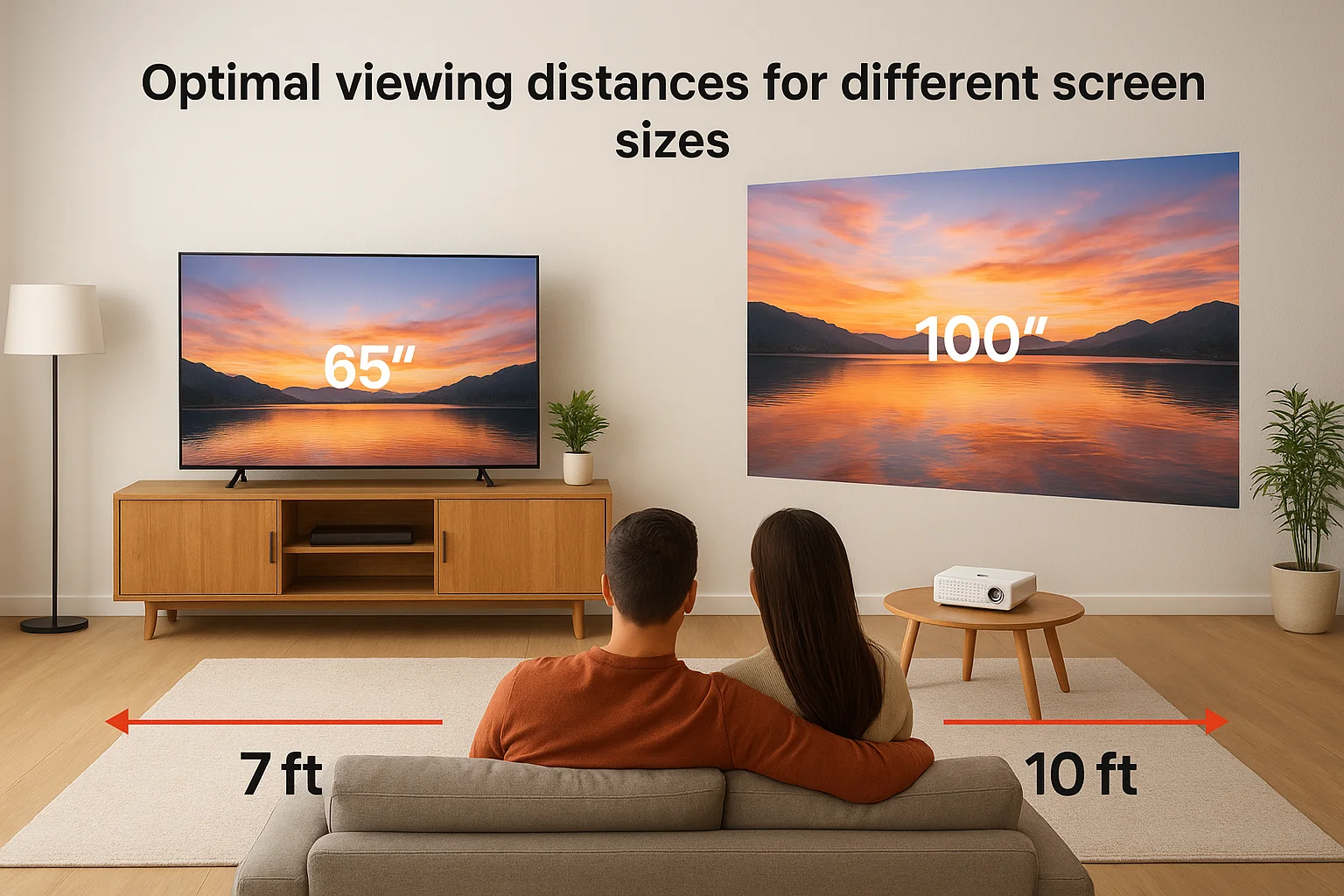
TVs rarely exceed 85 inches in consumer spaces due to cost and mounting challenges, so you're looking at ideal distances of 7 to 9 feet maximum. Projectors let you scale up to 120 or 150 inches without exponential price increases, pushing optimal seating back to 10 to 15 feet. That flexibility matters in dedicated theater rooms where you have the depth to leverage larger screens.
Match screen size to your furthest regular seat, not your closest one, because undersized displays disappoint more than slightly oversized ones.
Room layout constraints
Projectors need throw distance between the lens and screen, typically 1.5 to 2 times the screen width for most consumer models. A 120-inch screen requires roughly 12 to 16 feet of clearance, which you get from ceiling mounts above seating or rear shelves behind the last row. Short-throw projectors cut that distance in half but cost more and reduce flexibility in screen sizing.
TVs mount anywhere you have wall space and a stud, making them compatible with tighter rooms and irregular layouts. You avoid the geometry puzzle entirely. Furniture placement becomes simpler because you don't need clear beam paths or specific ceiling locations. The installation flexibility matters when you're adapting existing spaces rather than building custom theaters from scratch.
Setup, wiring, and long-term maintenance
Installation difficulty and ongoing upkeep separate plug-and-play convenience from systems that need professional attention. TVs mount to walls in under an hour with basic tools, while projectors require ceiling mounts, screen installation, and careful cable routing through walls or conduit. The setup complexity affects both your initial timeline and what happens when components fail years later. Understanding these practical differences helps you budget time and money beyond the sticker price when weighing projector vs tv for home theater installations.
Installation complexity and time investment
You can unbox a TV, mount it to a wall bracket, and start watching within two hours using the included stand or a basic wall mount. Power and HDMI cables plug directly into accessible ports behind the display. Most people handle TV installation themselves or hire a handyman for $100 to $200 if they want wire concealment through walls.
Projectors demand professional installation for ceiling mounts because you need precise alignment, secure mounting into joists, and conduit runs for power and video cables. Screen installation adds another layer since tensioned screens require frame assembly and wall anchoring. Expect full projector setups to take four to eight hours including wire fishing, equipment mounting, calibration, and testing. Professional installation typically runs $500 to $1,500 depending on room complexity and whether you're running cables through finished walls.
Budget at least half a day for projector installation even with professional help, compared to under two hours for TV mounting.
Maintenance schedules and replacement costs
TVs require zero routine maintenance beyond occasional screen cleaning with microfiber cloths. You turn them on and they work for 50,000 to 100,000 hours before brightness degrades noticeably. When a TV fails, you replace the entire unit since individual component repairs cost nearly as much as new displays.
Projectors need lamp replacements every 2,000 to 5,000 hours depending on the model, which translates to every two to five years for typical users. Replacement lamps cost $150 to $400 each, and you'll spend 10 minutes swapping them yourself. Laser projectors eliminate lamp changes but cost $2,000 to $5,000 more upfront. Dust filters need cleaning every three to six months to prevent overheating, and lens cleaning becomes necessary when image sharpness drops. Factor these recurring tasks into your decision if you prefer maintenance-free technology.
Costs in 2026 and a quick decision checklist
Budget reality shapes the projector vs tv for home theater debate more than most buyers admit upfront. A quality 75-inch TV costs $1,200 to $2,500 depending on panel technology, while a comparable projector with screen runs $1,500 to $3,000 for similar image quality at larger sizes. You need to factor in installation costs, replacement lamps, and accessories like AV receivers since projectors rarely include built-in speakers worth using. The price gap narrows or reverses when you compare screen sizes above 100 inches.
2026 pricing ranges you'll encounter
Modern 4K TVs in the 65 to 85-inch range cost between $800 and $3,000 based on features like Mini-LED backlighting, local dimming zones, and refresh rates. OLED models start around $1,800 for 65 inches and climb past $3,500 for 77-inch panels. These prices include everything you need except wall mounting hardware, which adds $50 to $150 for brackets plus installation if you hire help.
Projectors span a wider range because screen size and technology vary dramatically. Entry-level 1080p models start at $500 to $800 but compromise brightness and color accuracy. Quality 4K projectors with HDR support run $1,500 to $3,000, while laser models begin around $2,500 and stretch past $5,000. Add $300 to $800 for a motorized tensioned screen, plus installation costs if you need professional mounting and wiring. Lamp replacements every few years add another $150 to $400 per cycle.
Total cost of ownership over five years matters more than sticker price alone, especially when projector lamps need replacing twice in that timeframe.
Quick decision framework
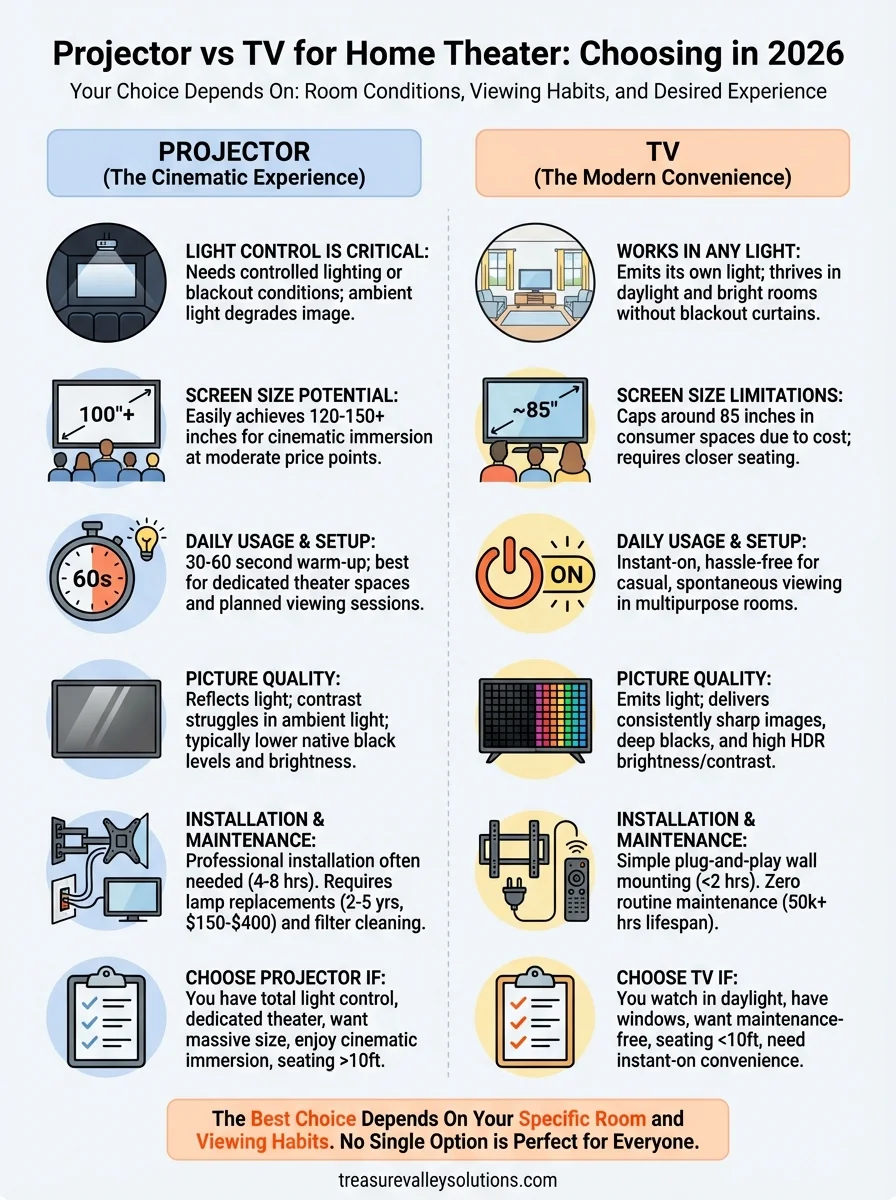
Choose a TV if you answer yes to most of these: you watch during daylight hours regularly, your room has windows without blackout shades, you want maintenance-free operation, your seating distance stays under 10 feet, or you need instant-on convenience for casual viewing.
Pick a projector if these apply: you control room lighting completely, you're building a dedicated theater space, you want screens larger than 100 inches, your seating distance exceeds 10 feet, or cinematic immersion outweighs daily convenience. Budget for professional installation and accept that you'll replace lamps or invest more upfront in laser technology.
Your next step
You now understand the practical differences in the projector vs tv for home theater debate, but knowing which technology fits your space requires more than comparing specifications. Your room's lighting, dimensions, and usage patterns determine which option delivers better results. Making the wrong choice means living with compromises that bother you every time you watch something.
Treasure Valley Solutions designs and installs both projector and TV systems across the Boise area, and we know which questions to ask before recommending either path. We measure your room, test lighting conditions, and explain exactly what you'll get with each option based on your specific space and budget. Our team handles everything from equipment selection to professional installation and programming, so your system works flawlessly from day one.
Contact us today to schedule a consultation where we'll assess your room and show you samples of both technologies in action. You'll make a confident decision backed by local expertise instead of guessing based on online reviews written about completely different spaces.
Need Expert Help?
Ready to implement these solutions in your own home or business?
Our Services

Home theater design and installation planned around your room, viewing goals, and equipment scope.
Expert TV Mounting Treasure Valley Homeowners & Businesses Trust
Explore whole-home audio, commercial sound, Sonos setup, and surround sound installation in the Treasure Valley.
Serving the Treasure Valley
Local installation in your city