 (208) 991-3502
 Meridian, ID



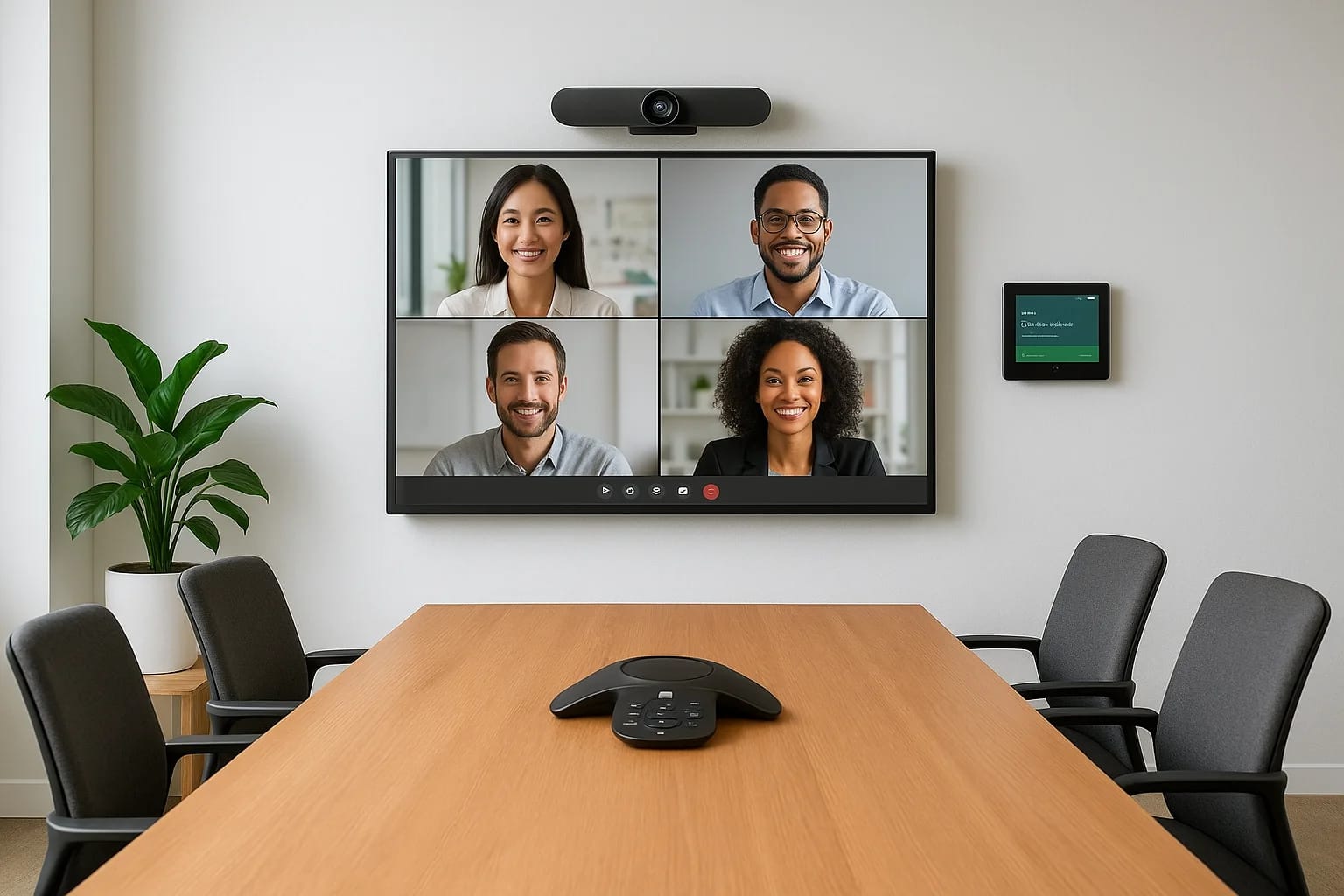

Hybrid meetings aren't going anywhere. Whether your team is split between the office and remote locations, or you're hosting clients who can't make it in person, your conference room needs to perform....
Plan the right scope
Choose a conference-room project path
Hybrid meetings aren't going anywhere. Whether your team is split between the office and remote locations, or you're hosting clients who can't make it in person, your conference room needs to perform. The right conference room AV solutions make the difference between productive collaboration and frustrating technical difficulties that waste everyone's time.
Finding the right equipment can feel overwhelming. You've got cameras, microphones, displays, room controllers, and software platforms, all needing to work together seamlessly. Budget matters too, but so does reliability and ease of use for everyone on your team, from the tech-savvy to the not-so-much.
At Treasure Valley Solutions, we've spent over a decade designing and installing commercial AV systems for businesses across Idaho. This guide breaks down 10 conference room AV solutions built for hybrid meetings, from compact video bars to complete room kits. We'll cover what each solution does best, who it's built for, and how to match the right technology to your space and meeting style.
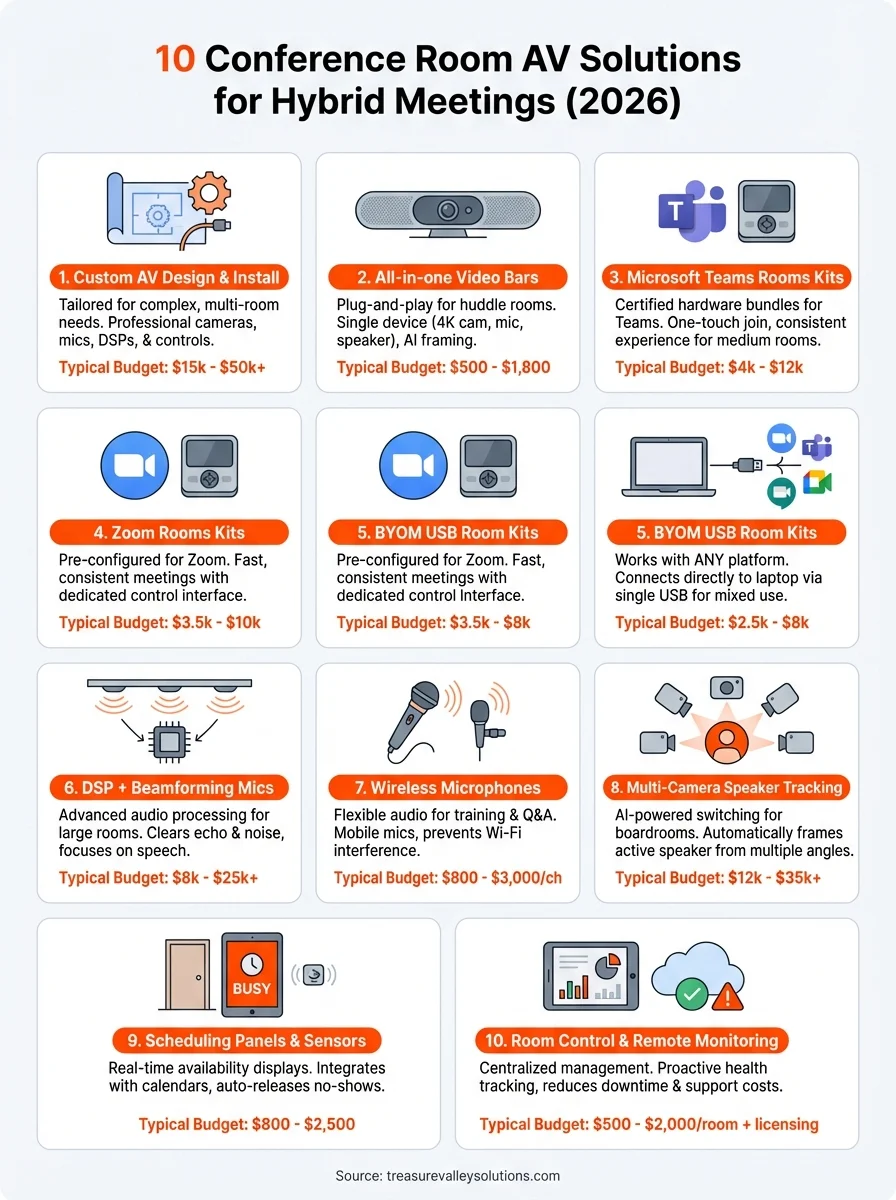
1. Treasure Valley Solutions custom AV design and install
Not every conference room fits a pre-packaged kit. Your space has unique acoustics, lighting conditions, table layouts, and workflow requirements that deserve custom attention from experts who understand how technology and people actually work together. When you need conference room AV solutions that integrate perfectly with your existing infrastructure and scale with your business, working with a professional AV integrator makes sense.
What it is
Custom AV design and installation means you get a system built specifically for your conference rooms, not adapted from someone else's solution. Treasure Valley Solutions starts by understanding how you use your spaces, what meeting platforms you prefer, and what technical challenges you're facing. Your installer surveys the room, measures acoustics, tests sightlines, and designs a system that addresses every detail from cable management to user control interfaces.
The installation includes professional-grade cameras, microphones, displays, processors, and control systems selected for your exact needs. Everything gets mounted, wired, programmed, and tested before your team ever sees it. You receive training on the system and ongoing support when questions arise or when you need to expand to additional rooms.
Who it fits
This approach works best if you're managing multiple conference spaces across your facility or if you have complex requirements that standard kits can't handle. You might need to integrate with existing building systems, support specific security protocols, or accommodate unusual room dimensions that throw off typical camera angles and mic pickup patterns.
Companies investing in long-term infrastructure choose custom design because it eliminates compatibility headaches and reduces the total cost of ownership over time. Your IT team doesn't spend hours troubleshooting incompatible hardware or figuring out why audio echoes in the east conference room but not the west one.
Custom design ensures you're not paying for features you'll never use or skipping the ones your team actually needs every day.
What to spec and ask for
Ask your integrator how they'll handle acoustic treatment and whether the room needs sound-dampening panels or strategic furniture placement. Request a detailed equipment list with model numbers so you can verify compatibility with your existing tech stack and meeting platforms.
You should also confirm their certification levels with major manufacturers and whether they'll provide ongoing support or remote monitoring services. Get clear timelines for design, installation, and testing phases.
Typical cost range
Budget $15,000 to $50,000 per conference room for professional design and installation, depending on room size and complexity. Small meeting spaces might start around $10,000 while executive boardrooms with multiple cameras, advanced audio processing, and custom control systems can exceed $75,000. These numbers include equipment, labor, programming, and initial training but not annual support contracts.
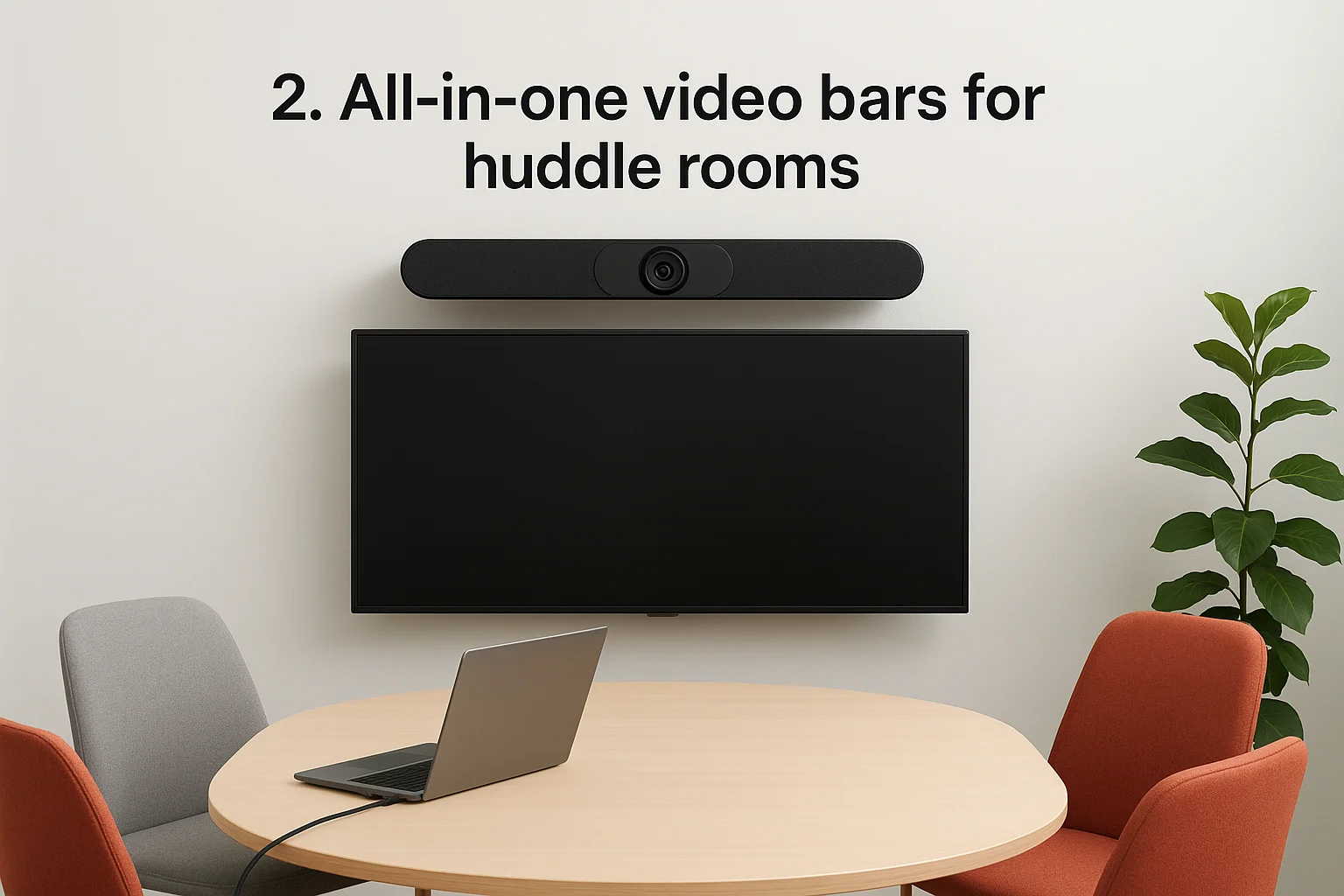
2. All-in-one video bars for huddle rooms
Small meeting spaces and huddle rooms need conference room AV solutions that work immediately without complicated setup. All-in-one video bars combine camera, microphone array, and speakers into a single device that sits above or below your display. You plug in one USB cable to a laptop or room computer, and you're ready to meet. These systems deliver professional video quality and clear audio in spaces designed for four to six people.
What it is
An all-in-one video bar packages everything you need for video conferencing into one streamlined device. The camera typically offers 4K resolution with a wide field of view to capture everyone around a small table. Built-in microphone arrays use beamforming technology to focus on voices while filtering out keyboard clicks and HVAC noise. Integrated speakers handle remote participant audio without requiring separate equipment.
Most video bars include AI-powered features like auto-framing, which adjusts the camera view as people enter or leave the meeting. Some models add USB passthrough ports for wireless presentation systems or external peripherals. The device mounts easily using a TV mount bracket or sits on a shelf, and installation rarely requires professional help.
Who it fits
These systems work perfectly if you're outfitting smaller collaboration spaces where teams gather for quick standups, client calls, or focused project work. Your huddle rooms probably have a TV or display already, so adding a video bar completes the setup without major construction or cabling.
Businesses scaling their hybrid infrastructure appreciate video bars because you can standardize across multiple locations using the same model. Your team gets consistent experiences whether they book the third-floor huddle room or the one down by reception.
What to spec and ask for
Look for video bars with at least 120-degree field of view to capture everyone at the table without cutting off people at the edges. Verify the microphone pickup range matches your room depth, typically six to ten feet for huddle spaces.
Check compatibility with your primary meeting platform before purchasing, whether that's Microsoft Teams, Zoom, Google Meet, or another service.
Ask about built-in noise cancellation and echo reduction capabilities. Some models include physical privacy shutters for the camera, which matters if your space handles confidential discussions.
Typical cost range
Plan to spend $500 to $1,800 per video bar depending on camera resolution, audio quality, and brand. Entry-level units start around $400 while premium models with advanced AI features and superior audio processing reach $2,000. You'll need a compatible display and mounting hardware, but installation costs remain minimal since most users handle setup themselves.
3. Microsoft Teams Rooms kits for medium rooms
Medium-sized conference rooms seating eight to twelve people need conference room AV solutions that scale beyond basic video bars while staying manageable for everyday use. Microsoft Teams Rooms kits deliver certified hardware bundles designed specifically for Teams meetings, ensuring compatibility and simplified deployment across your organization. These systems include cameras, microphones, speakers, touch controllers, and compute devices that work together without configuration headaches.
What it is
A Microsoft Teams Rooms kit packages certified hardware components into a pre-tested bundle that installs quickly in medium conference spaces. The system includes a dedicated touch panel for starting meetings, sharing content, and controlling room settings. You get a high-quality camera with intelligent framing, microphone arrays for clear voice pickup across the table, and speakers positioned for natural audio.
The compute module runs Microsoft Teams Rooms software, which launches meetings with one-touch simplicity and displays room calendars for scheduling. Remote participants see and hear everyone clearly while in-room attendees control the experience through the touch interface or their personal devices.
Who it fits
Your business benefits from Teams Rooms kits if Microsoft Teams serves as your primary collaboration platform and you need consistent experiences across multiple meeting spaces. Organizations already invested in the Microsoft 365 ecosystem appreciate the native integration and centralized management capabilities.
Teams Rooms kits eliminate the bring-your-own-device chaos where different laptops create inconsistent meeting quality and troubleshooting nightmares.
What to spec and ask for
Request kits certified for your specific room size, as Microsoft categorizes solutions by square footage and participant count. Verify the camera offers at least 1080p resolution with a field of view wide enough to capture your entire conference table.
Ask about microphone pickup range and whether the kit includes ceiling or table-mounted options. Confirm the touch panel size works comfortably for your users and whether the system supports dual displays if needed.
Typical cost range
Expect to invest $4,000 to $12,000 per room for a complete Microsoft Teams Rooms kit covering medium spaces. Entry-level bundles start around $3,500 while premium configurations with advanced cameras and expanded audio reach $15,000. These costs include all core hardware but not installation labor or annual Microsoft licensing fees.
4. Zoom Rooms kits for fast, consistent meetings
Zoom Rooms kits deliver pre-configured conference room AV solutions built specifically for organizations that rely on Zoom as their primary video meeting platform. These certified hardware bundles combine cameras, audio equipment, displays, and dedicated controllers into tested configurations that work immediately after installation. Your team joins meetings with one-touch simplicity while remote participants experience consistent quality regardless of which conference room hosts the call.
What it is
A Zoom Rooms kit includes certified hardware components selected and tested together to meet Zoom's performance standards for specific room sizes. The system features a dedicated touch controller that displays your meeting calendar and launches Zoom sessions instantly. You get a high-quality camera with intelligent framing, professional microphone arrays, and speakers calibrated for clear audio throughout the space.
The compute device runs Zoom Rooms software that manages the entire meeting experience, from scheduling to screen sharing to room controls. Everything connects through simple cabling that most IT teams handle without specialized AV expertise.
Who it fits
Your organization benefits from Zoom Rooms kits if Zoom serves as your standard video platform and you need reliable performance across multiple meeting spaces. Companies tired of laptop-dependent meetings appreciate the dedicated hardware approach because it eliminates compatibility issues and provides consistent experiences.
Zoom Rooms kits work especially well if your team schedules back-to-back meetings and needs transitions that take seconds, not minutes of troubleshooting.
What to spec and ask for
Specify kits certified for your room dimensions and participant count, as Zoom categorizes solutions by space size and capacity. Verify the camera resolution meets your quality standards and offers adequate field of view for your conference table layout.
Ask about microphone coverage patterns and whether the kit supports expansion microphones for larger tables. Confirm whether you need single or dual display configurations.
Typical cost range
Budget $3,500 to $10,000 per room for complete Zoom Rooms kits covering medium spaces. Basic configurations start around $3,000 while advanced setups with premium cameras and expanded audio reach $12,000. Costs include hardware but not installation labor or Zoom licensing fees.
5. BYOM USB room kits for mixed meeting platforms
Your organization probably doesn't use just one video conferencing platform. Sales uses Zoom, engineering prefers Google Meet, and executives run Microsoft Teams. BYOM (Bring Your Own Meeting) USB room kits solve this problem by connecting directly to any laptop or device through a simple USB connection. These conference room AV solutions work with every major meeting platform without requiring dedicated software or specialized configurations.
What it is
BYOM USB room kits include a camera, microphone array, and speakers that function as standard USB peripherals when connected to any computer. Your laptop recognizes the equipment instantly as a webcam, microphone, and speaker set. The kit includes a central hub or control unit that consolidates all connections into one USB cable running to the conference table or presentation area.
Some systems add a small touch controller for adjusting camera position and audio levels, while others rely entirely on your meeting software's native controls. Installation remains straightforward with minimal cabling required.
Who it fits
You benefit from BYOM kits if different teams in your organization use competing video platforms and you need flexibility without maintaining multiple dedicated systems. Companies with external partners or clients appreciate BYOM because visitors can connect their own devices and use familiar meeting software.
BYOM kits eliminate the platform wars by supporting whatever software your team or guests prefer for each specific meeting.
What to spec and ask for
Request kits with USB 3.0 connectivity for reliable 4K video transmission and verify compatibility with Windows, Mac, and Chromebook devices. Ask about cable length from the hub to the connection point since longer runs may require active USB extensions.
Confirm the camera offers adequate field of view for your table configuration and whether the system includes a physical privacy shutter.
Typical cost range
Plan to spend $2,500 to $8,000 per room for BYOM USB kits covering medium conference spaces. Entry-level systems start around $2,000 while premium configurations with advanced cameras and expanded microphone coverage reach $10,000. These prices include all hardware but not installation labor.
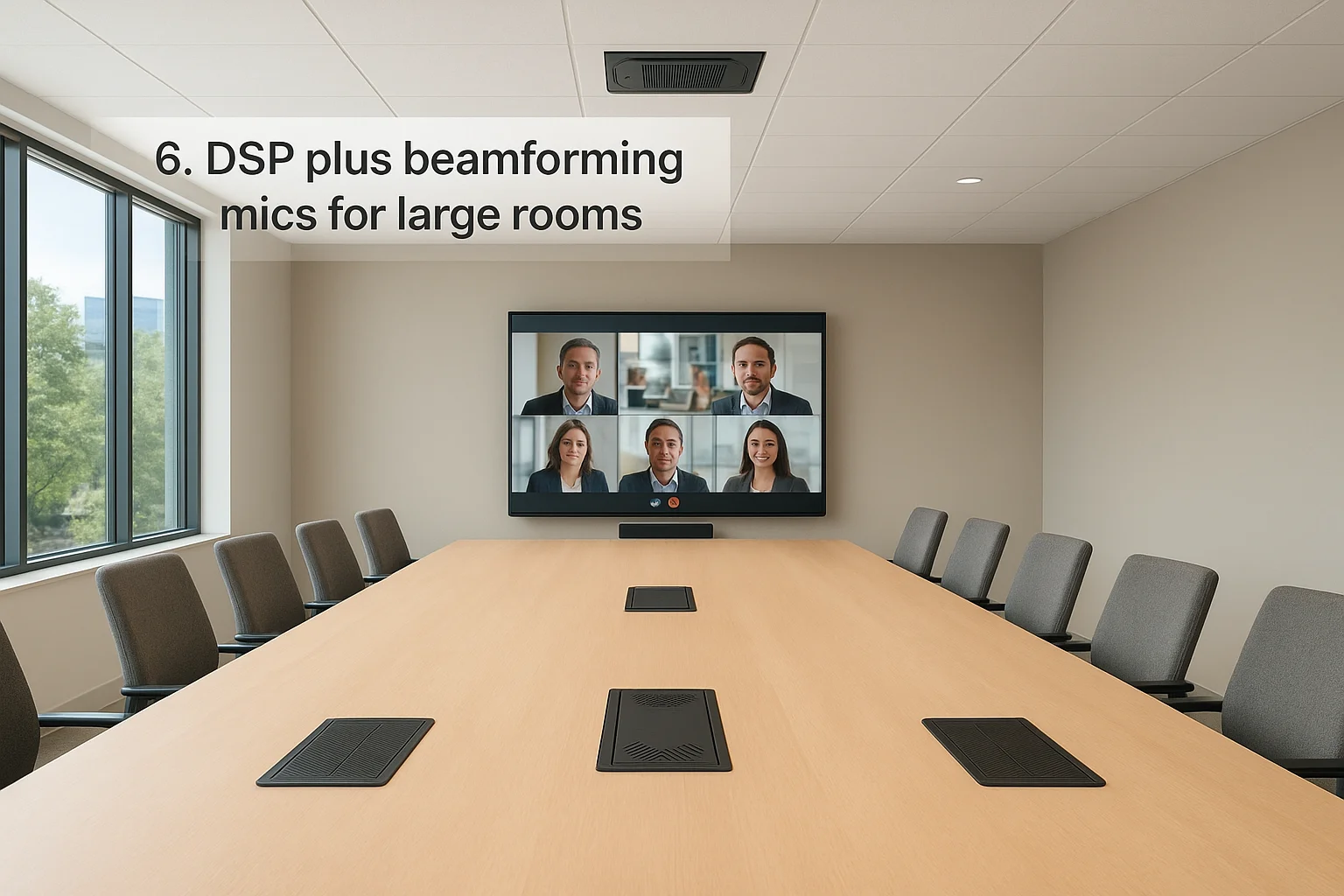
6. DSP plus beamforming mics for large rooms
Large conference rooms and boardrooms demand advanced audio processing that basic microphone systems can't deliver. Digital Signal Processors (DSP) paired with beamforming microphone arrays provide the sophisticated audio management these spaces require. This combination of conference room AV solutions captures clear speech from every seat while eliminating echo, background noise, and the hollow sound that plagues oversized meeting spaces.
What it is
A DSP unit serves as the audio brain of your conference room, processing all microphone inputs and speaker outputs through algorithms that optimize sound quality in real time. The processor handles echo cancellation, noise reduction, automatic gain control, and audio routing between local speakers and remote participants. Beamforming microphone arrays work alongside the DSP by using multiple microphone elements that electronically focus on active speakers while rejecting sound from other directions.
These systems typically mount ceiling microphones above key seating areas or place tabletop arrays at strategic positions around long conference tables. The DSP connects to your video conferencing equipment, room speakers, and network infrastructure through industry-standard audio connections.
Who it fits
Your organization needs DSP and beamforming microphones if you regularly host meetings with twelve or more participants in rooms where standard microphone pickup patterns leave dead zones. Boardrooms with large tables, training rooms with flexible seating, and multi-purpose spaces benefit from this technology because it adapts to different room configurations.
Companies investing in executive meeting spaces choose DSP-based systems because the audio quality directly impacts how professional your organization appears to clients and partners.
What to spec and ask for
Request a coverage map showing where microphones will be placed and how pickup patterns overlap to ensure no seating positions get missed. Ask about the DSP's channel capacity and whether it supports future expansion if you add more microphone arrays or zones.
Verify the system includes automatic mixing capabilities that adjust levels as different people speak rather than requiring manual control. Confirm whether the DSP integrates with your preferred video conferencing platforms.
Typical cost range
Budget $8,000 to $25,000 per large conference room for DSP units, beamforming microphone arrays, and professional installation. Complex boardrooms with multiple zones and advanced processing needs can exceed $30,000. These costs include equipment, cabling, programming, and system tuning but not annual support contracts.
7. Wireless microphones for flexible seating and training
Training sessions, town halls, and workshops create audio challenges that fixed microphone systems can't solve. Participants move around, presenters walk while speaking, and seating arrangements change based on activity type. Wireless microphone systems give your team the audio flexibility these dynamic meeting formats demand while maintaining professional sound quality throughout the space.
What it is
Wireless microphone systems include handheld, lapel, and headset microphones that transmit audio via radio frequencies to a central receiver connected to your conference room AV solutions. The receiver outputs clean audio to your meeting platform and room speakers without cables restricting movement. Modern digital wireless systems operate in licensed frequency bands that prevent interference from Wi-Fi networks and other building electronics.
Most systems support multiple microphones simultaneously, allowing panel discussions or Q&A sessions where several people speak in sequence. Battery-powered transmitters clip to belts or fit in pockets while microphone elements capture clear speech from various positions.
Who it fits
Your organization benefits from wireless microphones if you host training sessions where instructors move around the room or conduct workshops that involve audience participation. Companies running town hall meetings appreciate wireless handhelds because they enable attendees to ask questions from their seats without shouting across the room.
Wireless systems eliminate the awkward moment when someone tries to speak from the back of the room and remote participants can't hear the question.
What to spec and ask for
Request systems operating in UHF frequencies rather than 2.4 GHz bands that compete with Wi-Fi traffic. Ask about battery life and whether the system includes a charging dock for multiple microphones.
Verify the receiver offers balanced audio outputs compatible with your existing AV equipment and how many microphones the system supports simultaneously.
Typical cost range
Budget $800 to $3,000 per wireless microphone channel depending on transmission quality and microphone type. Basic two-channel systems start around $600 while professional four-channel configurations with premium headset microphones reach $5,000. Costs include transmitters, receivers, and microphones but not installation labor.
8. Multi-camera speaker tracking for boardrooms
Executive boardrooms hosting high-stakes negotiations and board meetings require video experiences that rival in-person presence. Multi-camera speaker tracking systems use intelligent switching between multiple camera angles to frame the active speaker automatically, creating dynamic video feeds that keep remote participants engaged. These sophisticated conference room AV solutions deliver broadcast-quality meeting experiences without requiring a production crew or manual camera operation.
What it is
Multi-camera speaker tracking combines two or more cameras positioned at different angles around the boardroom with AI-powered software that detects who's speaking and switches to the optimal view. The system typically includes wide-angle cameras capturing the entire room and close-up cameras focused on specific seating zones. When someone begins speaking, the software analyzes audio inputs and switches to the camera providing the best framing of that person within milliseconds.
Advanced systems add voice triangulation through microphone arrays that pinpoint speaker locations with precision. The switching happens smoothly using professional video mixers that prevent jarring cuts between camera angles.
Who it fits
Your organization benefits from multi-camera tracking if your boardroom hosts client presentations or executive meetings where video quality influences business outcomes. Companies with distributed leadership teams appreciate these systems because remote executives receive the same visual information as in-room participants.
Multi-camera tracking ensures remote board members can read facial expressions and body language that single-camera systems miss.
What to spec and ask for
Request systems with at least three camera positions covering different zones around your boardroom table. Ask about switching latency and whether the system supports manual override when automatic tracking makes incorrect decisions.
Verify the cameras offer 4K resolution and low-light performance for rooms with varying lighting conditions. Confirm whether the system integrates with your existing video conferencing platform.
Typical cost range
Budget $12,000 to $35,000 per boardroom for multi-camera speaker tracking systems including cameras, switching equipment, and professional installation. Complex setups with four or more cameras and advanced AI processing can exceed $45,000. These costs include hardware and programming but not annual maintenance contracts.
9. Room scheduling panels and occupancy sensors
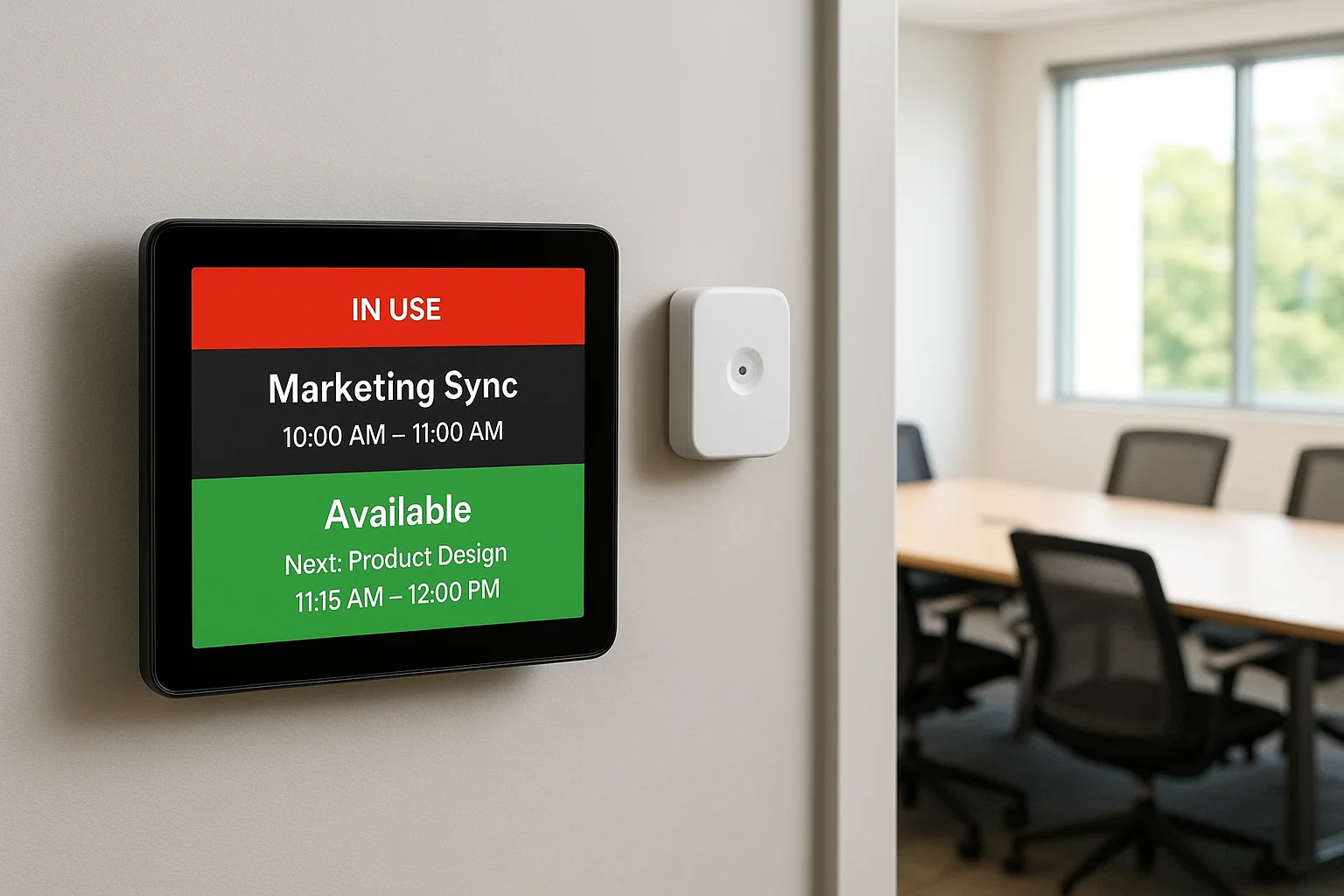
Conference room scheduling chaos costs your team productive hours every week. Double bookings happen, people reserve rooms they never use, and teams waste time hunting for available meeting spaces. Room scheduling panels and occupancy sensors bring data-driven management to your conference room AV solutions by displaying real-time availability outside each room and tracking actual usage patterns. These systems integrate with your calendar platform to eliminate scheduling conflicts and optimize space utilization across your facility.
What it is
Room scheduling panels mount outside conference room doors displaying current meeting status and upcoming reservations pulled directly from your Microsoft 365, Google Workspace, or other calendar systems. The touchscreen displays show who reserved the room, meeting duration, and whether the space is available for ad-hoc bookings. Users can claim available rooms on the spot or extend existing meetings through the panel interface.
Occupancy sensors detect when people actually enter the room using passive infrared, ultrasonic, or camera-based detection technologies. The sensors communicate with your scheduling system to release reservations when booked rooms sit empty beyond a grace period, typically five to ten minutes.
Who it fits
Your organization benefits from scheduling panels if you manage multiple meeting spaces and experience frequent booking conflicts or no-show reservations that waste available rooms. Companies with hybrid teams appreciate these systems because they provide visibility into which conference rooms are actually being used versus sitting empty while marked as occupied.
Scheduling panels eliminate the awkward interruptions when teams barge into rooms thinking they're available when someone's already meeting inside.
Who it fits
Facilities managing ten or more meeting spaces see the biggest returns from occupancy data because it reveals utilization patterns that inform decisions about space allocation and future conference room investments.
What to spec and ask for
Request panels with high-resolution displays readable in your building's lighting conditions and verify integration with your existing calendar platform. Ask whether the system supports room check-in requirements that automatically release no-show bookings.
Confirm occupancy sensors offer adequate detection range for your room sizes and whether they distinguish between one person and full occupancy for capacity analytics.
Typical cost range
Budget $800 to $2,500 per room for scheduling panels and occupancy sensors including installation. Basic panels start around $600 while premium models with larger displays and advanced analytics reach $3,000. Costs include hardware and software licensing but may require annual subscription fees for cloud-based management platforms.
10. Room control and remote monitoring for AV uptime
Conference room technology fails at the worst possible moments. Remote monitoring and control systems prevent these failures by tracking your conference room AV solutions continuously, alerting your team to problems before users discover them, and enabling remote troubleshooting that resolves issues without site visits. These management platforms reduce downtime, lower support costs, and provide usage data that informs future technology decisions across your meeting spaces.
What it is
Room control systems centralize management of displays, cameras, microphones, lighting, shades, and other equipment through touchscreen panels or mobile apps that replace multiple remote controls. The interface provides one-touch presets for different meeting types while hiding complexity from users. Remote monitoring software tracks device status across your entire conference room portfolio, collecting performance metrics and health data from networked AV equipment. The platform sends alerts when cameras go offline, displays fail, or network connections drop, allowing your IT team to respond proactively.
Who it fits
Your organization benefits from control and monitoring systems if you manage five or more conference rooms and spend significant time troubleshooting AV problems. Companies with distributed facilities appreciate remote capabilities because your IT team can diagnose and fix issues without traveling between buildings or sending technicians to every location.
Room monitoring eliminates the common scenario where users report problems after wasting twenty minutes trying to start their meeting.
What to spec and ask for
Request platforms compatible with your existing AV equipment manufacturers and verify whether monitoring requires proprietary hardware or works with standard network protocols. Ask about alert customization options and whether the system integrates with your IT ticketing platform.
Confirm reporting capabilities that track room utilization and equipment reliability over time. Verify whether the platform supports scheduled maintenance reminders and firmware update management.
Typical cost range
Budget $500 to $2,000 per room for control interfaces plus platform licensing fees ranging from $3,000 to $15,000 annually depending on room count and feature requirements. Enterprise deployments with advanced analytics and integrations may reach $25,000 in annual licensing costs. These prices include software but not professional programming services.
Next steps
You now have ten proven conference room AV solutions that solve different hybrid meeting challenges across room sizes and budgets. Your next decision depends on whether you need simple plug-and-play equipment for a single huddle room or a comprehensive system spanning multiple spaces with varied requirements.
Start by inventorying your current meeting spaces and identifying which rooms cause the most frustration. Consider whether your team struggles more with audio clarity, video quality, or the basic ability to start meetings quickly. That pain point guides which solution category you should explore first.
Custom integration makes sense when you're managing multiple conference rooms or dealing with complex requirements that off-the-shelf kits can't address. Treasure Valley Solutions designs and installs complete commercial AV systems throughout the Treasure Valley area, handling everything from initial planning through ongoing support. Contact our team to discuss your specific conference room needs and get a detailed proposal.
Need Expert Help?
Ready to implement these solutions in your own home or business?
Our Services
View All Services
Serving the Treasure Valley
Local installation in your city